2018年2月20日 下午6:35
安装mysql
1 | [czh@centos6 vhost]$ sudo yum -y install mysql-server |
配置字符集
1 | [czh@centos6 vhost]$ sudo vim /etc/my.cnf |
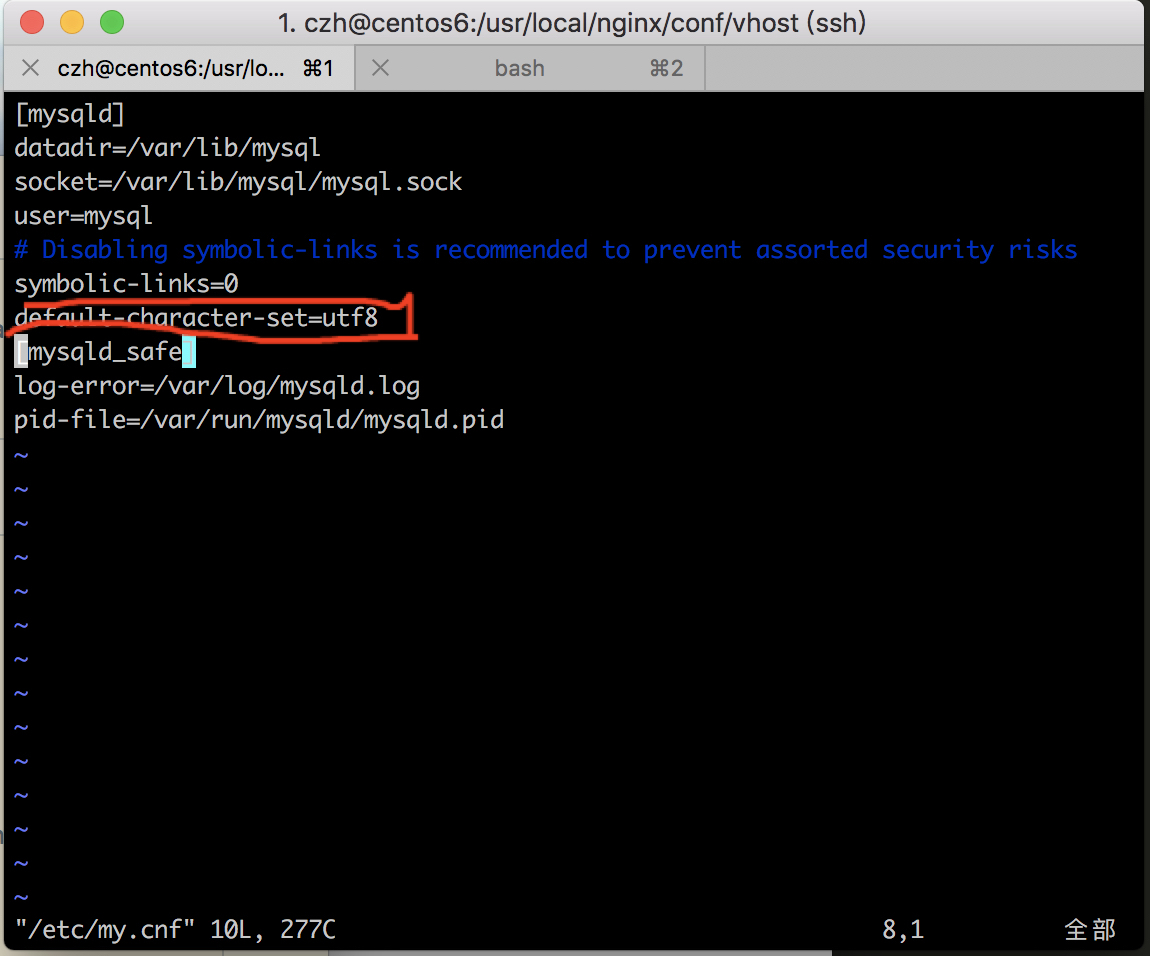
1 | [mysqld] |
设置开机自启:
1 | [czh@centos6 vhost]$ sudo chkconfig mysqld on |
1 | [czh@centos6 vhost]$ sudo chkconfig --list mysqld |
[czh@centos6 vhost]$ sudo service mysqld start
Initializing MySQL database: WARNING: The host ‘centos6.8-linux.shared’ could not be looked up with resolveip.
This probably means that your libc libraries are not 100 % compatible
with this binary MySQL version. The MySQL daemon, mysqld, should work
normally with the exception that host name resolving will not work.
This means that you should use IP addresses instead of hostnames
when specifying MySQL privileges !
Installing MySQL system tables…
180220 18:41:23 [Warning] ‘–default-character-set’ is deprecated and will be removed in a future release. Please use ‘–character-set-server’ instead.
OK
Filling help tables…
180220 18:41:23 [Warning] ‘–default-character-set’ is deprecated and will be removed in a future release. Please use ‘–character-set-server’ instead.
OK
To start mysqld at boot time you have to copy
support-files/mysql.server to the right place for your system
PLEASE REMEMBER TO SET A PASSWORD FOR THE MySQL root USER !
To do so, start the server, then issue the following commands:
/usr/bin/mysqladmin -u root password ‘new-password’
/usr/bin/mysqladmin -u root -h centos6.8-linux.shared password ‘new-password’
Alternatively you can run:
/usr/bin/mysql_secure_installation
which will also give you the option of removing the test
databases and anonymous user created by default. This is
strongly recommended for production servers.
See the manual for more instructions.
You can start the MySQL daemon with:
cd /usr ; /usr/bin/mysqld_safe &
You can test the MySQL daemon with mysql-test-run.pl
cd /usr/mysql-test ; perl mysql-test-run.pl
Please report any problems with the /usr/bin/mysqlbug script!
[ OK ]Starting mysqld: [ OK ]
1 |
|
[czh@centos6 vhost]$ mysql -u root
Welcome to the MySQL monitor. Commands end with ; or \g.
Your MySQL connection id is 2
Server version: 5.1.73 Source distribution
Copyright (c) 2000, 2013, Oracle and/or its affiliates. All rights reserved.
Oracle is a registered trademark of Oracle Corporation and/or its
affiliates. Other names may be trademarks of their respective
owners.
Type ‘help;’ or ‘\h’ for help. Type ‘\c’ to clear the current input statement.
mysql> select user,host from mysql.user
-> ;
+——+————————+
| user | host |
+——+————————+
| root | 127.0.0.1 |
| | centos6.8-linux.shared |
| root | centos6.8-linux.shared |
| | localhost |
| root | localhost |
+——+————————+
5 rows in set (0.00 sec)
mysql> delete from mysql.user where user=’’;
Query OK, 2 rows affected (0.00 sec)
mysql> select user,host from mysql.user;
+——+————————+
| user | host |
+——+————————+
| root | 127.0.0.1 |
| root | centos6.8-linux.shared |
| root | localhost |
+——+————————+
3 rows in set (0.00 sec)
1 |
|
[czh@centos6 vhost]$ sudo vim /etc/sysconfig/iptables
1 |  |
mysql> insert into mysql.user(Host,User,Password)values(“localhost”,”mmall”,password(“mmall”));
Query OK, 1 row affected, 3 warnings (0.00 sec)
mysql> select user,host from mysql.user;
+——+————————+
| user | host |
+——+————————+
| root | 127.0.0.1 |
| root | centos6.8-linux.shared |
| mmal | localhost |
| root | localhost |
+——+————————+
4 rows in set (0.00 sec)
mysql>
1 |
|
mysql> create database mmall default character set utf8 collate utf8_general_ci;
Query OK, 1 row affected (0.00 sec)
1 |
|
mysql> select * from mysql.user \G;
*** 1. row ***
Host: localhost
User: root
Password:
Select_priv: Y
Insert_priv: Y
Update_priv: Y
Delete_priv: Y
Create_priv: Y
Drop_priv: Y
Reload_priv: Y
Shutdown_priv: Y
Process_priv: Y
File_priv: Y
Grant_priv: Y
References_priv: Y
Index_priv: Y
Alter_priv: Y
Show_db_priv: Y
Super_priv: Y
Create_tmp_table_priv: Y
Lock_tables_priv: Y
Execute_priv: Y
Repl_slave_priv: Y
Repl_client_priv: Y
Create_view_priv: Y
Show_view_priv: Y
Create_routine_priv: Y
Alter_routine_priv: Y
Create_user_priv: Y
Event_priv: Y
Trigger_priv: Y
ssl_type:
ssl_cipher:
x509_issuer:
x509_subject:
max_questions: 0
max_updates: 0
max_connections: 0
max_user_connections: 0
*** 2. row ***
Host: centos6.8-linux.shared
User: root
Password:
Select_priv: Y
Insert_priv: Y
Update_priv: Y
Delete_priv: Y
Create_priv: Y
Drop_priv: Y
Reload_priv: Y
Shutdown_priv: Y
Process_priv: Y
File_priv: Y
Grant_priv: Y
References_priv: Y
Index_priv: Y
Alter_priv: Y
Show_db_priv: Y
Super_priv: Y
Create_tmp_table_priv: Y
Lock_tables_priv: Y
Execute_priv: Y
Repl_slave_priv: Y
Repl_client_priv: Y
Create_view_priv: Y
Show_view_priv: Y
Create_routine_priv: Y
Alter_routine_priv: Y
Create_user_priv: Y
Event_priv: Y
Trigger_priv: Y
ssl_type:
ssl_cipher:
x509_issuer:
x509_subject:
max_questions: 0
max_updates: 0
max_connections: 0
max_user_connections: 0
*** 3. row ***
Host: 127.0.0.1
User: root
Password:
Select_priv: Y
Insert_priv: Y
Update_priv: Y
Delete_priv: Y
Create_priv: Y
Drop_priv: Y
Reload_priv: Y
Shutdown_priv: Y
Process_priv: Y
File_priv: Y
Grant_priv: Y
References_priv: Y
Index_priv: Y
Alter_priv: Y
Show_db_priv: Y
Super_priv: Y
Create_tmp_table_priv: Y
Lock_tables_priv: Y
Execute_priv: Y
Repl_slave_priv: Y
Repl_client_priv: Y
Create_view_priv: Y
Show_view_priv: Y
Create_routine_priv: Y
Alter_routine_priv: Y
Create_user_priv: Y
Event_priv: Y
Trigger_priv: Y
ssl_type:
ssl_cipher:
x509_issuer:
x509_subject:
max_questions: 0
max_updates: 0
max_connections: 0
max_user_connections: 0
*** 4. row ***
Host: localhost
User: mmal
Password: *B24D58108523CB417C6988470B0FD4141D7FBAF6
Select_priv: N
Insert_priv: N
Update_priv: N
Delete_priv: N
Create_priv: N
Drop_priv: N
Reload_priv: N
Shutdown_priv: N
Process_priv: N
File_priv: N
Grant_priv: N
References_priv: N
Index_priv: N
Alter_priv: N
Show_db_priv: N
Super_priv: N
Create_tmp_table_priv: N
Lock_tables_priv: N
Execute_priv: N
Repl_slave_priv: N
Repl_client_priv: N
Create_view_priv: N
Show_view_priv: N
Create_routine_priv: N
Alter_routine_priv: N
Create_user_priv: N
Event_priv: N
Trigger_priv: N
ssl_type:
ssl_cipher:
x509_issuer:
x509_subject:
max_questions: 0
max_updates: 0
max_connections: 0
max_user_connections: 0
4 rows in set (0.00 sec)
ERROR:
No query specified
1 |
mysql> grant all privileges on mmall.* to mmall@’%’ identified by ‘mmall’ with grant option;
Query OK, 0 rows affected (0.00 sec)
1 | 注:此时的结果不变 |
mysql> set password for root@localhost=password(‘root’);
Query OK, 0 rows affected (0.00 sec)
mysql> set password for 127.0.0.1@localhost=password(‘root’);
ERROR 1064 (42000): You have an error in your SQL syntax; check the manual that corresponds to your MySQL server version for the right syntax to use near ‘127.0.0.1@localhost=password(‘root’)’ at line 1
mysql> set password for root@127.0.0.1=password(‘root’);
Query OK, 0 rows affected (0.00 sec)
mysql> select user,host,password from mysql.user;
+——-+————————+——————————————-+
| user | host | password |
+——-+————————+——————————————-+
| root | localhost | *81F5E21E35407D884A6CD4A731AEBFB6AF209E1B |
| root | centos6.8-linux.shared | |
| root | 127.0.0.1 | *81F5E21E35407D884A6CD4A731AEBFB6AF209E1B |
| mmall | % | *B24D58108523CB417C6988470B0FD4141D7FBAF6 |
| mmall | localhost | *B24D58108523CB417C6988470B0FD4141D7FBAF6 |
+——-+————————+——————————————-+
5 rows in set (0.00 sec)
mysql>
1 |
|
[czh@centos6 vhost]$ mysql -u root -p
Enter password:
Welcome to the MySQL monitor. Commands end with ; or \g.
Your MySQL connection id is 8
1 |
|
[czh@centos6 vhost]$ sudo service mysqld restart
[sudo] password for czh:
Stopping mysqld: [ OK ]
Starting mysqld: [ OK ]
1 |
|
[czh@localhost bin]$ mysql -u root -p
Enter password:
Welcome to the MySQL monitor. Commands end with ; or \g.
Your MySQL connection id is 4
Server version: 5.1.73 Source distribution
Copyright (c) 2000, 2013, Oracle and/or its affiliates. All rights reserved.
Oracle is a registered trademark of Oracle Corporation and/or its
affiliates. Other names may be trademarks of their respective
owners.
Type ‘help;’ or ‘\h’ for help. Type ‘\c’ to clear the current input statement.
mysql> select user,host from mysql.user;
+——-+————————+
| user | host |
+——-+————————+
| mmall | % |
| root | 127.0.0.1 |
| root | centos6.8-linux.shared |
| mmall | localhost |
| root | localhost |
+——-+————————+
5 rows in set (0.00 sec)
mysql> GRANT ALL PRIVILEGES ON . TO ‘root’@’%’ IDENTIFIED BY ‘root’ WITH GRANT OPTION;
Query OK, 0 rows affected (0.00 sec)
mysql> flush privileges;
Query OK, 0 rows affected (0.00 sec)
注:当我将上面的提高的全部更改之后,发现我的navicat坏了,总提示超时,我重新下载了一个就好了。