0%

2017年7月17日 下午5:19

问题

  1. WordPress提示“在裁剪您的图像时发生了错误”
  2. 解决wordpress修改固定连接后不能正常访问(404 or 有点尴尬诶!该页无法显示。)

问题1解决方法

  1. WordPress提示“在裁剪您的图像时发生了错误”的解决方法
  2. 以上的这篇文章用的是php5,而我用的是php7
  3. 我试了试sudo apt-get install php7-gd,但是会提示
    1
    2
    3
    4
    Reading package lists... Done
    Building dependency tree
    Reading state information... Done
    E: Unable to locate package php7-gd
  4. 于是我直接省了,用sudo apt-get install php-gd,成功了
  5. 然后sudo systemctl reload nginx,重启服务器

问题2的解决方法

  1. 修改nginx配置文件
  2. 在原来的基础上加上
    1
    2
    3
    location /wordpress {
    try_files $uri $uri/ /wordpress/index.php?$args;
    }
  3. 最后变成了
    1
    2
    3
    4
    5
    6
    7
    8
    9
    10
    11
    12
    13
    14
    15
    16
    17
    18
    19
    20
    21
    22
    23
    24
    25
    26
    27
    28
    29
    30
    31
    32
    33
    34
    35
    36
    37
    38
    server {
    listen 80 default_server;
    listen [::]:80 default_server ipv6only=on;

    root /var/www;
    index index.html index.htm index.php;

    # Make site accessible from http://localhost/
    server_name localhost;

    location / {
    # First attempt to serve request as file, then
    # as directory, then fall back to displaying a 404.
    try_files $uri $uri/ =404;
    # Uncomment to enable naxsi on this location
    # include /etc/nginx/naxsi.rules
    }

    location ~ \.php/ {
    if ($request_uri ~ ^(.+\.php)(/.+?)($|\?)) { }
    fastcgi_pass unix:/run/php/php7.0-fpm.sock;
    include snippets/fastcgi-php.conf;
    fastcgi_param SCRIPT_NAME $1;
    fastcgi_param PATH_INFO $2;
    fastcgi_param SCRIPT_FILENAME $document_root$1;
    }

    location ~ \.php$ {
    include snippets/fastcgi-php.conf;
    fastcgi_pass unix:/run/php/php7.0-fpm.sock;
    fastcgi_param SCRIPT_FILENAME $document_root$fastcgi_script_name;
    }

    location /wordpress {
    try_files $uri $uri/ /wordpress/index.php?$args;
    }

    }
  4. 我参考的文章是nginx官方的针对wordpress的处理方法文章

2017年7月17日 下午4:05

来源:https://www.nginx.com/resources/wiki/start/topics/recipes/wordpress/
目的:解决wordpress修改固定连接后不能正常访问(404 or 有点尴尬诶!该页无法显示。),其实我的没改的时候也是(有点尴尬诶!该页无法显示)、

1
2
3
4
5
6
7
8
9
10
11
12
13
14
15
16
17
18
19
20
21
22
23
24
25
26
27
28
29
30
31
32
33
34
35
36
37
38
server {
listen 80 default_server;
listen [::]:80 default_server ipv6only=on;

root /var/www;
index index.html index.htm index.php;

# Make site accessible from http://localhost/
server_name localhost;

location / {
# First attempt to serve request as file, then
# as directory, then fall back to displaying a 404.
try_files $uri $uri/ =404;
# Uncomment to enable naxsi on this location
# include /etc/nginx/naxsi.rules
}

location ~ \.php/ {
if ($request_uri ~ ^(.+\.php)(/.+?)($|\?)) { }
fastcgi_pass unix:/run/php/php7.0-fpm.sock;
include snippets/fastcgi-php.conf;
fastcgi_param SCRIPT_NAME $1;
fastcgi_param PATH_INFO $2;
fastcgi_param SCRIPT_FILENAME $document_root$1;
}

location ~ \.php$ {
include snippets/fastcgi-php.conf;
fastcgi_pass unix:/run/php/php7.0-fpm.sock;
fastcgi_param SCRIPT_FILENAME $document_root$fastcgi_script_name;
}

location /wordpress {
try_files $uri $uri/ /wordpress/index.php?$args;
}

}

2017年7月16日 上午11:09

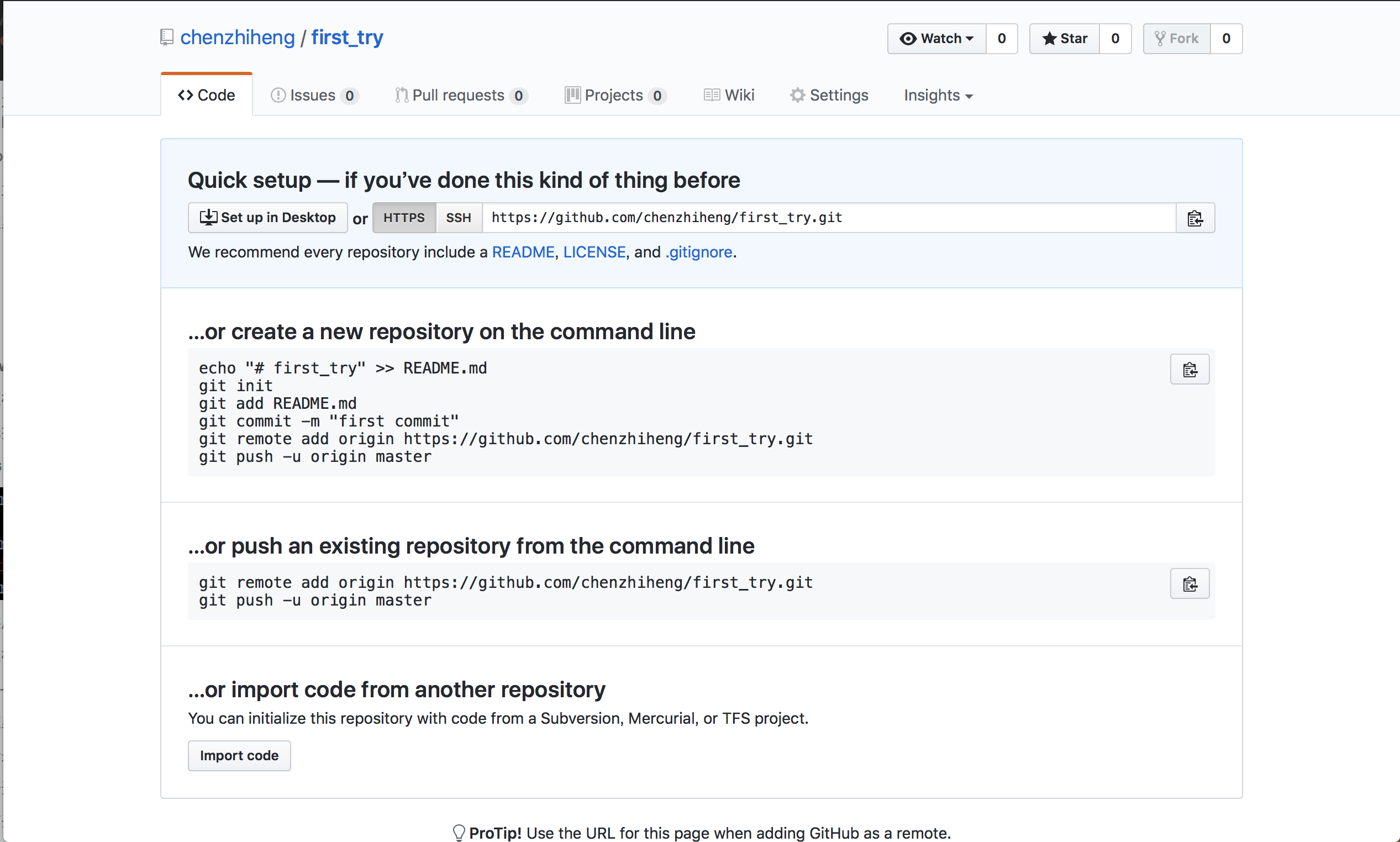
把本地项目提交到github步骤

  1. 本地:必须创建新的ssh
    1. 这要注意新建文件的名字要有一定的辨识度
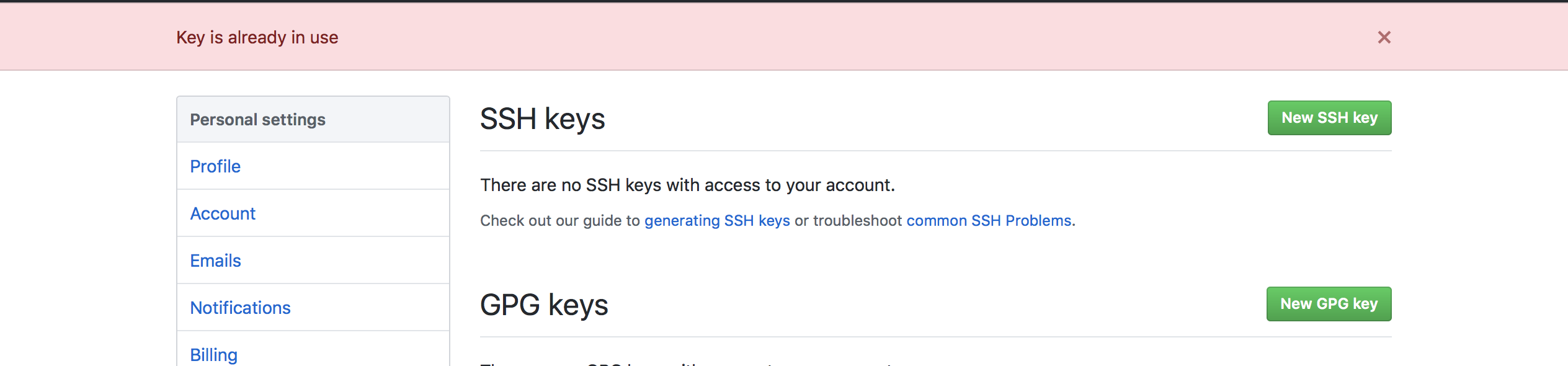
  2. github:setting中设置添加本地创建好的ssh
    1. 这里必须用新的ssh,不能重复用
  3. 本地:进入相关目录下进行如下指令
    1
    2
    3
    4
    5
    6
    echo "# tre" >> README.md
    git init
    git add README.md
    git commit -m "first commit"
    git remote add origin https://chenzhiheng@github.com/chenzhiheng/tre.git
    git push -u origin master


github有相关的提醒
4. 这里要输入一次github密码
5. 此时,文件已经提交
6. 注意点:
1. 这里的htttp:….. 必须使用这种,否则会报错
2. 当git init之后不能直接push,要先commit一次,把数据提交到本地的repostory。因为push:是将repository提交到github
3. 要使用新的ssh,否则会如下图

常用指令

  1. remote连接删掉:git remote remove
  2. 生成ssh:ssh-keygen -t rsa -f ~_.ssh_id_rsa.【标识后缀】 -C “【注释】”

关于github团队合作的一些使用及理解

  1. Github关键功能功能
    1. 代码仓库,备份代码
    2. 对代码进行多次的拷贝,各自有略微不同,这里叫做branch
    3. 小组协作,可以提交自己的更改合并请求合并,并讨论
    4. 说出自己的问题,并讨论
    5. 详细的记录每次的更改,commite
  2. 冲突
    1. 合并的两个branch对同一区域进行的不同的更改
  3. 整个过程概念的理解:
    自白:
    1. 我要参与加入一个开源项目中去,于是我fork了这个开源项目。
    2. 此时还有很多人与我一样共同为这个开源项目努力
    3. 我可以在issue中提出我的问题,然后和大家讨论,看是否有人正在改,那我就不用弄这个了
    4. 我也可以和这个人合作,但是容易产生冲突
    5. 当我的问题得到认可之后,我就可以开工了
    6. 我先在我的github中,可以新建branch,走Understanding the GitHub Flow · GitHub Guidesgithub flow
    7. 意味着:当我pull request 时,compare是自己github中的
    8. 最后我改的差不多了,然后我就将我的改好的branch,和我老大的branch进行compare
    9. 这个请求会添加到老大的pull request中,而自己是没有的
    10. 这时可以理解为:大家要来讨论一下你改的怎么样
    11. 要是有conflict的话,还要resolve一下
    12. 这时我可以不可以去让这个pull request 进行merge的。这已经不归我管了
    13. 如何老大认为不错,而且冲突解决了的话,老大就merge
    14. 如果大家有人发现了问题,那么老大可以close pull request
    15. 那我就得接的去改!

我参考的一些链接:

  1. 30分钟 git命令 从入门到放弃
  2. 使用Git完成基本的版本控制
  3. Mac下git和github使用 - 简书
  4. Mac怎么生成.ssh文件
  5. ssh-keygen参数说明
  6. git生成ssh key及本地解决多个ssh key的问题
  7. .ssh目录下存放的known_hosts是什么
  8. 如何删掉 git remote 的分支
  9. 解决github push错误The requested URL returned error: 403 Forbidden while accessing

2017年7月16日 下午4:08

连接服务器

1
2
3
4
5
6
7
8
9
10
11
12
13
14
15
16
17
18
19
localhost:~ czh$ ls
Applications Music go-pear.phar
Desktop Pictures htdocs
Documents Public new
Downloads VirtualBox VMs 游戏
Hello.class Windows 7 个人笔记
Hello.java android_studio 个人资料仓库
Library c && c++ 非个人资料仓库
Movies eclipse_workspace
localhost:~ czh$ cd .ssh
localhost:.ssh czh$ ssh -i shanghai ubuntu@118.89.199.142
Welcome to Ubuntu 16.04.1 LTS (GNU/Linux 4.4.0-53-generic x86_64)

* Documentation: https://help.ubuntu.com
* Management: https://landscape.canonical.com
* Support: https://ubuntu.com/advantage

Last login: Fri Jun 23 08:51:58 2017 from 222.31.41.2
ubuntu@VM-219-69-ubuntu:~$

上传文件夹到服务器

1
2
3
4
5
6
7
8
localhost:.ssh czh$ scp /Users/czh/Desktop/wordpress ubuntu@118.89.199.142:/var/www
Permission denied (publickey).
lost connection
localhost:.ssh czh$ ssh-add shanghai
Identity added: shanghai (shanghai)
localhost:.ssh czh$ scp /Users/czh/Desktop/wordpress ubuntu@118.89.199.142:/var/www
/Users/czh/Desktop/wordpress: not a regular file
localhost:.ssh czh$ scp -r /Users/czh/Desktop/wordpress ubuntu@118.89.199.142:/var/www

远程连接数据库

1
2
3
4
5
6
7
8
9
10
11
12
13
14
15
localhost:.ssh czh$ mysql -h 118.89.199.142 -u myuser -p
Enter password:
Welcome to the MySQL monitor. Commands end with ; or \g.
Your MySQL connection id is 25672
Server version: 5.7.18-0ubuntu0.16.04.1 (Ubuntu)

Copyright (c) 2000, 2016, Oracle and/or its affiliates. All rights reserved.

Oracle is a registered trademark of Oracle Corporation and/or its
affiliates. Other names may be trademarks of their respective
owners.

Type 'help;' or '\h' for help. Type '\c' to clear the current input statement.

mysql>

下载远程服务器sql到本地(此备份只备份数据和数据结构,没有备份存储过程和触发器 )

1
mysqldump -h 192.168.42.43 -u root -p test4>test.sql;

MYSQL 数据库导入导出命令_Mysql_脚本之家

执行本地sql到服务器

1
2
3
mysql> create database test4;
mysql> use test4;
mysql> source ./desktop/test4.sql;

上传文件到服务器

1
.ssh czh$ scp /Users/czh/Desktop/default ubuntu@118.89.199.142:/etc/nginx/sites-available

重启服务器

1
sudo systemctl reload nginx

2017年7月16日 下午4:01

效率 = 效率的如何评估+好的休息 + 事先安排+随机应变

数据库远程链接失败

1
2
3
localhost:.ssh czh$ mysql -h 18.89.199.142 -u root -p
Enter password:
ERROR 2003 (HY000): Can't connect to MySQL server on '18.89.199.142' (60)

链接服务器配置数据库

1
2
3
4
5
6
7
8
9
10
11
12
13
14
15
16
17
18
19
20
21
22
23
24
25
26
27
28
29
30
31
32
33
34
35
36
37
38
39
40
41
42
43
44

localhost:.ssh czh$ ssh -i shanghai ubuntu@118.89.199.142
Welcome to Ubuntu 16.04.1 LTS (GNU/Linux 4.4.0-53-generic x86_64)

* Documentation: https://help.ubuntu.com
* Management: https://landscape.canonical.com
* Support: https://ubuntu.com/advantage

Last login: Sun Jun 4 19:14:42 2017 from 221.205.188.117
ubuntu@VM-219-69-ubuntu:~$ sudo vim /etc/mysql/my.cnf
ubuntu@VM-219-69-ubuntu:~$ sudo vim /etc/mysql/conf.d
ubuntu@VM-219-69-ubuntu:~$ sudo vim /etc/mysql/mysql.conf.d
ubuntu@VM-219-69-ubuntu:~$ cd /etc
ubuntu@VM-219-69-ubuntu:/etc$ cd mysql
ubuntu@VM-219-69-ubuntu:/etc/mysql$ ls
conf.d debian.cnf my.cnf.fallback mysql.conf.d
debian-start my.cnf mysql.cnf
ubuntu@VM-219-69-ubuntu:/etc/mysql$ sudo vim /etc/mysql/mysql.cnf
ubuntu@VM-219-69-ubuntu:/etc/mysql$ sudo vim /etc/mysql/conf.d
ubuntu@VM-219-69-ubuntu:/etc/mysql$ sudo vim /etc/mysql/my.cnf
ubuntu@VM-219-69-ubuntu:/etc/mysql$ sudo vim /etc/mysql/my.cnf.fallback
ubuntu@VM-219-69-ubuntu:/etc/mysql$ sudo vim /etc/mysql/debian.cnf
ubuntu@VM-219-69-ubuntu:/etc/mysql$ sudo vim /etc/mysql/my.cnf
ubuntu@VM-219-69-ubuntu:/etc/mysql$ cd /etc/mysql/conf.d/
ubuntu@VM-219-69-ubuntu:/etc/mysql/conf.d$ ls
mysql.cnf mysqldump.cnf
ubuntu@VM-219-69-ubuntu:/etc/mysql/conf.d$ sudo vim /etc/mysql/mysql.cnf
ubuntu@VM-219-69-ubuntu:/etc/mysql/conf.d$ sudo vim mysql.cnf
ubuntu@VM-219-69-ubuntu:/etc/mysql/conf.d$ sudo vim mysqldump.cnf
ubuntu@VM-219-69-ubuntu:/etc/mysql/conf.d$ cd ..
ubuntu@VM-219-69-ubuntu:/etc/mysql$ cd mysql.conf.d
ubuntu@VM-219-69-ubuntu:/etc/mysql/mysql.conf.d$ ls
mysqld.cnf mysqld_safe_syslog.cnf
ubuntu@VM-219-69-ubuntu:/etc/mysql/mysql.conf.d$ cd mysqld.cnf
-bash: cd: mysqld.cnf: Not a directory
ubuntu@VM-219-69-ubuntu:/etc/mysql/mysql.conf.d$ sudo vim mysqld.cnf
ubuntu@VM-219-69-ubuntu:/etc/mysql/mysql.conf.d$ sudo restart mysql
sudo: restart: command not found
ubuntu@VM-219-69-ubuntu:/etc/mysql/mysql.conf.d$ sudo /etc/init.d/mysql restart
[ ok ] Restarting mysql (via systemctl): mysql.service.
ubuntu@VM-219-69-ubuntu:/etc/mysql/mysql.conf.d$ exit;
logout

远程链接数据库失败

1
2
3
4
Connection to 118.89.199.142 closed.
localhost:.ssh czh$ mysql -h 118.89.199.142 -u root -p
Enter password:
ERROR 1130 (HY000): Host '221.205.188.117' is not allowed to connect to this MySQL server

连接服务器进入数据库

1
2
3
4
5
6
7
8
9
10
11
12
13
14
15
16
17
18
19
20
21
22
23
24
25
26
27
28
29
30
31
32
33
34
35
36
37
38
39
40
41
42
43
44
45
46
47
48
49
50
51
52
53
54
55
56
57
58
59
60
61
62
63
64
65
66
67
68
69
70
71
72
73
74
localhost:.ssh czh$ ssh -i shanghai ubuntu@118.89.199.142
Welcome to Ubuntu 16.04.1 LTS (GNU/Linux 4.4.0-53-generic x86_64)

* Documentation: https://help.ubuntu.com
* Management: https://landscape.canonical.com
* Support: https://ubuntu.com/advantage

Last login: Sun Jun 4 19:29:11 2017 from 221.205.188.117


ubuntu@VM-219-69-ubuntu:~$ mysql -u root -p
Enter password:
Welcome to the MySQL monitor. Commands end with ; or \g.
Your MySQL connection id is 5
Server version: 5.7.18-0ubuntu0.16.04.1 (Ubuntu)

Copyright (c) 2000, 2017, Oracle and/or its affiliates. All rights reserved.

Oracle is a registered trademark of Oracle Corporation and/or its
affiliates. Other names may be trademarks of their respective
owners.

Type 'help;' or '\h' for help. Type '\c' to clear the current input statement.

mysql> show databases;
+--------------------+
| Database |
+--------------------+
| information_schema |
| mysql |
| performance_schema |
| sys |
+--------------------+
4 rows in set (0.00 sec)

mysql> exi;t
ERROR 1064 (42000): You have an error in your SQL syntax; check the manual that corresponds to your MySQL server version for the right syntax to use near 'exi' at line 1
->
-> exit;
ERROR 1064 (42000): You have an error in your SQL syntax; check the manual that corresponds to your MySQL server version for the right syntax to use near 't

exit' at line 1
mysql> exit;
Bye

ubuntu@VM-219-69-ubuntu:~$ mysql -u root -p
Enter password:
Welcome to the MySQL monitor. Commands end with ; or \g.
Your MySQL connection id is 6
Server version: 5.7.18-0ubuntu0.16.04.1 (Ubuntu)

Copyright (c) 2000, 2017, Oracle and/or its affiliates. All rights reserved.

Oracle is a registered trademark of Oracle Corporation and/or its
affiliates. Other names may be trademarks of their respective
owners.

Type 'help;' or '\h' for help. Type '\c' to clear the current input statement.

mysql> GRANT ALL PRIVILEGES ON *.* TO 'myuser'@'%' IDENTIFIED BY '012468czh.' WITH GRANT OPTION
-> ;
ERROR 1819 (HY000): Your password does not satisfy the current policy requirements
mysql> GRANT ALL PRIVILEGES ON *.* TO 'myuser'@'%' IDENTIFIED BY '012468czh' WITH GRANT OPTION;
ERROR 1819 (HY000): Your password does not satisfy the current policy requirements
mysql> set global validate_password_policy=0;
Query OK, 0 rows affected (0.00 sec)

mysql> GRANT ALL PRIVILEGES ON *.* TO 'myuser'@'%' IDENTIFIED BY '012468czh.' WITH GRANT OPTION;
Query OK, 0 rows affected, 1 warning (0.00 sec)

mysql> exit;
Bye
ubuntu@VM-219-69-ubuntu:~$ exit;
logout

远程连接数据库失败

1
2
3
4
Connection to 118.89.199.142 closed.
localhost:.ssh czh$ mysql -h 118.89.199.142 -u root -p
Enter password:
ERROR 1045 (28000): Access denied for user 'root'@'221.205.188.117' (using password: YES)

连接数据库成功

1
2
3
4
5
6
7
8
9
10
11
12
13
14
15
16
17
18
19
20
21
22
23
24
25
26
27
28
29
30
31
32
33
34
35
36
37
38
39
40
41
42
43
44
45
46
47
48
49
50
51
52
53
54
55
56
57
58
59
60
61
62
63
64
65
66
67
68
69
70
71
72
73
74
75
76
77
78
79
80
81
82
83
84
85
86
87
88
89
90
91
92
93
94
95
96
97
98
99
100
101
102
103
104
105
106
107
108
109
110
111
112
113
114
115
116
117
118
119
120
121
122
123
124
125


mysql> show databases;
+--------------------+
| Database |
+--------------------+
| information_schema |
| mysql |
| performance_schema |
| sys |
+--------------------+
4 rows in set (0.05 sec)

mysql> create database report;
Query OK, 1 row affected (0.04 sec)

mysql> show databases;
+--------------------+
| Database |
+--------------------+
| information_schema |
| mysql |
| performance_schema |
| report |
| sys |
+--------------------+
5 rows in set (0.03 sec)

mysql> use report;
Database changed
mysql> source /Users/czh/Downloads/report.sql ;
Query OK, 0 rows affected (0.04 sec)

Query OK, 0 rows affected (0.03 sec)

Query OK, 0 rows affected (0.03 sec)

Query OK, 0 rows affected (0.04 sec)

Query OK, 0 rows affected (0.03 sec)

Query OK, 0 rows affected (0.04 sec)

Query OK, 0 rows affected (0.07 sec)

Query OK, 7 rows affected (0.04 sec)
Records: 7 Duplicates: 0 Warnings: 0

Query OK, 0 rows affected (0.07 sec)

Query OK, 7 rows affected (0.03 sec)
Records: 7 Duplicates: 0 Warnings: 0

Query OK, 0 rows affected (0.04 sec)

Query OK, 0 rows affected (0.07 sec)

Query OK, 10 rows affected (0.04 sec)
Records: 10 Duplicates: 0 Warnings: 0

Query OK, 0 rows affected (0.05 sec)

Query OK, 7 rows affected (0.05 sec)
Records: 7 Duplicates: 0 Warnings: 0

Query OK, 0 rows affected (0.03 sec)

Query OK, 0 rows affected (0.06 sec)

Query OK, 1 row affected (0.04 sec)

Query OK, 0 rows affected (0.05 sec)

Query OK, 7 rows affected (0.03 sec)
Records: 7 Duplicates: 0 Warnings: 0

Query OK, 0 rows affected (0.11 sec)
Records: 0 Duplicates: 0 Warnings: 0

Query OK, 0 rows affected (0.08 sec)
Records: 0 Duplicates: 0 Warnings: 0

Query OK, 0 rows affected (0.07 sec)
Records: 0 Duplicates: 0 Warnings: 0

Query OK, 0 rows affected (0.09 sec)
Records: 0 Duplicates: 0 Warnings: 0

Query OK, 0 rows affected (0.09 sec)
Records: 0 Duplicates: 0 Warnings: 0

Query OK, 0 rows affected (0.08 sec)
Records: 0 Duplicates: 0 Warnings: 0

Query OK, 7 rows affected (0.05 sec)
Records: 7 Duplicates: 0 Warnings: 0

Query OK, 7 rows affected (0.06 sec)
Records: 7 Duplicates: 0 Warnings: 0

Query OK, 10 rows affected (0.05 sec)
Records: 10 Duplicates: 0 Warnings: 0

Query OK, 7 rows affected (0.06 sec)
Records: 7 Duplicates: 0 Warnings: 0

Query OK, 1 row affected (0.05 sec)
Records: 1 Duplicates: 0 Warnings: 0

Query OK, 7 rows affected (0.05 sec)
Records: 7 Duplicates: 0 Warnings: 0

Query OK, 7 rows affected (0.05 sec)
Records: 7 Duplicates: 0 Warnings: 0

Query OK, 7 rows affected (0.05 sec)
Records: 7 Duplicates: 0 Warnings: 0

Query OK, 0 rows affected (0.03 sec)

Query OK, 0 rows affected (0.04 sec)

Query OK, 0 rows affected (0.04 sec)

mysql>

——————————————————

登陆服务器配置项目

1
2
3
4
5
6
7
8
9
10
11
12
13
14
15
16
17
18
19
20
21
22
23
24
25
26
27
28
29
30
31
Last login: Mon Jun  5 13:23:16 2017 from 221.205.47.210
ubuntu@VM-219-69-ubuntu:~$ cd /var/www/html
ubuntu@VM-219-69-ubuntu:/var/www/html$ ls
index.nginx-debian.html info.php report
ubuntu@VM-219-69-ubuntu:/var/www/html$ chmod 777 report
ubuntu@VM-219-69-ubuntu:/var/www/html$ cd report
ubuntu@VM-219-69-ubuntu:/var/www/html/report$ ls
Application README.md Untitled-1.html index.php
Public ThinkPHP composer.json target.xls
ubuntu@VM-219-69-ubuntu:/var/www/html/report$ cd Application
ubuntu@VM-219-69-ubuntu:/var/www/html/report/Application$ ls
Admin Common Home README.md Runtime index.html
ubuntu@VM-219-69-ubuntu:/var/www/html/report/Application$ cd Runtime
ubuntu@VM-219-69-ubuntu:/var/www/html/report/Application/Runtime$ cd..
cd..: command not found
##
ubuntu@VM-219-69-ubuntu:/var/www/html/report/Application/Runtime$ cd ..
ubuntu@VM-219-69-ubuntu:/var/www/html/report/Application$ sudo rm Runtime
rm: cannot remove 'Runtime': Is a directory
ubuntu@VM-219-69-ubuntu:/var/www/html/report/Application$ sudo rm -r Runtime
ubuntu@VM-219-69-ubuntu:/var/www/html/report/Application$ ls
Admin Common Home README.md index.html
ubuntu@VM-219-69-ubuntu:/var/www/html/report/Application$ ls
Admin Common Home README.md index.html
ubuntu@VM-219-69-ubuntu:/var/www/html/report/Application$ ls
Admin Common Home README.md index.html
ubuntu@VM-219-69-ubuntu:/var/www/html/report/Application$ cd ..
ubuntu@VM-219-69-ubuntu:/var/www/html/report$ chmod 777 Application
ubuntu@VM-219-69-ubuntu:/var/www/html/report$ exit;
logout
Connection to 118.89.199.142 closed.

连接服务器配置nigix

1
2
3
4
5
6
7
8
9
10
11
12
13
14
15
localhost:.ssh czh$ ssh -i shanghai ubuntu@118.89.199.142
Welcome to Ubuntu 16.04.1 LTS (GNU/Linux 4.4.0-53-generic x86_64)

* Documentation: https://help.ubuntu.com
* Management: https://landscape.canonical.com
* Support: https://ubuntu.com/advantage

Last login: Mon Jun 5 13:45:00 2017 from 221.205.47.210
ubuntu@VM-219-69-ubuntu:~$ sudo vim /etc/nginx/sites-available/default
ubuntu@VM-219-69-ubuntu:~$ cd /etc/nginx/sites-available/
ubuntu@VM-219-69-ubuntu:/etc/nginx/sites-available$ ls
default
ubuntu@VM-219-69-ubuntu:/etc/nginx/sites-available$ exit;
logout
Connection to 118.89.199.142 closed.

远程下载

1
2
3
4
5
6
localhost:.ssh czh$ scp ubuntu@118.89.199.142:/etc/nginx/sites-available/default/Users/czh/Desktop/
usage: scp [-12346BCpqrv] [-c cipher] [-F ssh_config] [-i identity_file]
[-l limit] [-o ssh_option] [-P port] [-S program]
[[user@]host1:]file1 ... [[user@]host2:]file2
localhost:.ssh czh$ scp ubuntu@118.89.199.142:/etc/nginx/sites-available/default /Users/czh/Desktop/
default 100% 2092 57.5KB/s 00:00

登陆服务器配置

1
2
3
4
5
6
7
8
9
10
11
12
13
14
localhost:.ssh czh$ ssh -i shanghai ubuntu@118.89.199.142
Welcome to Ubuntu 16.04.1 LTS (GNU/Linux 4.4.0-53-generic x86_64)

* Documentation: https://help.ubuntu.com
* Management: https://landscape.canonical.com
* Support: https://ubuntu.com/advantage

Last login: Mon Jun 5 16:46:55 2017 from 221.205.47.210
ubuntu@VM-219-69-ubuntu:~$ cd /etc/nginx/sites-available/
ubuntu@VM-219-69-ubuntu:/etc/nginx/sites-available$ sudo rm default
ubuntu@VM-219-69-ubuntu:/etc/nginx/sites-available$ ls
ubuntu@VM-219-69-ubuntu:/etc/nginx/sites-available$ exit;
logout
Connection to 118.89.199.142 closed.

上传文件到服务器

1
2
3
4
localhost:.ssh czh$ scp /Users/czh/Desktop/default ubuntu@118.89.199.142:/etc/nginx/sites-available/
scp: /etc/nginx/sites-available//default: Permission denied
localhost:.ssh czh$ scp /Users/czh/Desktop/default ubuntu@118.89.199.142:/etc/nginx/sites-available
scp: /etc/nginx/sites-available/default: Permission denied

连接服务器进行配置

1
2
3
4
5
6
7
8
9
10
11
12
13
14
localhost:.ssh czh$ ssh -i shanghai ubuntu@118.89.199.142
Welcome to Ubuntu 16.04.1 LTS (GNU/Linux 4.4.0-53-generic x86_64)

* Documentation: https://help.ubuntu.com
* Management: https://landscape.canonical.com
* Support: https://ubuntu.com/advantage

Last login: Mon Jun 5 16:56:37 2017 from 221.205.47.210
ubuntu@VM-219-69-ubuntu:~$ sudo chmod 777 /etc/nginx/sites-available
ubuntu@VM-219-69-ubuntu:~$ exit;
logout
Connection to 118.89.199.142 closed.
localhost:.ssh czh$ scp /Users/czh/Desktop/default ubuntu@118.89.199.142:/etc/nginx/sites-available
default 100% 1292 35.1KB/s 00:00

登陆服务器重启nginx

1
2
3
4
5
6
7
8
9
10
11
12
13
14
15
localhost:.ssh czh$ ssh -i shanghai ubuntu@118.89.199.142
Welcome to Ubuntu 16.04.1 LTS (GNU/Linux 4.4.0-53-generic x86_64)

* Documentation: https://help.ubuntu.com


server {
* Management: https://landscape.canonical.com
* Support: https://ubuntu.com/advantage

Last login: Mon Jun 5 17:02:15 2017 from 221.205.47.210
ubuntu@VM-219-69-ubuntu:~$ sudo systemctl reload nginx
ubuntu@VM-219-69-ubuntu:~$ exit;
logout
Connection to 118.89.199.142 closed.

上传文件到服务器

1
2
localhost:.ssh czh$ scp /Users/czh/Desktop/default ubuntu@118.89.199.142:/etc/nginx/sites-available
default 100% 1287 27.9KB/s 00:00

登陆服务器进行nginx配置

1
2
3
4
5
6
7
8
9
10
11
12
13
14
15
16
17
18
19
20
localhost:.ssh czh$ ssh -i shanghai ubuntu@118.89.199.142
Welcome to Ubuntu 16.04.1 LTS (GNU/Linux 4.4.0-53-generic x86_64)

* Documentation: https://help.ubuntu.com
* Management: https://landscape.canonical.com
* Support: https://ubuntu.com/advantage

Last login: Mon Jun 5 17:03:27 2017 from 221.205.47.210
ubuntu@VM-219-69-ubuntu:~$ sudo nginx -t
nginx: the configuration file /etc/nginx/nginx.conf syntax is ok
nginx: configuration file /etc/nginx/nginx.conf test is successful
ubuntu@VM-219-69-ubuntu:~$ sudo systemctl reload nginx
ubuntu@VM-219-69-ubuntu:~$ sudo vim /etc/nginx/sites-available/default
ubuntu@VM-219-69-ubuntu:~$ sudo nginx -t
nginx: the configuration file /etc/nginx/nginx.conf syntax is ok
nginx: configuration file /etc/nginx/nginx.conf test is successful
ubuntu@VM-219-69-ubuntu:~$ sudo systemctl reload nginx
ubuntu@VM-219-69-ubuntu:~$ exit;
logout
Connection to 118.89.199.142 closed.

上传文件到服务器

1
2
localhost:.ssh czh$ scp /Users/czh/Desktop/default ubuntu@118.89.199.142:/etc/nginx/sites-available
default 100% 2092 56.6KB/s 00:00

连接服务器配置nginx

1
2
3
4
5
6
7
8
9
10
11
12
13
14
15
localhost:.ssh czh$ ssh -i shanghai ubuntu@118.89.199.142
Welcome to Ubuntu 16.04.1 LTS (GNU/Linux 4.4.0-53-generic x86_64)

* Documentation: https://help.ubuntu.com
* Management: https://landscape.canonical.com
* Support: https://ubuntu.com/advantage

Last login: Mon Jun 5 17:08:04 2017 from 221.205.47.210
ubuntu@VM-219-69-ubuntu:~$ sudo nginx -t
nginx: the configuration file /etc/nginx/nginx.conf syntax is ok
nginx: configuration file /etc/nginx/nginx.conf test is successful
ubuntu@VM-219-69-ubuntu:~$ sudo systemctl reload nginx
ubuntu@VM-219-69-ubuntu:~$ exit;
logout
Connection to 118.89.199.142 closed.

上传文件到服务器

1
2
localhost:.ssh czh$ scp /Users/czh/Desktop/default ubuntu@118.89.199.142:/etc/nginx/sites-available
default 100% 984 18.9KB/s 00:00

连接服务器配置nginx

1
2
3
4
5
6
7
8
9
10
11
12
13
14
15
16
17
localhost:.ssh czh$ ssh -i shanghai ubuntu@118.89.199.142
Welcome to Ubuntu 16.04.1 LTS (GNU/Linux 4.4.0-53-generic x86_64)

* Documentation: https://help.ubuntu.com
* Management: https://landscape.canonical.com
* Support: https://ubuntu.com/advantage

Last login: Mon Jun 5 17:14:25 2017 from 221.205.47.210
ubuntu@VM-219-69-ubuntu:~$ sudo nginx -t
nginx: [emerg] unknown directive "..." in /etc/nginx/sites-enabled/default:3
nginx: configuration file /etc/nginx/nginx.conf test failed
ubuntu@VM-219-69-ubuntu:~$ cd /etc/nginx/sites-enabled/
ubuntu@VM-219-69-ubuntu:/etc/nginx/sites-enabled$ ls
default
ubuntu@VM-219-69-ubuntu:/etc/nginx/sites-enabled$ exit;
logout
Connection to 118.89.199.142 closed.

上传文件并配置nginx

1
2
3
4
5
6
7
8
9
10
11
12

localhost:.ssh czh$ scp /Users/czh/Desktop/default ubuntu@118.89.199.142:/etc/nginx/sites-available
default 100% 1324 34.6KB/s 00:00
localhost:.ssh czh$ ssh -i shanghai ubuntu@118.89.199.142
Welcome to Ubuntu 16.04.1 LTS (GNU/Linux 4.4.0-53-generic x86_64)

* Documentation: https://help.ubuntu.com
* Management: https://landscape.canonical.com
* Support: https://ubuntu.com/advantage

Last login: Mon Jun 5 17:18:00 2017 from 221.205.47.210
ubuntu@VM-219-69-ubuntu:~$g

2017年7月7日 下午6:17

分为三部分:

  1. FileImpl.class 接口类,说明了其中各个方法的作用
  2. MyFile.class 是接口FileImpl.class的具体实现
  3. Test.class是一个测试类
    FileImpl.class
    1
    2
    3
    4
    5
    6
    7
    8
    9
    10
    11
    12
    13
    14
    15
    16
    17
    18
    19
    20
    21
    22
    23
    24
    25
    26
    27
    28
    29
    30
    31
    32
    33
    34
    35
    36
    37
    38
    39
    40
    41
    42
    43
    44
    45
    46
    47
    48
    49
    50
    51
    52
    53
    54
    55
    56
    57
    58
    59
    60
    61
    62
    63
    64
    65
    66
    67
    68
    69
    70
    71
    72
    73
    74
    75
    76
    77
    78
    79
    80
    81
    82
    83
    84
    85
    86
    87
    88
    89
    90
    91
    92
    93
    94
    package cn.chenzhiheng.file.impl;

    import java.util.ArrayList;

    /**
    * 文件的接口,用来定义文件的功能
    * @author czh
    *
    */
    public interface FileImpl {
    /**
    * 获取一行数据
    * @param name 文件名
    * @param len 长度
    * @return String
    */
    String getLine(String name,int len);
    /**
    * 取一行数据,分割到数组
    * @param name 文件名
    * @param len 长度
    * @return String[]
    */
    String[] getLineArray(String name,int len);
    /**
    * 获取整个文件的内容
    * @param name
    * @return String[]
    */
    ArrayList<String> getTotalArray(String name);
    /**
    * 重写整个文件
    * @param strings
    * @param name
    */
    void insertTotal(ArrayList<String> list,String name);
    /**
    * 插入表头
    * @param name 文件名
    * @param len 长度
    * @param strings
    */
    void insertHead(String[] strings,String name);
    /**
    * 插入一条数据
    * @param name 文件名
    * @param len 长度
    */
    void insertLineArray(String[] strings,String name);
    /**
    * 插入一条数据
    * @param string 插入字符串
    * @param name 文件名
    */
    void insertLine(String string,String name,boolean flag);
    /**
    * 新建一个文件
    * @param name 文件名
    */
    void newFile(String name);
    /**
    * 分割一个字符串为String[]
    * @param string
    * @return String[]
    */
    String[] mySplit(String string);
    /**
    * 数据的更新
    * @param name 文件名
    * @param param1 用于定位
    * @param param2 用于更新
    * @param column1 param1列数
    * @param column2 param2列数
    */
    void updateLine(String name,String param1,String param2,int column1,int column2);
    /**
    * 获取此文件的总行数
    * @param name 文件名
    * @return int 数据的总行数
    */
    int getLineNum(String name);

    /**
    * 数据的删除
    * @param name 文件名
    * @param param1 用于定位
    * @param param2 用于更新
    * @param column1 param1列数
    * @param column2 param2列数
    */
    void deleteLine(String name,String param1,String param2,int column1,int column2);


    }

MyFile.class

1
2
3
4
5
6
7
8
9
10
11
12
13
14
15
16
17
18
19
20
21
22
23
24
25
26
27
28
29
30
31
32
33
34
35
36
37
38
39
40
41
42
43
44
45
46
47
48
49
50
51
52
53
54
55
56
57
58
59
60
61
62
63
64
65
66
67
68
69
70
71
72
73
74
75
76
77
78
79
80
81
82
83
84
85
86
87
88
89
90
91
92
93
94
95
96
97
98
99
100
101
102
103
104
105
106
107
108
109
110
111
112
113
114
115
116
117
118
119
120
121
122
123
124
125
126
127
128
129
130
131
132
133
134
135
136
137
138
139
140
141
142
143
144
145
146
147
148
149
150
151
152
153
154
155
156
157
158
159
160
161
162
163
164
165
166
167
168
169
170
171
172
173
174
175
176
177
178
179
180
181
182
183
184
185
186
187
188
189
190
191
192
193
194
195
196
197
198
199
200
201
202
203
204
205
206
207
208
209
210
211
212
213
214
215
216
217
218
219
220
221
222
223
224
225
226
227
228
229
230
231
232
233
234
235
236
237
238
239
240
241
242
243
244
245
246
247
248
249
250
251
252
253
254
255
256
257
258
259
260
261
262
263
264
265
266
267
268
269
270
271
272
273
274
275
276
277
278
package cn.chenzhiheng.file;

import java.io.BufferedReader;
import java.io.BufferedWriter;
import java.io.File;
import java.io.FileReader;
import java.io.FileWriter;
import java.io.IOException;
import java.util.ArrayList;

import cn.chenzhiheng.file.impl.FileImpl;
/**
* 实现FileImpl接口的File类
* @author czh
*
*/
public class MyFile implements FileImpl{

@Override
public String getLine(String name,int len) {
try {
FileReader fr;
fr = new FileReader(name);
BufferedReader br = new BufferedReader(fr);

String string = new String();
string = br.readLine();
//循环找到第len行数据
for(int i = 1 ; i <= len && string !=null;i++){
string = br.readLine();
}

br.close();
fr.close();

return string;
} catch (Exception e) {
// TODO Auto-generated catch block
e.printStackTrace();
}
return null;
}

@Override
public String[] getLineArray(String name,int len) {

try {
FileReader fr;
fr = new FileReader(name);
BufferedReader br = new BufferedReader(fr);

String string = new String();
string = br.readLine();
//循环找到第len行数据
for(int i = 1 ; i <= len && string !=null;i++){
string = br.readLine();
}

br.close();
fr.close();

return mySplit(string);
} catch (Exception e) {
// TODO Auto-generated catch block
e.printStackTrace();
}
return null;

}


@Override
public void insertHead(String[] strings,String name) {
try {
FileWriter fw;
//这里是覆盖,小心使用
fw = new FileWriter(name);
BufferedWriter bw = new BufferedWriter(fw);

String string = new String();
for(int i = 0;i < strings.length;i++){
string +="\t"+strings[i];
}

bw.write(string);
bw.flush();
bw.newLine();

bw.close();
fw.close();

} catch (IOException e) {
e.printStackTrace();
}

}

@Override
public void insertLineArray(String[] strings,String name) {

try {
FileWriter fw;
//这里是追加
fw = new FileWriter(name,true);
BufferedWriter bw = new BufferedWriter(fw);

String string = new String();
for(int i = 0;i < strings.length;i++){
string +="\t"+strings[i];
}

bw.write(string);
bw.flush();
bw.newLine();

bw.close();
fw.close();

} catch (IOException e) {
e.printStackTrace();
}

}


@Override
public void insertLine(String string, String name,boolean flag) {
try {
FileWriter fw;
//这里是追加
fw = new FileWriter(name,flag);
BufferedWriter bw = new BufferedWriter(fw);

bw.write(string);
bw.flush();
bw.newLine();

bw.close();
fw.close();

} catch (IOException e) {
e.printStackTrace();
}

}


@Override
public void newFile(String name) {
File file = new File(name);
if(file.exists()){
System.out.println("文件已存在");
}
else{
try {
file.createNewFile();
} catch (IOException e) {
e.printStackTrace();
}
System.out.println("已经创建文件");
}

}

@Override
public String[] mySplit(String string) {
//将取出的数据分解到rstr
String rstr[] = new String[2];
rstr = string.split("\t");

return rstr;
}

@Override
public void updateLine(String name, String param1, String param2,int column1,int column2) {
String string;//取出来的一行
String[] strings;//取出来的一行

//得到整个文件内容+数据头
ArrayList<String> list =getTotalArray(name);
System.out.println(list);

//取出来一行判断一行+出去数据头
for(int i = 1;i < list.size();i++){
string = list.get(i);

strings = mySplit(string);
if(strings[column1].equals(param1)){
//将字符串进行替换
strings[column2]=param2;

string = "";
for(int j = 0;j < strings.length;j++){
string += strings[j]+"\t";
}
//改变list中的内容
list.remove(i);
list.add(i,string);
System.out.println(string);
break;
}

}
System.out.println(list);
//再次写入到文件中
insertTotal(list, name);


}

@Override
public int getLineNum(String name) {
String string=getLine(name,1);
int i = 1;
while(string != null){
string=getLine(name,++i);
}
//数据的行数
return i-1;

}

@Override
public ArrayList<String> getTotalArray(String name) {
ArrayList<String> list = new ArrayList();
int num = getLineNum(name);
//这里特殊,从0行开始,要把表头也算上
for(int i = 0;i <= num ;i++){
list.add(getLine(name,i));
}
return list;
}

@Override
public void insertTotal(ArrayList<String> list, String name) {
//0要覆盖原来的内容
insertLine(list.get(0), name,false);
//从1开始
for(int i = 1; i < list.size();i++ ){
insertLine(list.get(i), name,true);

}

}

@Override
public void deleteLine(String name, String param1, String param2, int column1, int column2) {
String string;//取出来的一行
String[] strings;//取出来的一行

//得到整个文件内容+数据头
ArrayList<String> list =getTotalArray(name);
System.out.println(list);

//取出来一行判断一行+出去数据头
for(int i = 1;i < list.size();i++){
string = list.get(i);

strings = mySplit(string);
if(strings[column1].equals(param1)){

//改变list中的内容
list.remove(i);

System.out.println(string);
break;
}

}
System.out.println(list);
//再次写入到文件中
insertTotal(list, name);

}


}

测试类

1
2
3
4
5
6
7
8
9
10
11
12
13
14
15
16
17
18
19
20
21
22
23
24
25
26
27
28
package cn.chenzhiheng.test;

import cn.chenzhiheng.file.MyFile;

public class Test {

public static void main(String[] args) {
//文件功能测试-成功
MyFile file = new MyFile();
file.newFile("hello.txt");
String[] strings ={"1","2","3"};
String[] strings1 ={"11","21","31"};
String[] strings2 ={"cc","cc","cc"};
file.insertHead(strings, "hello.txt");
file.insertLineArray(strings1, "hello.txt");
file.insertLineArray(strings2, "hello.txt");
System.out.println(file.getLine("hello.txt", 1));
String[] strings3=file.getLineArray("hello.txt", 1);
for(int i =0;i<strings3.length;i++){
System.out.println(strings3[i]);
}

System.out.println(file.getLineNum("hello.txt"));
file.updateLine("hello.txt", "21", "55", 2, 3);
file.deleteLine("hello.txt", "21", "55", 2, 3);
}

}

2017年7月7日 下午6:05

字符串数组转字符串

错误1

1
string = strings.toString();

错误2

1
2
3
4
string = null;
for(int j = 0;j < strings.length;j++){
string += strings[j];
}

输出:
null112155
正确

1
2
3
4
string = "";
for(int j = 0;j < strings.length;j++){
string += strings[j]+"\t";
}

反射只能执行方法,但是得不到对象

1
2
3
4
5
6
7
8
9
10
11
12
13
14
//获取PriorityFactory对应的Class对象
Class cla=PriorityFactory.class;
//创建PriorityFactory对象
PriorityFactory pf=new PriorityFactory();
//得到method方法
Method met1;
try {
met1 = cla.getMethod(method,null);
//调用method,得到对象
System.out.println(met1.invoke(pf,null));

} catch (Exception e) {
e.printStackTrace();
}

java.lang.classnotfoundexception 反射

错的

1
2
3
4
5
6
7
8

public String[][] getInt(){
String[][] strings = new String[3][1];
strings[0][0] = "query";
strings[1][0] = "buyBook";
strings[2][0] = "findBookById";
return strings;
}
  1. 接口中属性下不来
  2. char[] a转字符串,toString是错的
  3. String.split(”\.”); java分割字符串
1
2
String[] strings = transferString(list);
System.out.println("aaa"+strings);
1
2
3
DefaultTableModel tableModel = (DefaultTableModel) table
.getModel();
tableModel.setRowCount(0);// 清除原有行

解决方案:java - org.jdesktop.swingbinding.JTableBinding$BindingTableModel cannot be cast to javax.swing.table.DefaultTableModel - Stack Overflow

1
2
3
4
5
6
// 将变化的值赋给第9列
//对一个cell同时读写会造成循环
// table_2.setValueAt(string, row, 8);
@Override
public void tableChanged(TableModelEvent e) {
不能更改cell的值

Java中普通代码块,构造代码块,静态代码块区别及代码示例 - sophine - 博客园
Demo2_Student.java

1
2
3
4
5
6
7
8
9
10
11
12
13
14
package delete;
class Student {
static {
System.out.println("Student 静态代码块");
}

{
System.out.println("Student 构造代码块");
}
public Student() {
System.out.println("Student 构造方法");
}

}

Student.java

1
2
3
4
5
6
7
8
9
10
11
12
13
14
15
package delete;
class Demo2_Student {

static {
System.out.println("Demo2_Student静态代码块");
}

public static void main(String[] args) {
System.out.println("我是main方法");

Student s1 = new Student();
Student s2 = new Student();

}
}

输出:
Demo2_Student静态代码块
我是main方法
Student 静态代码块
Student 构造代码块
Student 构造方法
Student 构造代码块
Student 构造方法

2017年7月6日 上午8:03

成员式内部类-非静态:

1. 生成两个class文件
2. **Outer$Inner.class**
3. Outer.class
4. **内部类的方法和属性可以和外部类相同**

Outer.class

1
2
3
4
5
6
7
8
9
10
11
12
13
14
15

public class Outer {
String name;
public void method(){

}

public class Inner{
int age;
String name;
void method(){

}
}
}

成员式内部类-静态

Outer2.class

1
2
3
4
5
6
7
8
9
10
11
12
13
14
15

public class Outer2 {
String name;
public void method(){

}

public static class Inner{
int age;
String name;
void method(){

}
}
}

Test1.class

1
2
3
4
5
6
7
8
9
10
11

public class Test1 {

public static void main(String[] args) {
//创建成员式内部类 -- 非静态
Outer.Inner oi = new Outer().new Inner();
//创建成员式内部类 -- 静态
Outer2.Inner oi2 = new Outer2.Inner();
}

}

匿名内部类

Outer3.class

1
2
3
4
5
6
7
8
9
10
11
12
13
14
15
16
17
18
19
20
21
22
23
24
25

public class Outer3 {
String name = "czh";
public void method(final int j){
int x=0;
class Inner{
//内部类使用外部的成员变量
int age = x;
String name2= name;
int k = j;

void method(){
System.out.println("Inner类方法");
}
}

Inner in = new Inner();
in.method();
}

public void method2(){
// Inner in2 = new Inner();
}

}

几点说明:
1. 全局变量name 和 method()中的局部变量可以直接被内部类Inner()使用,因为:name 和 x的作用域包含内部类
2. 内部类Inner的作用域为method()方法中,所以:在method2()中声明Inner类对象是会报错的。
3. java1.8中,method(final int j )中的final可以不用加了

反射

定义:在编译时不确定哪个类被加载,而在程序运行时才加载、
探知、使用。常用于框架中,具体的不会!

反射的操作方式:

  1. 我们平常操作时都是对象.属性/方法对象为主角
  2. 在反射中,属性(Field)方法(Method)构造(Constructor)为主角,他们去【点】原对象对象反而作为了参数
  3. 并且反射还可操作private属性
  4. 总结:换了一种操作类和对象的方式

两种得到类的方式

  1. Class cla=Student.class;
  2. 包名+类名
    1. Class cla = Class.forName(“package1.Student”);

反射常用的Java 类型

  1. Class类—可获取类和类的成员信息
  2. Field类—可访问类的属性
  3. Method类—可调用类的方法
  4. Constructor类—可调用类的构造方法

使用反射的步骤:

  1. 导入java.lang.reflect.*
  2. 获得需要操作的类的Java.lang.Class对象
  3. 调用Class的方法获取Field、Method等对象
  4. 使用反射API进行操作 (设置属性、调用方法)
1
2
3
4
5
6
7
8
9
10
11
12
13
14
15
16
17
18
19
20
21
22
23
24
25
26
27
28
29
30
31
32
33
34
35
36
37
38
39
40
41
42
43
44
45
46
47
48
49
50
51
52
53
54
55
56
57
58
59
60
61
62
63
64
65
66
67
68
69
70
71
72
73
74
75
76
77
78
79
80
81
82
83
84
85
86
87
88
89
90
//学生类
public class Student {
private String name; //姓名
private int age; //年龄

public String getName() {
return name;
}
public void setName(String name) {
this.name=name;
}
public int getAge() {
return age;
}
public void setAge(int age) {
this.age=age;
}
public String toString(){
return "name is "+name+", age is "+age;
}

}
================================================
//利用反射测试属性的调用
import java.lang.reflect.Field;

public class Test_Student {
public static void main(String[] args) throws Exception{
//创建一个Student对象
Student p=new Student();
//获取Student对应的Class对象
Class cla=Student.class;

//获取Student类的name属性,使用getDeclaredField()方法可获取各种访问级别的属性
Field nameField=cla.getDeclaredField("name");
//设置通过反射访问该Field时取消权限检查
nameField.setAccessible(true);
//调用set()方法为p对象的指定Field设置值
nameField.set(p, "Jack");

//获取Student类的name属性,使用getDeclaredField()方法可获取各种访问级别的属性
Field ageField=cla.getDeclaredField("age");
//设置通过反射访问该Field时取消权限检查
ageField.setAccessible(true);
//调用setInt()方法为p对象的指定Field设置值
ageField.setInt(p, 20);
System.out.println(p);
}

}
==================================================
// 反射中方法的测试
import java.lang.reflect.Method;

public class Test_Method {
public static void main(String[] args) throws Exception{
//获取Student对应的Class对象
Class cla=Student.class;
//创建Student对象
Student p=new Student();
//得到setName方法
Method met1=cla.getMethod("setName", String.class);
//调用setName,为name赋值
met1.invoke(p, "Jack");

//得到setName方法
Method met=cla.getMethod("getName", null);
//调用setName,为name赋值
Object o=met.invoke(p, null);
System.out.println(o);
}

}
==================================================
//反射中构造方法的测试
import java.lang.reflect.Constructor;
import java.util.Date;
public class Test_Constructor {
public static void main(String[] args) throws Exception{

//获取Date对应的Class对象
Class cla=Date.class;
//获取Date中带一个长整形参数的构造方法
Constructor cu=cla.getConstructor(long.class);
//调用Constructor的newInstance()方法创建对象
Date d=(Date)cu.newInstance(1987);
System.out.println(d.toString());

}
}

一个使用反射的例子(数据库连接)

1
2
3
4
5
6
public COnnnection getConnection() throws Exception{
Connection conn = null;
Class.forName("com.mysqk.jdbc.Dirver");
conn = DriverManager.getConnection("jdbc:mysql://127.0.0.1:3306/<Datebase>","root","123456");
syso("连接数据库成功");
}

2017年7月6日 下午3:16

首先了解一下Swing的模式


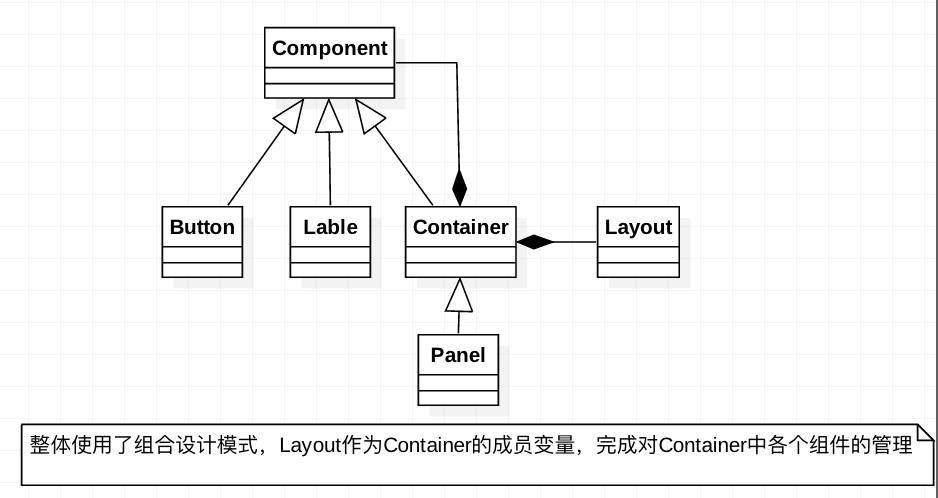
图1 Swing的基本结构(对应着Eclipse的图形界面

注意点:

1. **这个结果图也就说明了操作的步骤**
    1. 首先创建一个Container
    2. 然后给Container添加一个Layout
    3. 然后给Container中添加各种Componet
    4. 给Component添加监听
    5. 写监听处理
注: 在刚刚创建的JFrame中已经有一个Panel容器,并且设置为BorderLayout
2. **规律总结:**
    1. 这就像html一层一层的铺
    2. 动手之前就要从底层一直考虑到顶层,想好了再动手
    3. 要起好变量名字

具体知识点

1. 布局管理器(Layout)的理解
    1. 为了使我们生成的图形用户界面具有良好的**平台无关性**
    2. Java 语言中,提供了布局管理器这个工具来管理组件在容器中的布局
    3. 而**不使用直接**设置组件**位置**和**大小**的方式。
    4. **每个容器**都有一个布局管理器
    5. 当容器需要对某个组件迚行定 位戒判断其大小尺寸时,就会调用其对应的布局管理器。
2. 组件定位的两种方式
    1. 通过**布局管理器**自动
    2. 也可以取消布局管理器的作用,收到设置componet
        1. setLocation()
        2. setSize()
        3. setBounds()
3. 认识几个重要的方法
    1. f.setLayout(null);  取消布局管理器
    2. f.setVisible(true);默认为不可见的
4. 容器的分类
    1. 顶级容器
        1. JFrame此窗口带有边框、 标题、用于关闭和最小化窗口的图标等
        2. JDialog:用于对话框的类。
        3. JApplet:用于使用 Swing 组件的 Java Applet 的类。
    2. 中间容器
        1. JPanel:最灵活、最常用的中间容器。
        2. JScrollPane:与 JPanel 类似,但还可在大的组件或可扩展组件周围提供滚动条。
        3. JTabbedPane:包含多个组件,但一次只显示一个组 件。用户可在组件之间方便地切换。
        4. JToolBar:按行或列排列一组组件(通常是按钮)。
5. panel容器
    1. **Panel无法单独显示**,必须添加到某个容器中
    2.  Panel的缺省布局管理器为**FlowLayout**。
    3. 当把Panel作为一个组件添加到某个容器中后,该Panel仍然可以有自己 的布局管理器。因此,可以利用Panel使得BorderLayout中某个区域显 示多个组件。
6. frame容器
    1. Frame是一个顶级窗口
    2. Frame的缺省布局管理器为**BorderLayout**
7. JLable
    1. JLabel(Icon icon):icon表示使用的图标
    2. JLabel(String text,Icon icon,int align):text表 示使用的字符串; icon表示使用的图标;align表示水平 对齐方式,其值可以为:LEFT、RIGHT、CENTER。
1
2
ImageIcon icon = new ImageIcon("Calv.gif");
JLabel calv_label=newJLabel("这是 Calvin", icon, SwingConstants.LEFT);

事件

写监听的三种方式:

  1. 第一种:
    1. Jframe子类实现ActionListener接口
    2. 注册监听
    3. 实现actionPerformed()方法,
  2. 第二种
    1. 在注册监听的时候,写内部类(new ActionListener(){})
    2. 实现内部类中actionPerformed()方法。
  3. 第三种
    1. 单独写一个继承自ActionListener的内部类
      1. class Monitor implements ActionListener{}
    2. 主方法中声明对象
      1. Monitor bh = new Monitor();
    3. 注册监听
      1. b.addActionListener(bh);注册监听器

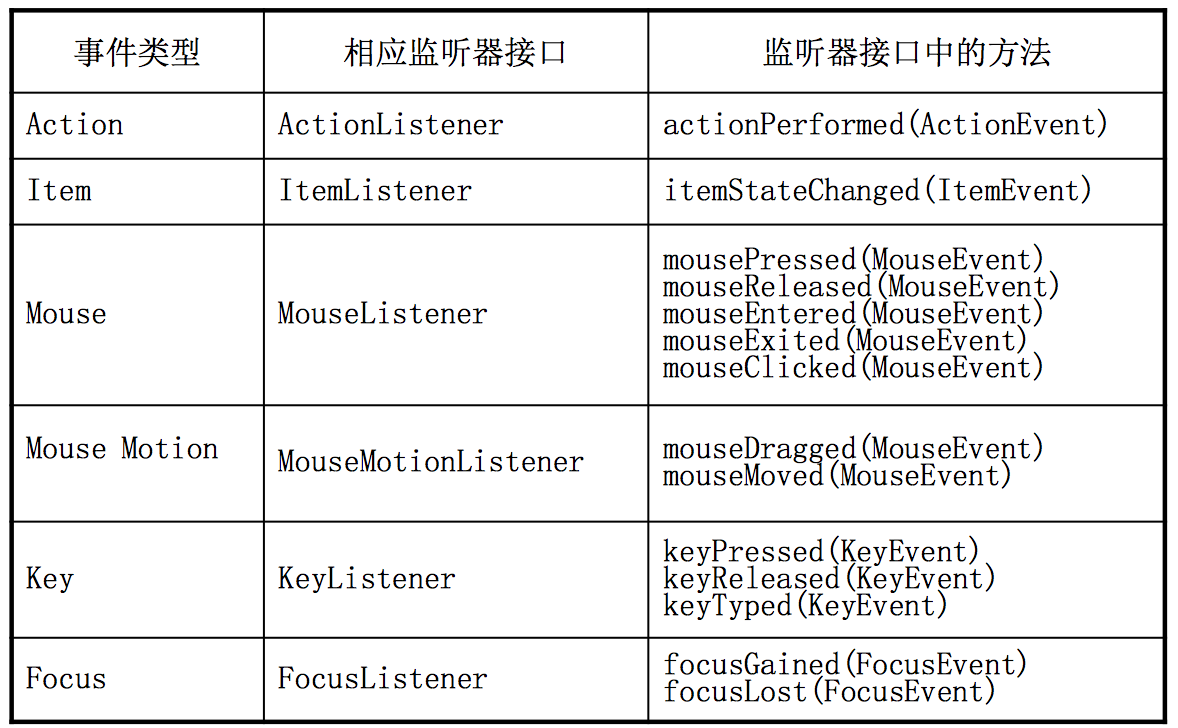
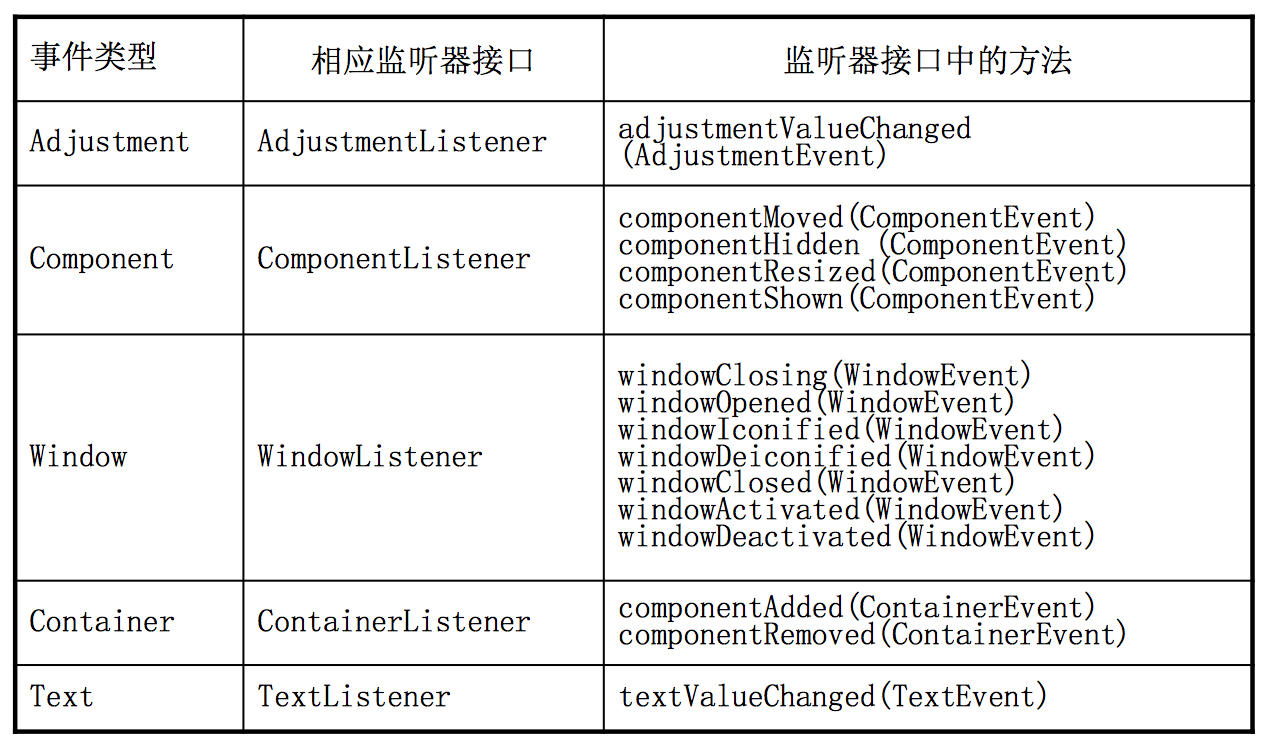
有哪些监听接口和接口对应的方法


图2

图3

例子

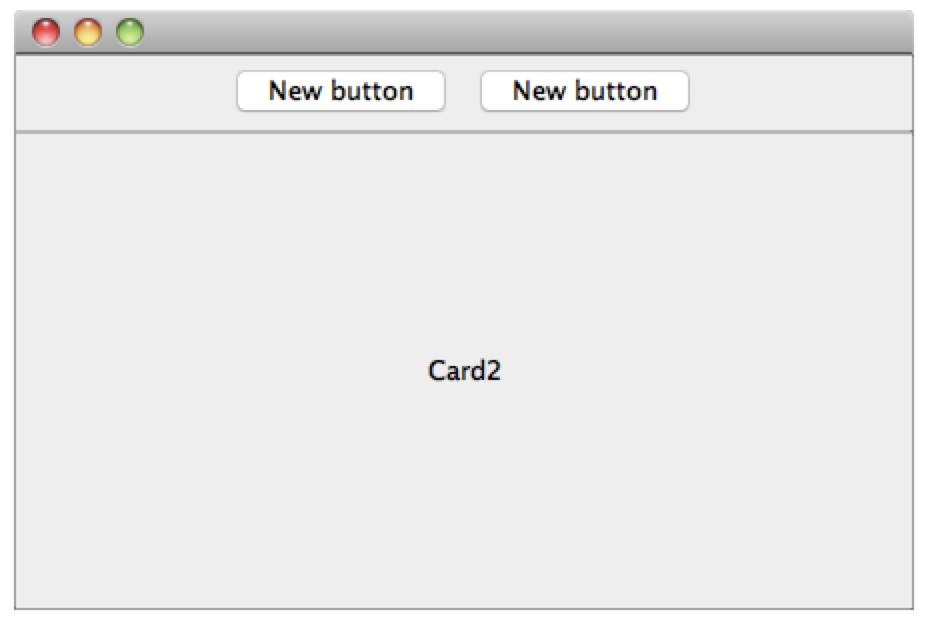
卡片切换


图4 效果图

1
2
3
4
5
6
7
8
9
10
11
12
13
14
15
16
17
18
19
20
21
22
23
24
25
26
27
28
29
30
31
32
33
34
35
36
37
38
39
40
41
42
43
44
45
46
47
48
49
50
51
52
53
54
55
56
57
58
59
60
61
62
63
64
65
66
67
68
69
70
71
72
73
74
75
76
77
78
79
80
81
82
83
84
85
86
87
88
89
90
91
92
93
package package1;

import java.awt.BorderLayout;
import java.awt.EventQueue;

import javax.swing.JFrame;
import javax.swing.JPanel;
import javax.swing.border.EmptyBorder;
import java.awt.CardLayout;
import javax.swing.JLabel;
import javax.swing.SwingConstants;
import javax.swing.JTabbedPane;
import java.awt.FlowLayout;
import javax.swing.JButton;
import javax.swing.JTextField;
import java.awt.GridLayout;
import java.awt.event.ActionEvent;
import java.awt.event.ActionListener;

public class JframeTest extends JFrame {
private JTextField textField;
private CardLayout card = null;

/*
* Launch the application.
*/
public static void main(String[] args) {
EventQueue.invokeLater(new Runnable() {
public void run() {
try {
JframeTest frame = new JframeTest();
frame.setVisible(true);
} catch (Exception e) {
e.printStackTrace();
}
}
});
}

/*
* Create the frame.
*/
public JframeTest() {


setDefaultCloseOperation(JFrame.EXIT_ON_CLOSE);
setBounds(100, 100, 450, 300);

JPanel panel = new JPanel();
getContentPane().add(panel, BorderLayout.NORTH);

JButton btnNewButton = new JButton("New button");
panel.add(btnNewButton);

JButton btnNewButton_1 = new JButton("New button");
panel.add(btnNewButton_1);

JPanel panel_1 = new JPanel();
getContentPane().add(panel_1, BorderLayout.CENTER);

card=new CardLayout(0, 0);
panel_1.setLayout(card);

JLabel lblCard = new JLabel("Card2");
lblCard.setHorizontalAlignment(SwingConstants.CENTER);
panel_1.add(lblCard, "name_2407873724218434");

JLabel lblNewLabel = new JLabel("card1");
lblNewLabel.setHorizontalAlignment(SwingConstants.CENTER);
panel_1.add(lblNewLabel, "name_2407873736860429");


btnNewButton.addActionListener(new ActionListener() {

@Override
public void actionPerformed(ActionEvent e) {
// TODO Auto-generated method stub
card.first(panel_1);
}
});

btnNewButton_1.addActionListener(new ActionListener() {

@Override
public void actionPerformed(ActionEvent e) {
// TODO Auto-generated method stub
card.last(panel_1);
}
});

}

}

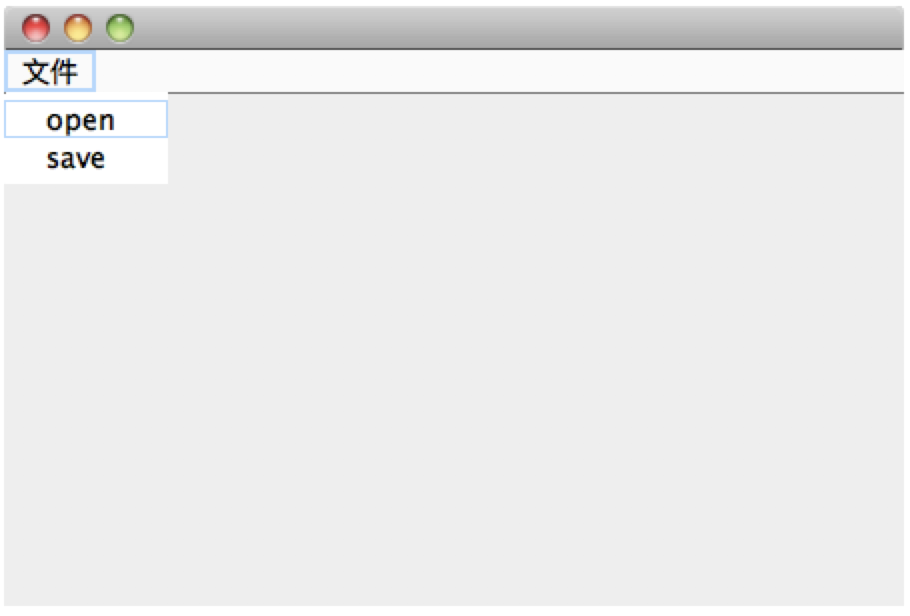
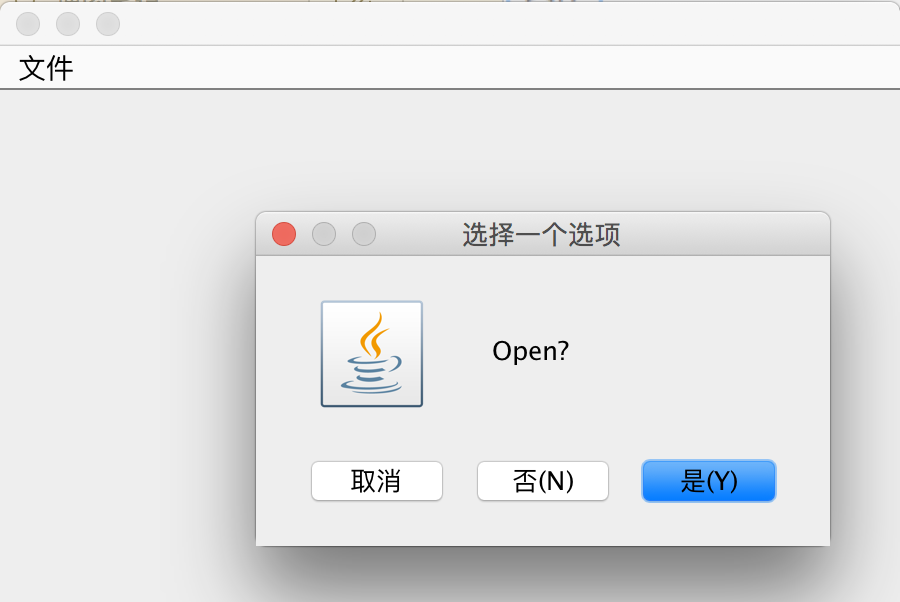
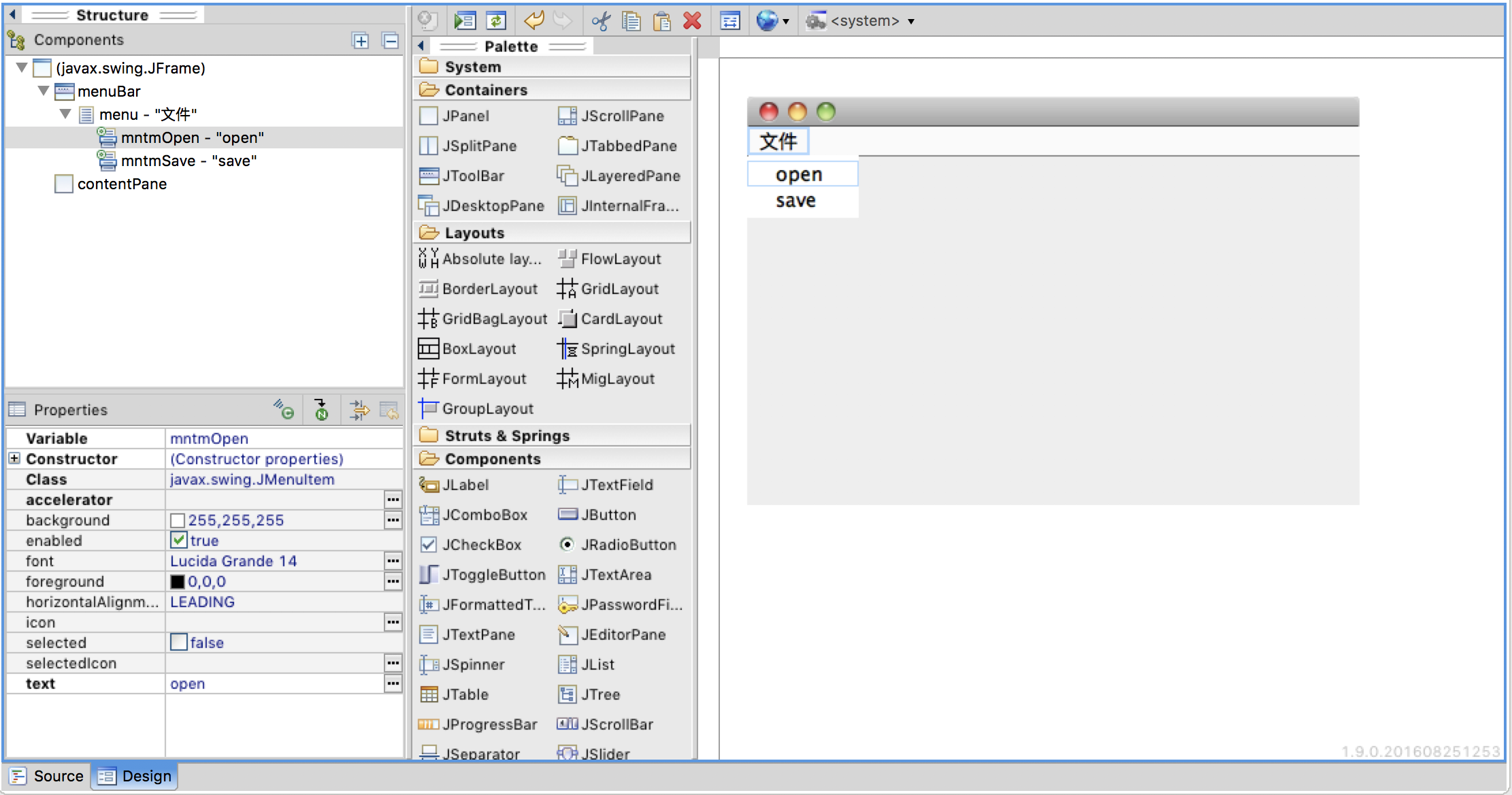
菜单栏


效果图5

效果图6

1
2
3
4
5
6
7
8
9
10
11
12
13
14
15
16
17
18
19
20
21
22
23
24
25
26
27
28
29
30
31
32
33
34
35
36
37
38
39
40
41
42
43
44
45
46
47
48
49
50
51
52
53
54
55
56
57
58
59
60
61
62
63
64
65
66
67
68
69
70
71
72
73
74
75
76
77
package package1;

import java.awt.BorderLayout;
import java.awt.EventQueue;
import java.awt.event.ActionEvent;
import java.awt.event.ActionListener;

import javax.swing.JFrame;
import javax.swing.JPanel;
import javax.swing.border.EmptyBorder;
import javax.swing.JMenuBar;
import javax.swing.JMenu;
import javax.swing.JMenuItem;
import javax.swing.JOptionPane;

public class Frame1 extends JFrame implements ActionListener{

private JPanel contentPane;
private JMenuItem mntmOpen;
private JMenuItem mntmSave;

/*
* Launch the application.
*/
public static void main(String[] args) {
EventQueue.invokeLater(new Runnable() {
public void run() {
try {
Frame1 frame = new Frame1();
frame.setVisible(true);
} catch (Exception e) {
e.printStackTrace();
}
}
});
}

/*
* Create the frame.
*/
public Frame1() {
setDefaultCloseOperation(JFrame.EXIT_ON_CLOSE);
setBounds(100, 100, 450, 300);

JMenuBar menuBar = new JMenuBar();
setJMenuBar(menuBar);

JMenu menu = new JMenu("\u6587\u4EF6");
menuBar.add(menu);

mntmOpen = new JMenuItem("open");
menu.add(mntmOpen);

mntmSave = new JMenuItem("save");
menu.add(mntmSave);

mntmOpen.addActionListener(this);
mntmSave.addActionListener(this);

contentPane = new JPanel();
contentPane.setBorder(new EmptyBorder(5, 5, 5, 5));
contentPane.setLayout(new BorderLayout(0, 0));
setContentPane(contentPane);
}

@Override
public void actionPerformed(ActionEvent e) {
if(e.getSource() == mntmOpen){
JOptionPane.showConfirmDialog(null, "Open?");
}
if(e.getSource() == mntmSave){
JOptionPane.showConfirmDialog(null, "Save?");
}

}

}

附:eclipse的插件截图

2017年7月5日 下午2:38

2019年3月29日 下午2:04 复习

三种分类

创建型:创建类和对象
结构模式:有利于在原先的程序基础上进行改进
行为模式:模拟人类世界的各种复杂的关系

六个原则

一天一个设计模式—分类与六大原则 - Devil的技术小屋 - 博客频道 - CSDN.NET

  1. 开闭原则:
    1. 对扩展开放,对修改关闭
    2. 为了达到这样的效果,我们需要使用接口和抽象类
  2. 里氏代换原则:LSP
  3. 依赖倒转:
    1. 针对接口编程,依赖于抽象不依赖于具体
  4. 接口隔离原则:
    1. 使用多个隔离的接口,比使用单个接口要好。还可以降低类之间的耦合度的意思
  5. 吉米特法则:(最少知道原则)
    1. 一个实体应当尽量减少和其他实体放生相互作用
  6. 合成复用原则:
    1. 使用合成/聚合模式

单例模式:

  1. 一个类有且仅有一个实例,并且自行实例化向整个系统提供
  2. 多线程不能访问

两种写法:

1
2
3
4
5
6
7
8
9
10
11
12
13
14
15
16
17
18
19
/*
* 懒汉式
* @author czh
*
*/
public class SingleClass {
private static SingleClass single = null;
//私有构造方法
private SingleClass(){

}
//静态方法生成对象
public static SingleClass getInstance(){
if(single == null){
single = new SingleClass();
}
return single;
}
}
1
2
3
4
5
6
7
8
9
10
11
12
13
14
15
16
17
18
/*
* 饿汉式
* @author czh
*
*/
public class SingleClass {
//这里直接声明对象
private static SingleClass single = new SingleClass();
//私有构造方法
private SingleClass(){

}
//静态方法生成对象
public static SingleClass getInstance(){
return single;
}

}

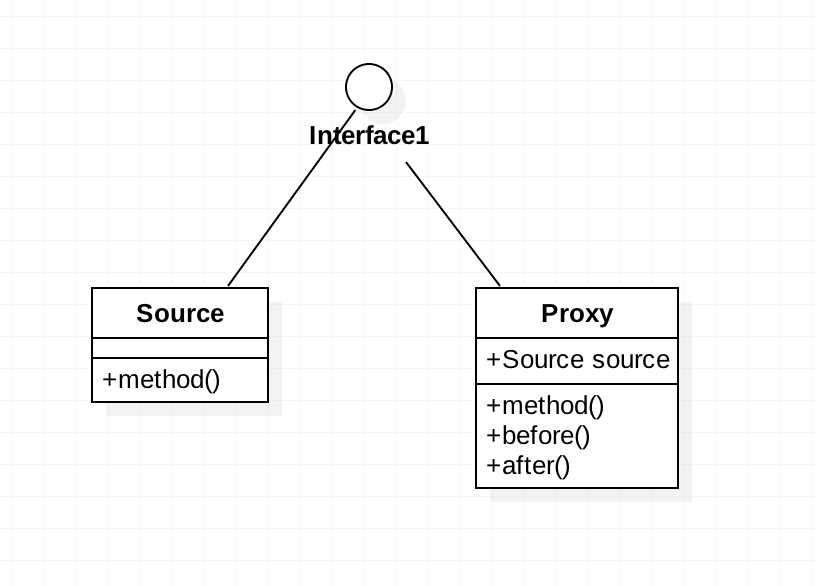
代理模式

使用场景:
1. 修改原有的的方法来适应。这样违反了“开闭”原则
2. 就是采用一个代理类调用原有的方法,且对产生的结果进行控制。这种方法就是代理模式。
3. 估计将来要对方法进行改写,那么就提前使用代理模式
4. 用接口的原因
1. 为了保证方法的相同,方便客户端更方便的切换到代理类中
5. 与装饰模式的区别
1. 装饰类是对的扩展
2. 代理模式是对方法的扩展

图1 代理模式
代码在后

适配器模式

1. 主要分为三类:
    1. 类的适配器模式、
    2. 对象的适配器模式、
    3. 接口的适配器模式。
2. **对类的扩充**:当一个类需要满足是一个新的接口
3. **对对象的扩充**:当一个对象需要满足一个新的接口
4. **对接口的缩小**:当一个类需要满足部分当前接口的方法


图2 对类的扩充
注:
1. 这里是继承。
2. method1()继承自Source,method2()继承与Targetble接口
3. Adapter继承来的method1(),可以充当接口中的method1()

注:
1. 这里是依赖。
2. adapter中的Method1()调用source的method1()

注:
1. 这里是有一个抽象类Wrapper,起一个过滤作用

代码在后

几个问题

为啥组合优于继承

  1. 首先要确认,组合可以完成继承的任务
  2. 但是组合可以通过包含多个对象扩充自己的功能
  3. 而继承,只能获得父类的功能,要想扩充得自己写

怎样面向接口编程

  1. 接口可以理解成规则
  2. 一个公司有了规则,大家才能按一致的目标前进
  3. 试想没有规则,按大家的默契,也可以完成同样的目的
  4. 但是,默契容易忘,公司有了新的员工,或者我离开公司久了(我代码好久没有看了)
  5. 那么我一看规则(接口),那么就可以很快的学会。

站在扩充的角度去分类设计模式

  1. 适配器模式+代理模式+装饰模式
  2. 这三种都是可以在代码本身的基础进行扩充的
  3. 所以:当当前代码需要扩种的时候要从这三种里选

注:其他模式的分类,我依然是按上一篇文章给开头的分类表分的,网上的好多分类方法我现在还理解不了,只能按自己的来了。

代码

代理模式

Proxy.java

1
2
3
4
5
6
7
8
9
10
11
12
13
14
15
16
17
18
19
20
21
22
23
24
25
26
package package4;

public class Proxy implements Sourceable{
private Source source;

public Proxy(Source source) {
super();
this.source = source;
}

@Override
public void method() {
before();
source.method();
after();
}

public void before(){
System.out.println("前面的准备");
}

public void after(){
System.out.println("后面的处理");
}

}

Source.java

1
2
3
4
5
6
7
8
9
10
11
package package4;

public class Source implements Sourceable{

@Override
public void method() {
// TODO Auto-generated method stub
System.out.println("Source 的方法执行");
}

}

Sourceable.java

1
2
3
4
5
package package4;

public interface Sourceable {
void method();
}

适配器模式

  1. 对类的扩充+对对象的扩充
    Source.java(adapt1.java+adapt2.java公用)
    1
    2
    3
    4
    5
    6
    7
    package package5;
    //原类
    public class Source {
    public void method1(){
    System.out.println("method1");
    }
    }
    TargetInterface.java(adapt1.java+adapt2.java公用)
    1
    2
    3
    4
    5
    6
    package package5;

    public interface TargetInterface {
    void method1();
    void mehtod2();
    }

Adapt1.java:

1
2
3
4
5
6
7
8
9
10
11
package package5;

public class Adapt1 extends Source implements TargetInterface {

@Override
public void mehtod2() {
// TODO Auto-generated method stub
System.out.println("method2");
}

}

Adapt2.java:

1
2
3
4
5
6
7
8
9
10
11
12
13
14
15
16
17
18
19
20
21
22
23
24
package package5;
//第二种适配器
public class Adapt2 implements TargetInterface {
private Source source;

public Adapt2(Source source) {
super();
source = source;
}

@Override
public void mehtod2() {
// TODO Auto-generated method stub

}

@Override
public void method1() {
source.method1();

}
}

}

2019年3月29日 下午2:02 添加

  1. 模式1和模式2最大的不同在于adapt2.java有:

    1. private Source Source;//这句是最大的不同
  2. 但是目的是相同是:用新建的adapt类来代替原先的soures原始类,给source类添加一个method2()的方法。

    1. 注意:已经写死的类source本身不论如何都无法添加method2()了,我们只能让他的适配器adapt去实现这个愿望了
  3. 对接口方法的过滤
    代码顺序按照UML图
    SourceInterface.java

    1
    2
    3
    4
    5
    6
    7
    package package5;

    public interface SourceInterface {
    void method1();
    void method2();
    void method3();
    }

    AbstractSource.java

    1
    2
    3
    4
    5
    6
    7
    8
    9
    10
    11
    12
    13
    14
    15
    16
    17
    18
    19
    20
    21
    22
    package package5;

    public abstract class AbstractSource implements SourceInterface {

    @Override
    public void method1() {
    System.out.println("method1");

    }

    @Override
    public void method2() {
    System.out.println("method2");

    }

    @Override
    public void method3() {
    System.out.println("method3");
    }

    }

    Source1.java

    1
    2
    3
    4
    5
    6
    7
    8
    9
    10
    11
    12
    package package5;
    /*
    * 我需要那个方法,我就实现那个方法
    * 原来直接implement接口,三个方法我必须都实现。
    */
    public class Source1 extends AbstractSource {

    @Override
    public void method1(){
    System.out.println("改写method1方法");
    }
    }