2019年11月10日 下午9:42
- 挂起这个程序
ctrl-z- 可以看到系统的提示:[1]+ Stopped _root_bin/rsync.sh
- 然后我们可以吧程序调度到后台执行:
bg 1- (bg 作业号)
- [1]+ _root_bin/rsync.sh &
- 用jobs命令查看任务
jobs- [1]+ Running _root_bin/rsync.sh &
- 把它调回到控制台运行
fg 1- _root_bin/rsync.sh
- 这样,你这控制台上就只有等待这个任务完成了。
2019年11月10日 下午9:42
ctrl-zbg 1jobsfg 12019年11月9日 下午4:20
Ubuntu16.04中查看硬盘的型号和读取速度 - Ranxf - 博客园
du -h --max-depth=1df -H查看磁盘IO负载 - 看哪些进程在读写磁盘 - 小轱辘 - 博客园
watch -n 1 lsof -u czh18 /dev/md1262019年11月9日 下午3:45
视觉目标跟踪DaSiamRPN - 简书
DASiamRPN阅读笔记:Distractor-aware Siamese Networks for Visual Object Tracking
2019年7月29日 下午12:17
SiamRPN系列文章串讲
2019年6月5日 上午12:27
SiamFC算法改进思路 | WorldHellooo’s Blog
自动化所:朱政,DaSiamRPN一作
SiamRPN系列文章 - 知乎
Zheng Zhu (朱政)
论文地址: https://arxiv.org/abs/1606.09549
项目地址: https://www.robots.ox.ac.uk/~luca/siamese-fc.html
tf实现: https://github.com/torrvision/siamfc-tf
pytorch实现: https://github.com/rafellerc/Pytorch-SiamFC
朱政分析:SiamFC文章,对SINT(Siamese Instance Search for Tracking,in CVPR2016)改进,第一个提出用全卷积孪生网络结构来解决tracking问题的paper,可以视为只有一个anchor的SiamRPN
重点描述:
1 | Learning to track arbitrary objects can be addressed using similarity learning. We propose to learn a function f(z, x) that compares an exemplar image z to a candidate image x of the 【same size】 and returns a high score if the two images depict the same object and a low score otherwise. To find the position of the object in a new image, we can then exhaustively test 【all possible locations】 and choose the candidate with the maximum similarity to the past appearance of the object. In experiments, we will simply use the 【initial appearance】 of the object as the exemplar. The function f will be learnt from a dataset of videos with labelled object trajectories |
论文地址: http://openaccess.thecvf.com/content_cvpr_2018/papers/Li_High_Performance_Visual_CVPR_2018_paper.pdf
项目地址: http://bo-li.info/SiamRPN/
朱政分析: SiamRPN文章,将anchor应用在候选区域的每个位置,同时进行分类和回归,one-shot local detection。
::我分析:这篇论文把FastR-CC中的RPN和SiamFC中的孪生相似性度量网络放在了一起::,这么一分析顶会的思想简单的要死
* 现在反过头来看这句话,当时真实天真!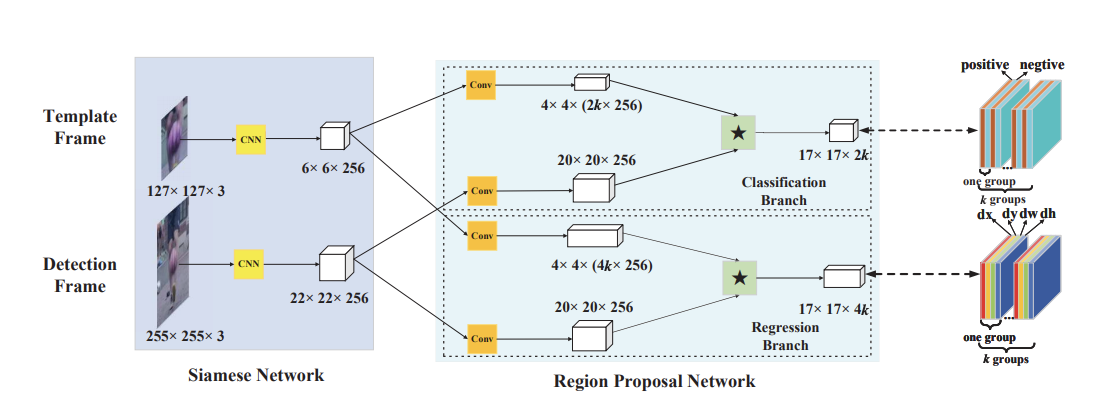
2019年11月8日 下午5:33
Python:pandas DataFrame取多列的方法
2018年1月8日 下午5:33
1 | from pandas import DataFrame, Series, read_csv |
2019年11月4日 下午6:39
Linux 查看某个用户的进程
top -U [USERNAME]
pwdx 31996
2019年9月11日 下午12:24
Linux下查看CPU使用率的命令 - 简书
使用top命令分析linux系统性能的详解_Linux_脚本之家 非常详细的讲解参数和输出简写
第一行是任务队列信息,跟 uptime 命令的执行结果类同,具体参数说明如下:
第二行,Tasks — 任务(进程),具体信息说明如下:
第三行,cpu状态信息,具体属性说明如下:
2019年11月1日 下午6:27
Linux中的定时自动执行功能(at,crontab) - 疯子110 - 博客园
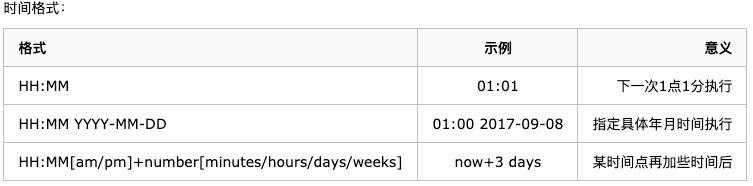
atqatrm 堆栈号1 | at now+3minutes |
2019年11月1日 下午5:39
实现自动化测试深度学习训练出来的模型
chmod 777 *.sh1 | !/bin/bash |
1 | !/home/chenzhiheng18/installed/bin/expect |
2019年11月1日 下午5:38
linux vi & vim 插入 删除 修改 文本 - 数据之美的博客 - CSDN博客
Vim使用技巧:撤销与恢复撤销 - wallace-lai - 博客园
撤销:u
恢复撤销:Ctrl + r
vim选中字符复制/剪切/粘贴 - 飞雪安能住酒中 - 博客园ctrl + v + hjkl
Shift+ v 使用可视化模式,也可以配合光标移动键选择文本。:%s/XXX/YYY/g 全局替换:s/p1/p2/g: 将当前行中所有p1均用p2替代 :n1,n2s/p1/p2/g: 将第n1至n2行中所有p1均用p2替代Shift+ v 使用可视化模式,也可以配合光标移动键选择文本。 set nusyntax on打开语法高亮。set encoding=utf-8 设置编码set autoindentset shiftwidth=4set expandtabset softtabstop=2Tab 转为多少个空格set relativenumberset cursorline光标所在的当前行高亮。set textwidth=80 设置行宽,即一行显示多少个字符。set ruler在状态栏显示光标的当前位置(位于哪一行哪一列)set showmatch set hlsearch搜索时,高亮显示匹配结果。set incsearchset ignorecaseset smartcaseset spell spelllang=en_us打开英语单词的拼写检查。set nobackupset noswapfileset undofile1 | set backupdir=~/.vim/.backup// |
set autoread2019年11月1日 下午4:33
START_EPOCH: 10RESUME: snapshot/checkpoint_e10.pth2019年11月1日 下午4:30
tar xvJf ****.tar.xz解压文件报错:tar: Error is not recoverable: exiting now
tar -xvf 不要加z参数unzip -d /mnt2/shanxi/PicFiles ‘/mnt2/shanxi/PicFile/*.zip’unzip ‘*.zip’tar -cvf test.tar ./test/ tar -zcvf test.tar.gz ./test/ tar -xzvf test.tar.gztar -xvf test.tar