0%

2018年3月1日 上午10:09

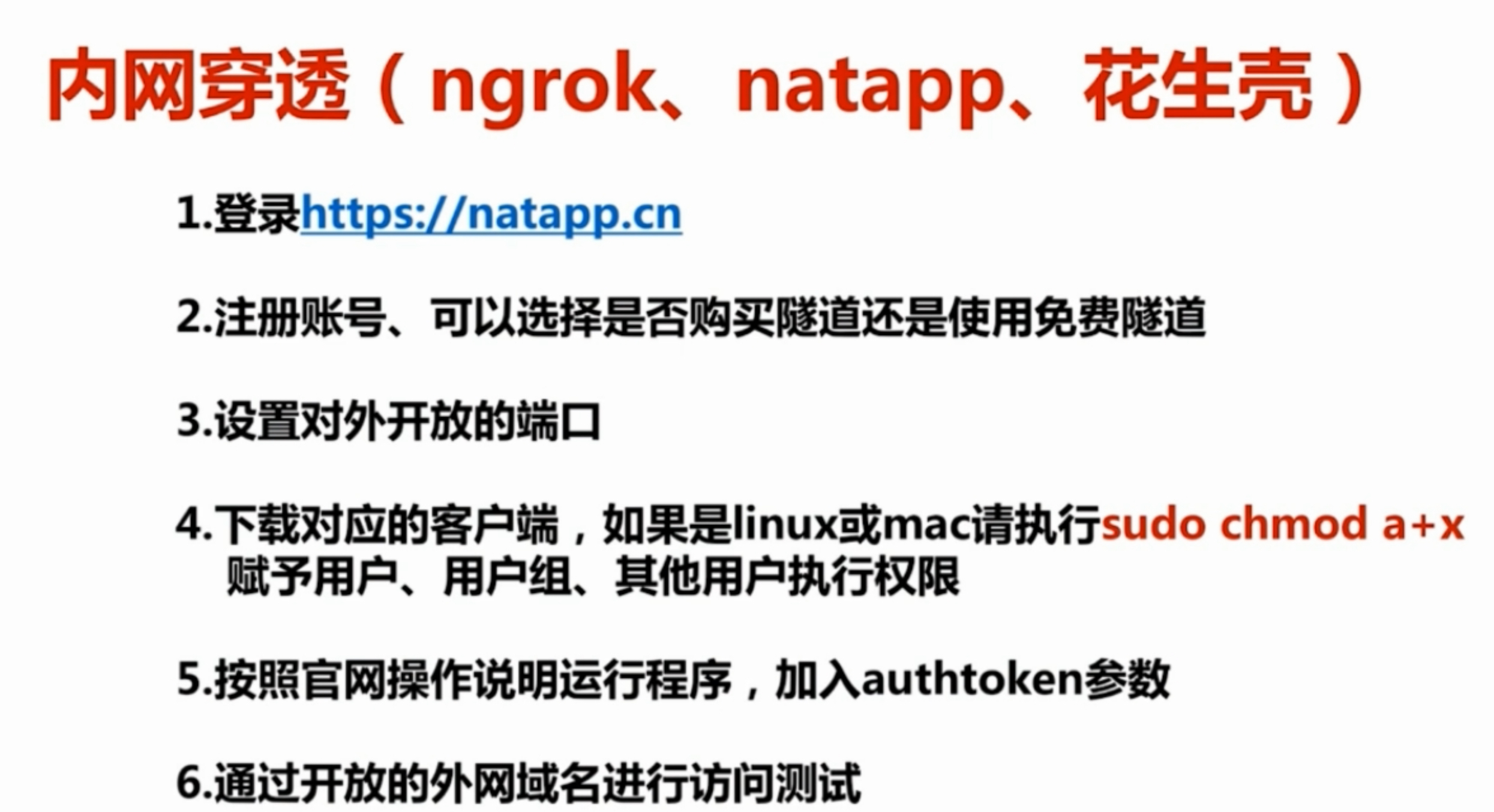
内网穿透(ngrok natapp 花生壳)

1. 先了解一些名词:
    1. [一分钟实现内网穿透(ngrok服务器搭建) - CSDN博客](http://blog.csdn.net/zhangguo5/article/details/77848658?utm_source=5ibc.net&utm_medium=referral)
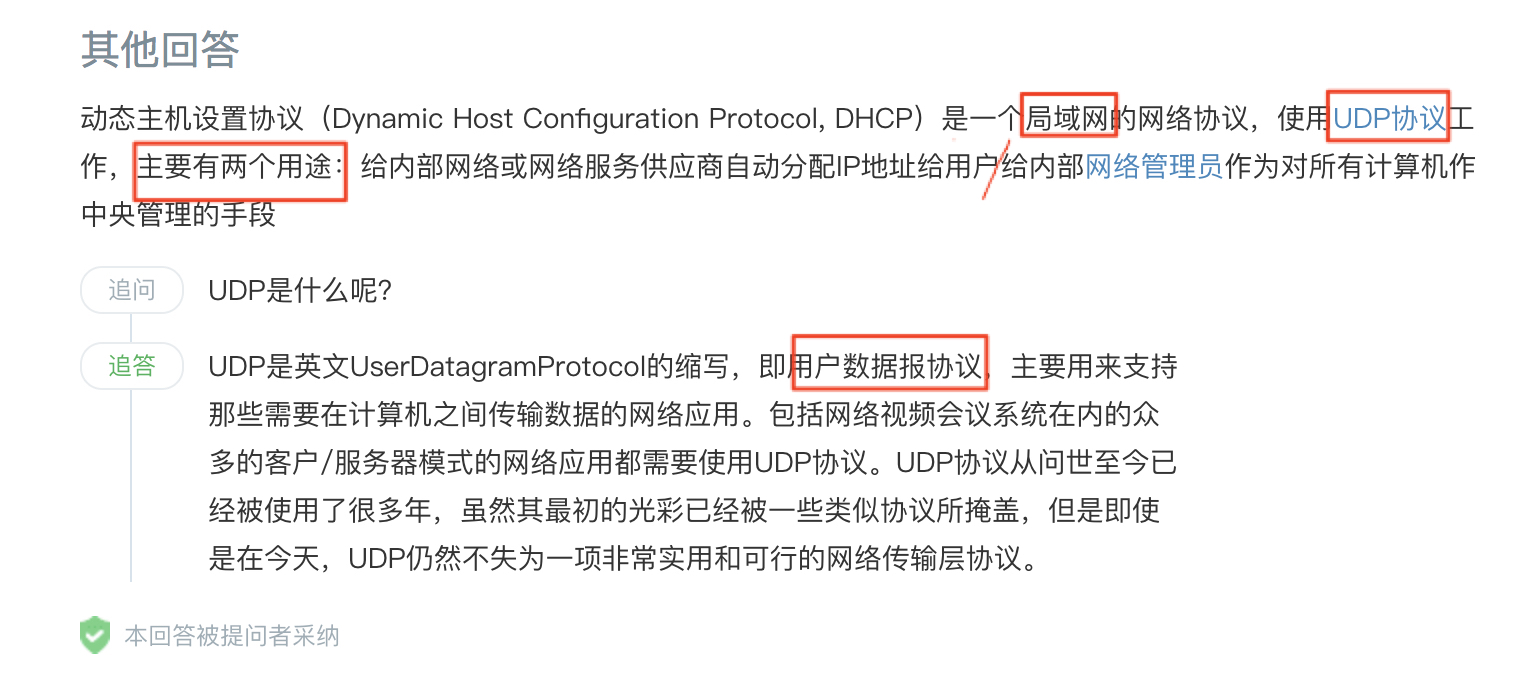
    2. [DHCP是什么?_百度知道](https://zhidao.baidu.com/question/266502733.html)


2. 理解内网穿透使用场景内网穿透怎么样让外网访问内网服务器和应用_百度经验

3. 项目中使用缘由:支付宝服务器执行的回调方法,这时会访问我们本地tomcat,目的是告诉我们一些信息,所以必要得要让支付宝服务器可以访问我们的本地机器中的tomcat但是我们知道两个不同局域网下的pc是不可以直接通讯的,这时就需要内网穿透,让支付宝服务器可以访问的到
4. natapp的作用有点像是我们已有域名和外网ip之后进行域名解析
5. 这其中最大的不同是:由于局域网nat模式,所有局域网下机器公用一个外部ip,一个ip对应n个pc主机,但是阿里服务器却是一个ip对应一个pc主机,所以能直接解析。所以我们内网穿透又叫做nat穿透,穿透路由器的nat层,从局域网中的众多的pc中找到正确的pc
6. NAT基本原理及应用 - commandow - 博客园
7. 我现在还弄不懂整个内网穿透的原理,就像vpn一样,但是最起码给了我以后检测我计算机网络知识的一个方法。
8. 【注意】:内网穿透这个功能并不是必须的,如果我们将项目发布在一个阿里云服务器上,这就不用的
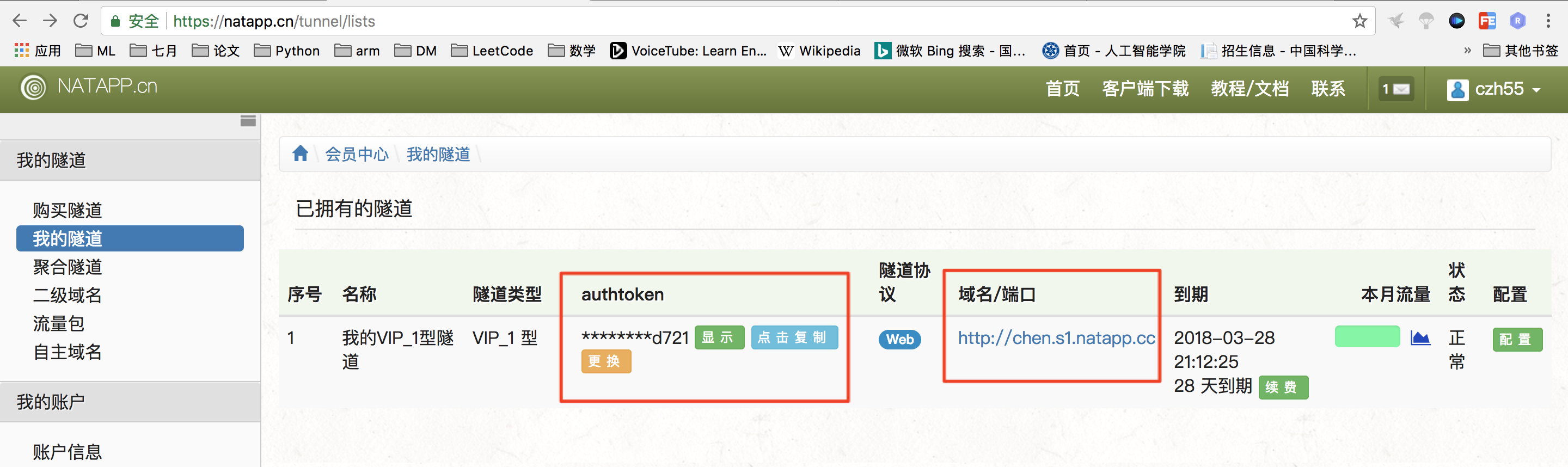
9. 我买的natapp.cn

9. 操作梗概:

2018年3月1日 上午10:08

远程debug:不需要服务器账户登录密码

  1. 操作流程:
    1. 保持远端代码版本和本地代码保持一致
      1. 这点就是最最重要的
      2. tomcat 开放远程调试端口 - 骑老虎放羊 - ITeye博客
    2. 执行sudo vim ${tomcat}_bin_catalina.sh
    3. 添加如下配置,其中的address为远程debug开放的端口
      1. CATALINA_OPTS="-server -Xdebug -Xnoagent -Djava.compiler=NONE -Xrunjdwp:transport=dt_socket,server=y,suspend=n,address=5005”
      2. 讲解参数:远程debug调试java代码 - Lawson - 博客园
    4. 把开放远程debug端口加到防火墙配置上去
      1. -A INPUT -p tcp -m tcp —dport 5005 -j ACCEPT
    5. 及时关闭开放的dubug端口

远程部署:需要服务器账户登录密码

  1. 参考文章:idea部署项目到远程tomcat - CSDN博客
    1. 这里验证了配置登录linux的账户信息

2018年3月1日 上午10:07

2018/3/27更新重要文章:

  1. 【intellij idea】Project Structure 讲解 - CSDN博客
    1. 【intellij idea】Project Structure 讲解 - hellozay - 博客园这个是原文
  2. IntelliJ IDEA 项目相关的几个重要概念介绍 - IntelliJ IDEA 使用教程 - 极客学院Wiki
  3. Migrating From Eclipse to IntelliJ IDEA - Help | IntelliJ IDEA
  4. 史上最简单的 IntelliJ IDEA 教程 - CSDN博客这个里面有各种文章

2018/4/2更新的文章

  1. tar包和jar包和war包的区别? - 知乎
  2. Intellij IDEA 修改项目名称 - 简书

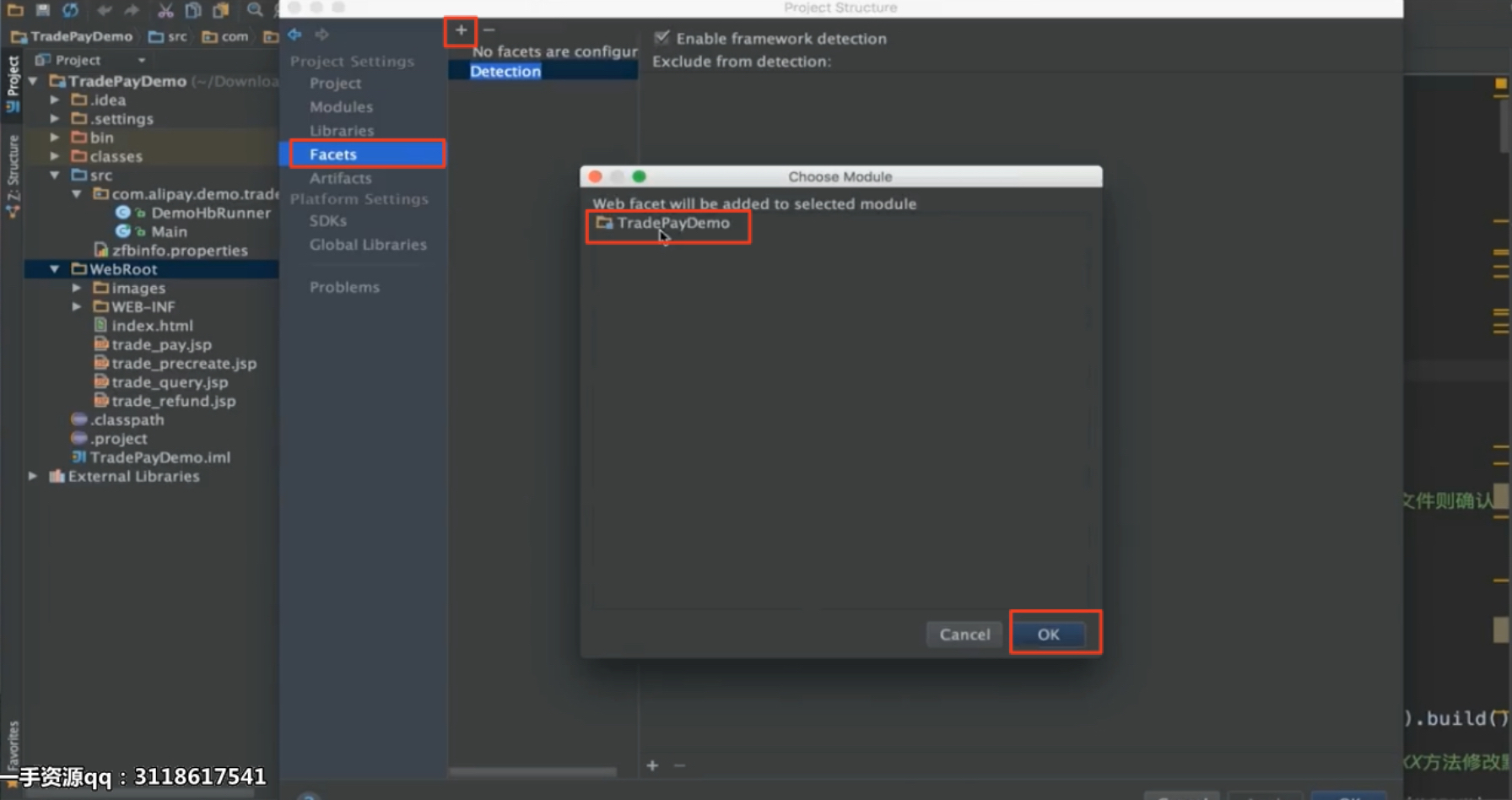
idea配置项目:module、Facets、Artifacts

  1. 参考链接
    1. idea报错:加载不到artifact。配置module和artifact - CSDN博客
    2. IDEA里面的facets和artifacts的讲解 - 祥福有梦想 - 博客园
  2. 总结:
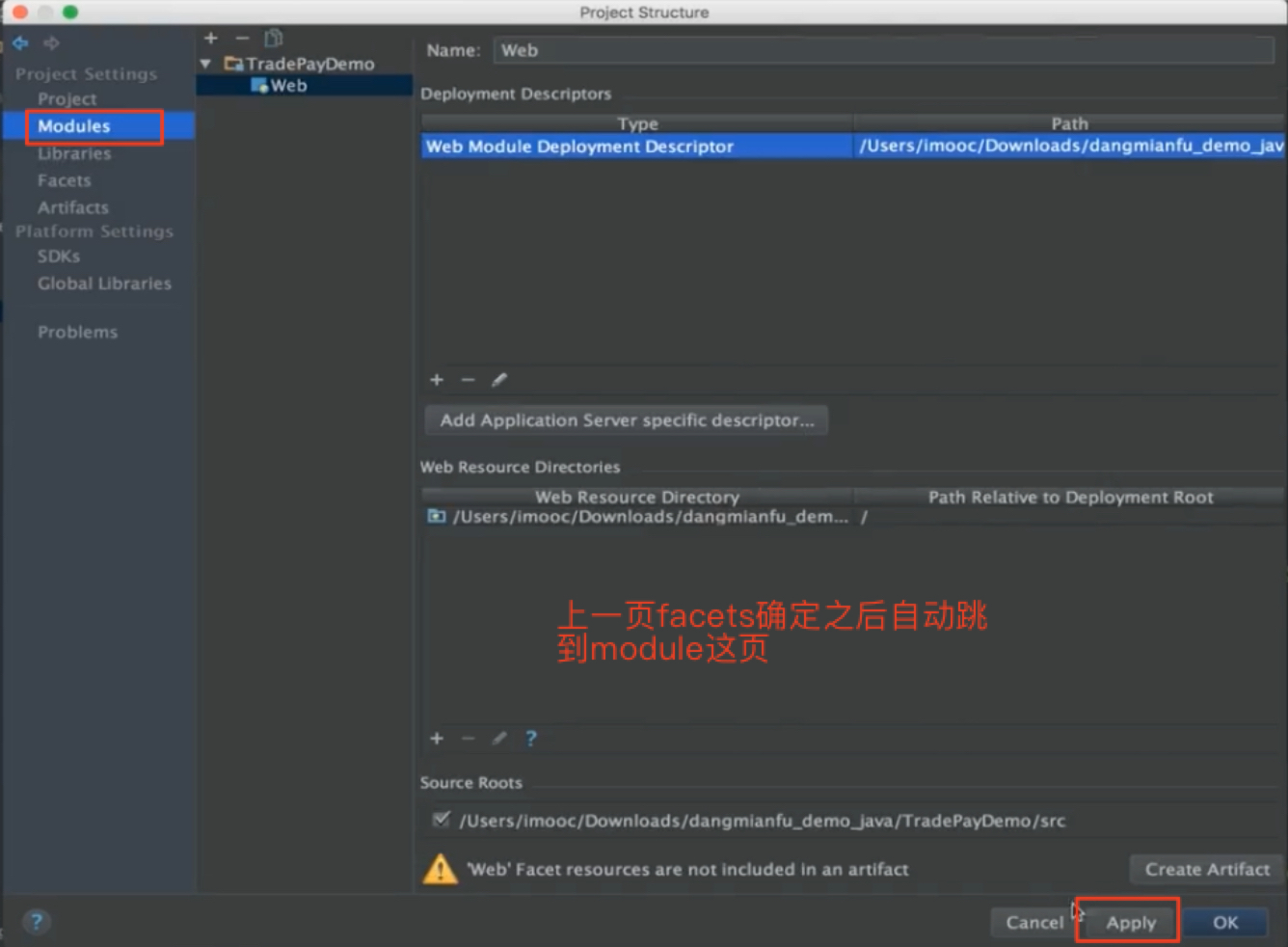
    1. 上面的文章配置了:module+facet+artifact这三个idea项目配置
    2. 为什么要配置:
      1. 无论配置module、Facets、Artifacts还是标记Content Root,都是Intellij IDEA要求我们这样做的,以便其能识别这些文件并整合各插件实现功能
      2. 我的的项目结构,名字,用途可能各不相同,这就得让idea知道当前这个到底是什么个情况。

idea中运行eclipse开发的项目

  1. 第一步:
  2. 第二步:

2018年2月27日 下午9:40

相关内容:

  1. 内网穿透
  2. 远程debug,远程部署
  3. idea配置2

学习的知识点

熟悉支付宝对接的核心文档,调通支付宝支付功能的官方Demo
解析支付宝SDK对接源码
RSA1和RSA2验证签名及加解密
避免支付宝重复通知和数据校验
natapp外网穿透和tomcat remote debug
生成二维码,并持久化到图片服务器

一些重要的官方文档

总文档:http://learning.happymmall.com/alipaydoc.html


沙箱登录:https://openhome.alipay.com/platform/appDaily.htm
沙箱环境使用说明:https://doc.open.alipay.com/doc2/detail.htm?treeId=200&articleId=105311&docType=1
如何使用沙箱环境:https://support.open.alipay.com/support/hotProblemDetail.htm?spm=a219a.7386793.0.0.uS5uZ6&id=251932&tagId=100248
当面付产品介绍:https://doc.open.alipay.com/docs/doc.htm?spm=a219a.7629140.0.0.hV5Clx&treeId=193&articleId=105072&docType=1
扫码支付接入指引:https://doc.open.alipay.com/docs/doc.htm?spm=a219a.7629140.0.0.Ia6Wqy&treeId=193&articleId=106078&docType=1
当面付快速接入:https://doc.open.alipay.com/docs/doc.htm?spm=a219a.7629140.0.0.bROnXf&treeId=193&articleId=105170&docType=1
当面付接入必读:https://doc.open.alipay.com/docs/doc.htm?spm=a219a.7629140.0.0.hV5Clx&treeId=193&articleId=105322&docType=1
当面付进阶功能:https://doc.open.alipay.com/docs/doc.htm?spm=a219a.7629140.0.0.YFmkxI&treeId=193&articleId=105190&docType=1
当面付异步通知-仅用于扫码支付:https://doc.open.alipay.com/docs/doc.htm?spm=a219a.7629140.0.0.BykVSR&treeId=193&articleId=103296&docType=1
当面付SDK&DEMO:https://support.open.alipay.com/docs/doc.htm?spm=a219a.7386797.0.0.k0rwWc&treeId=193&articleId=105201&docType=1
服务端SDK:https://doc.open.alipay.com/doc2/detail?treeId=54&articleId=103419&docType=1
生成RSA密钥:https://doc.open.alipay.com/docs/doc.htm?treeId=291&articleId=105971&docType=1
线上创建应用说明:https://doc.open.alipay.com/doc2/detail.htm?treeId=200&articleId=105310&docType=1#s0


支付宝扫码重要细节

  1. 主动轮训和回调的区别
  2. 避免单边账
  3. 同步请求的加签和验证签名
  4. 回调的验证
  5. 过虑重复通知
  6. 一定好验证并保证接受的异步通知是支付宝发出的
  7. 回调请求的放回

支付宝依赖的jar包:

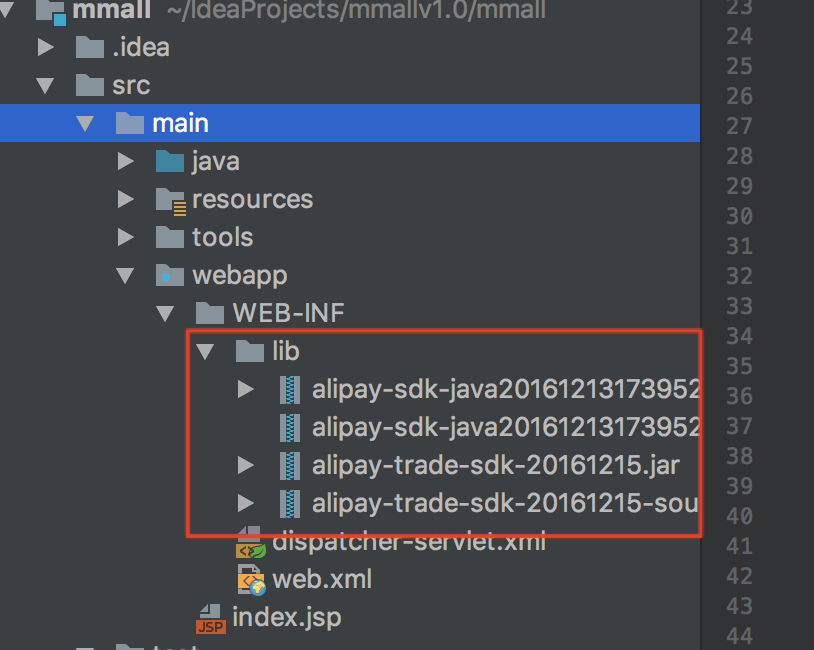
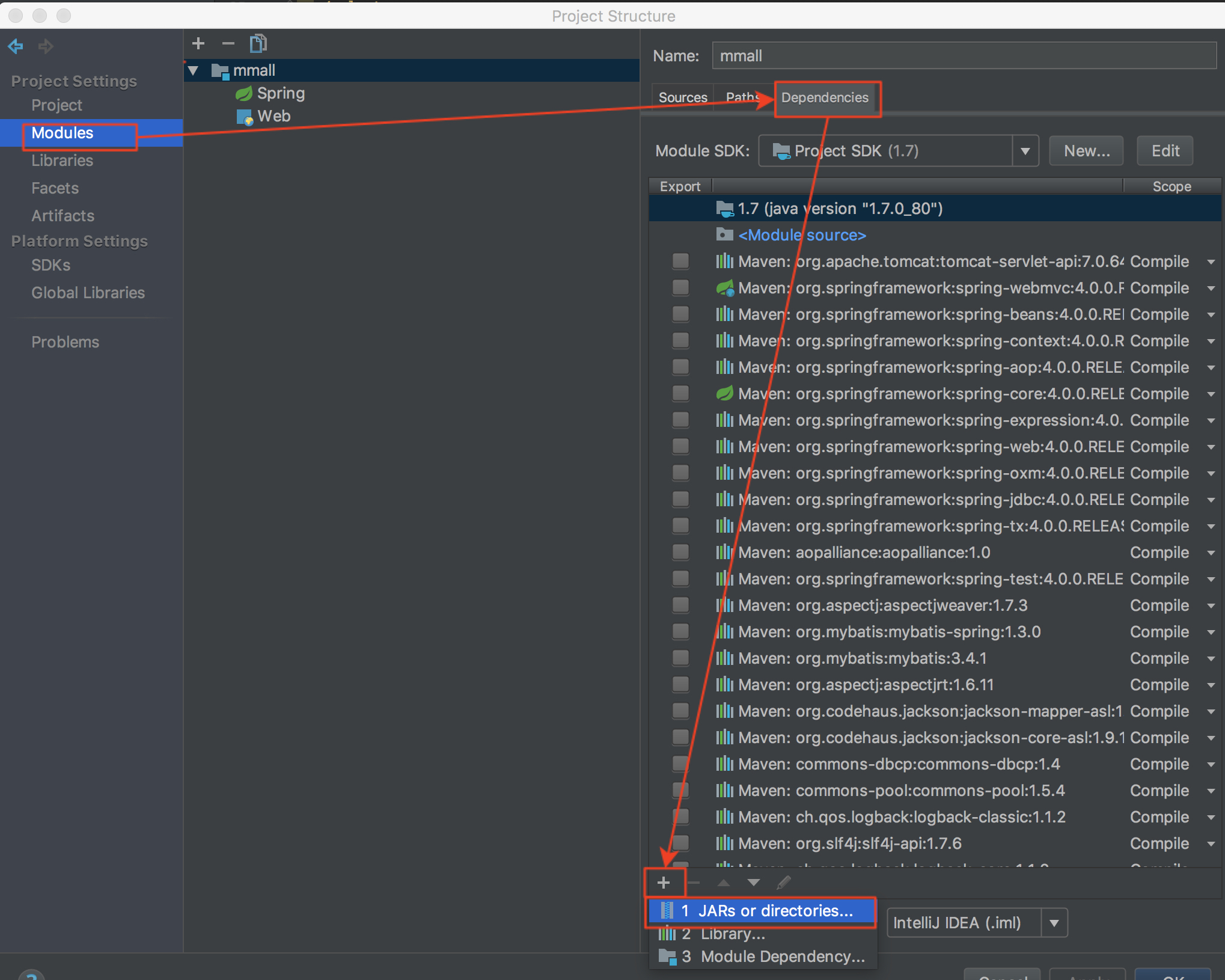
  1. 第一部分:否则会报红线错误❌
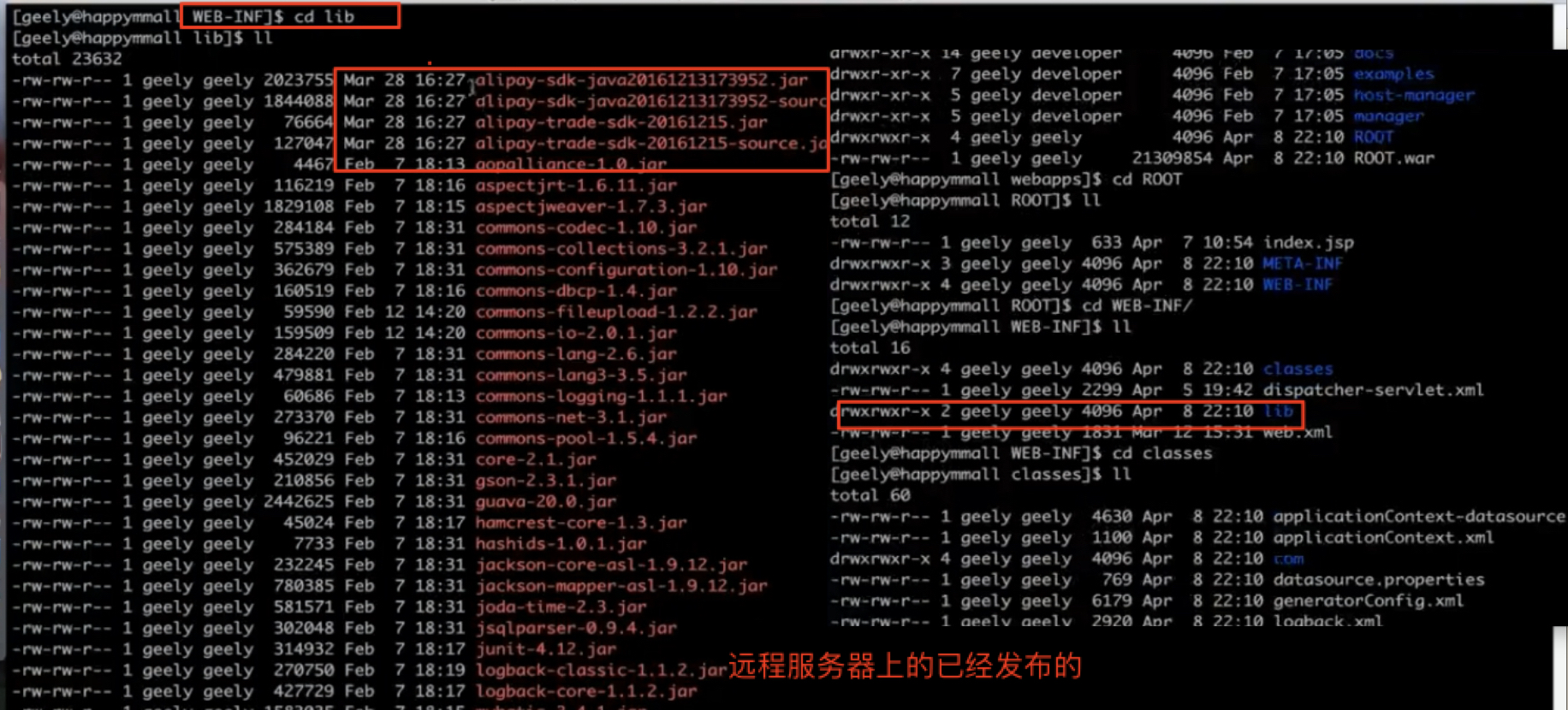
    1. 位置:webapp_WEB-INF_lib
    2. 添加方式:
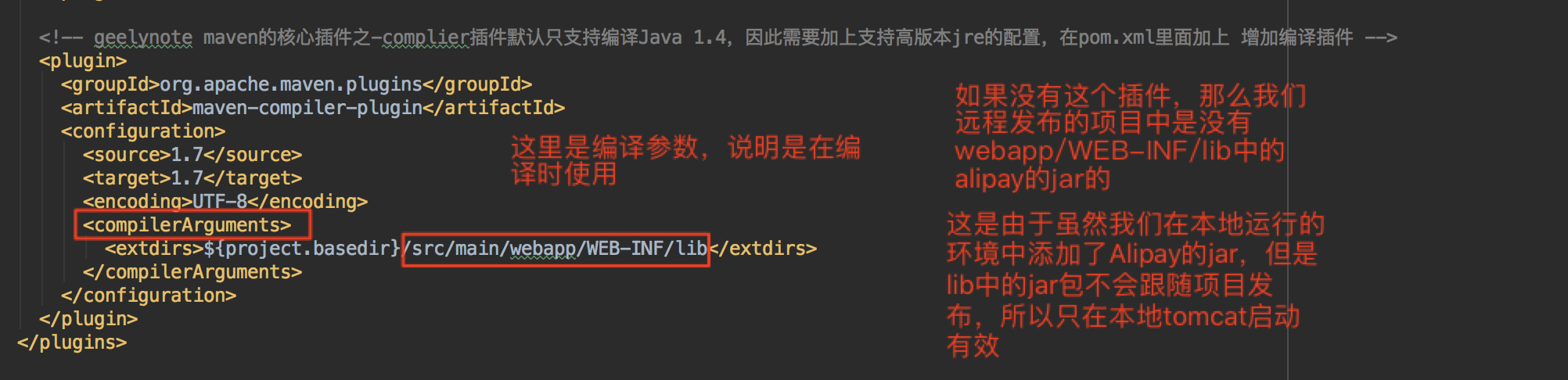
    3. 最重要的:如何将一个本地jar发布到服务器上!!!
      1. POM.xml的这个配置目的:是让项目发布的时候能够添加上alipay的jar包,否则会出现class not found的问题
      2. 关于打包发布的理解看这篇文章,很好@使用tomcat发布自己的Java项目 - CSDN博客
    4. 为啥要起lib为文件夹的名字
      1. 与项目发布后jar包所在的文件夹名相同,仅此而已,舒服
  2. 第二部分:
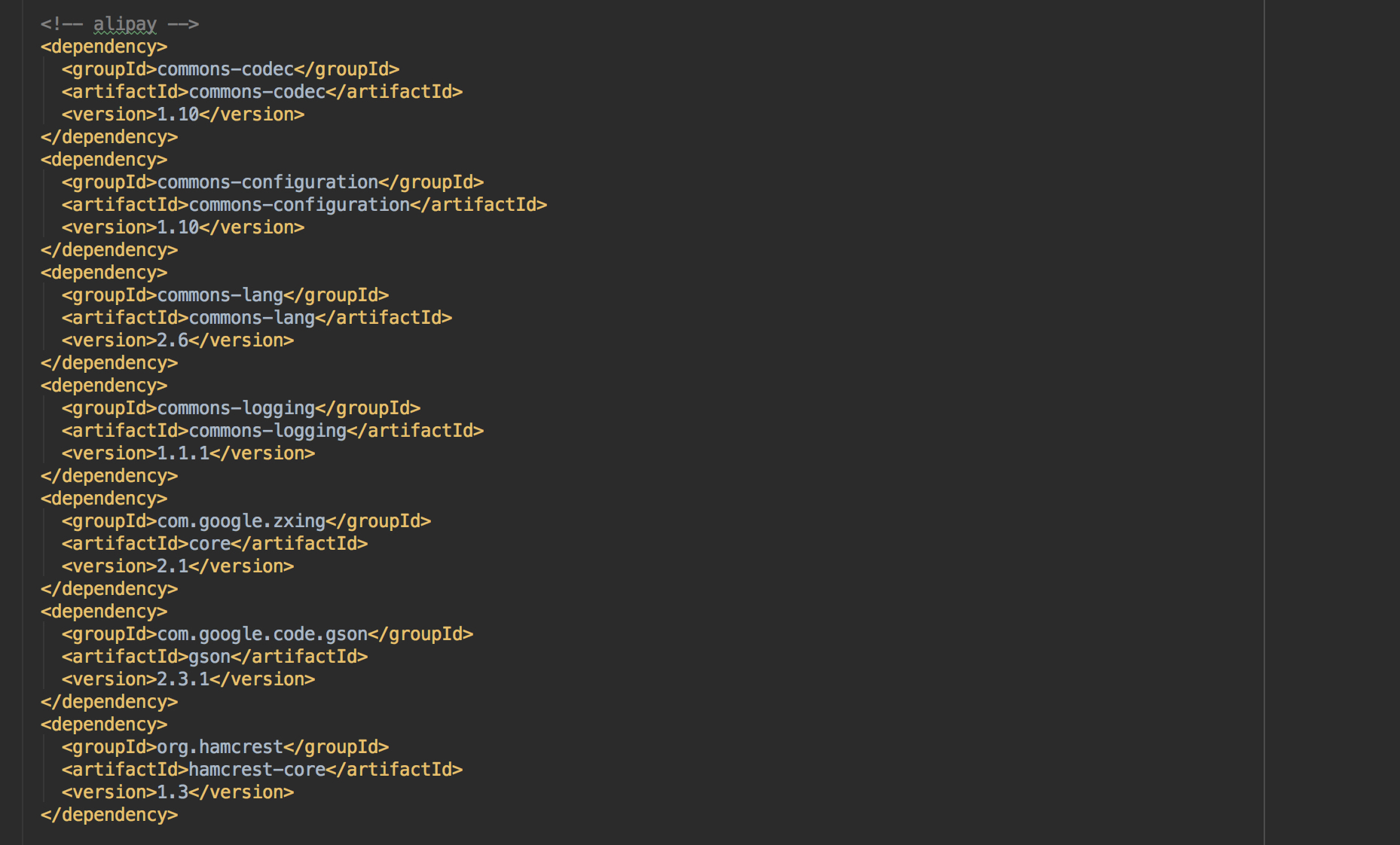
    1. 交给maven配置,自动添加
    2. 所在的位置POM.xml
    3. 注意:这个一定要使用配套的版本,这些jar包是和alipay的jar包相配合使用的

具体代码功能详解:

一共有三个对外接口:

  1. pay接口:返回订单号和ftp服务器中的二维码路径
  2. alipayCallback:插入payinfo信息,使alipay不再回调
  3. queryOrderPayStatus:判断订单状态

具体的看代码,注释我写的很详细

  1. OrderController.java
  2. OrderServiceImpl.java
    OrderController.java
    1
    2
    3
    4
    5
    6
    7
    8
    9
    10
    11
    12
    13
    14
    15
    16
    17
    18
    19
    20
    21
    22
    23
    24
    25
    26
    27
    28
    29
    30
    31
    32
    33
    34
    35
    36
    37
    38
    39
    40
    41
    42
    43
    44
    45
    46
    47
    48
    49
    50
    51
    52
    53
    54
    55
    56
    57
    58
    59
    60
    61
    62
    63
    64
    65
    66
    67
    68
    69
    70
    71
    72
    73
    74
    75
    76
    77
    78
    @RequestMapping("pay.do")
    @ResponseBody
    //session:判断用户类型 orderNo:订单号 request:获取文件夹路径
    //最后的返回:得到一个responseService,其中的data类型是Map<String ,String> resultMap 其中保存这订单号和ftp服务器中的二维码路径
    public ServerResponse pay(HttpSession session, Long orderNo, HttpServletRequest request){
    User user = (User)session.getAttribute(Const.CURRENT_USER);
    if(user ==null){
    return ServerResponse.createByErrorCodeMessage(ResponseCode.NEED_LOGIN.getCode(),ResponseCode.NEED_LOGIN.getDesc());
    }
    //获取文件夹的上传路径。表示获得服务器的绝对路径的意思。但是最终我们要从服务器上传到FTP中去 blog.csdn.net/inite/article/details/75577970
    String path = request.getSession().getServletContext().getRealPath("upload");
    return iOrderService.pay(orderNo,user.getId(),path);
    }

    @RequestMapping("alipay_callback.do")
    @ResponseBody
    /*
    这个是alipay服务器调用的回调接口,不是我们自己调用的
    1.让我们在payinfo数据表中存入付款信息
    2.alipay服务器根据返回的结果,判断还用不用接着回调了
    request来取得alipay的回调过程中传给我们的参数
    整个过程参考:https://docs.open.alipay.com/194/103296
    */
    public Object alipayCallback(HttpServletRequest request){
    Map<String,String> params = Maps.newHashMap();

    Map requestParams = request.getParameterMap();
    for(Iterator iter = requestParams.keySet().iterator();iter.hasNext();){
    String name = (String)iter.next();
    String[] values = (String[]) requestParams.get(name);
    String valueStr = "";
    for(int i = 0 ; i <values.length;i++){

    valueStr = (i == values.length -1)?valueStr + values[i]:valueStr + values[i]+",";
    }
    params.put(name,valueStr);
    }
    logger.info("支付宝回调,sign:{},trade_status:{},参数:{}",params.get("sign"),params.get("trade_status"),params.toString());

    //非常重要,验证回调的正确性,是不是支付宝发的.并且呢还要避免重复通知.

    params.remove("sign_type");
    try {
    boolean alipayRSACheckedV2 = AlipaySignature.rsaCheckV2(params, Configs.getAlipayPublicKey(),"utf-8",Configs.getSignType());

    if(!alipayRSACheckedV2){
    return ServerResponse.createByErrorMessage("非法请求,验证不通过,再恶意请求我就报警找网警了");
    }
    } catch (AlipayApiException e) {
    logger.error("支付宝验证回调异常",e);
    }

    //todo 验证各种数据


    //在这个函数中处理了:过虑重复通知 然后将payinfo数据表需要的数据保存在payinfo中,插入到数据库中
    ServerResponse serverResponse = iOrderService.aliCallback(params);
    if(serverResponse.isSuccess()){
    return Const.AlipayCallback.RESPONSE_SUCCESS;
    }
    return Const.AlipayCallback.RESPONSE_FAILED;
    }

    //查询订单状态
    @RequestMapping("query_order_pay_status.do")
    @ResponseBody
    public ServerResponse<Boolean> queryOrderPayStatus(HttpSession session, Long orderNo){
    User user = (User)session.getAttribute(Const.CURRENT_USER);
    if(user ==null){
    return ServerResponse.createByErrorCodeMessage(ResponseCode.NEED_LOGIN.getCode(),ResponseCode.NEED_LOGIN.getDesc());
    }

    ServerResponse serverResponse = iOrderService.queryOrderPayStatus(user.getId(),orderNo);
    if(serverResponse.isSuccess()){
    return ServerResponse.createBySuccess(true);
    }
    return ServerResponse.createBySuccess(false);
    }

OrderServiceImpl.java

1
2
3
4
5
6
7
8
9
10
11
12
13
14
15
16
17
18
19
20
21
22
23
24
25
26
27
28
29
30
31
32
33
34
35
36
37
38
39
40
41
42
43
44
45
46
47
48
49
50
51
52
53
54
55
56
57
58
59
60
61
62
63
64
65
66
67
68
69
70
71
72
73
74
75
76
77
78
79
80
81
82
83
84
85
86
87
88
89
90
91
92
93
94
95
96
97
98
99
100
101
102
103
104
105
106
107
108
109
110
111
112
113
114
115
116
117
118
119
120
121
122
123
124
125
126
127
128
129
130
131
132
133
134
135
136
137
138
139
140
141
142
143
144
145
146
147
148
149
150
151
152
153
154
155
156
157
158
159
160
161
162
163
164
165
166
167
168
169
170
171
172
173
174

//输入:orderNo订单号 userId从session中获取的用户id path二维码的上传路径文件夹
//输出:得到一个responseService,其中的data类型是Map<String ,String> resultMap 其中保存这订单号和ftp服务器中的二维码路径
public ServerResponse pay(Long orderNo,Integer userId,String path){
//responseService中的data
Map<String ,String> resultMap = Maps.newHashMap();
//验证orderNo并放入resultMap中
Order order = orderMapper.selectByUserIdAndOrderNo(userId,orderNo);
if(order == null){
return ServerResponse.createByErrorMessage("用户没有该订单");
}
resultMap.put("orderNo",String.valueOf(order.getOrderNo()));

/*
下面这段是从alipay的demo中摘抄的内容:
我们做了以下工作:
1.拼凑请求alipay服务器的各种参数
2.创建扫码支付请求builder,设置请求参数
3.对alipay进行访问,然后取得返回结果
*/

// (必填) 商户网站订单系统中唯一订单号,64个字符以内,只能包含字母、数字、下划线,
// 需保证商户系统端不能重复,建议通过数据库sequence生成,
String outTradeNo = order.getOrderNo().toString();

// (必填) 订单标题,粗略描述用户的支付目的。如“xxx品牌xxx门店当面付扫码消费”
String subject = new StringBuilder().append("happymmall扫码支付,订单号:").append(outTradeNo).toString();

// (必填) 订单总金额,单位为元,不能超过1亿元
// 如果同时传入了【打折金额】,【不可打折金额】,【订单总金额】三者,则必须满足如下条件:【订单总金额】=【打折金额】+【不可打折金额】
String totalAmount = order.getPayment().toString();

// (可选) 订单不可打折金额,可以配合商家平台配置折扣活动,如果酒水不参与打折,则将对应金额填写至此字段
// 如果该值未传入,但传入了【订单总金额】,【打折金额】,则该值默认为【订单总金额】-【打折金额】
String undiscountableAmount = "0";

// 卖家支付宝账号ID,用于支持一个签约账号下支持打款到不同的收款账号,(打款到sellerId对应的支付宝账号)
// 如果该字段为空,则默认为与支付宝签约的商户的PID,也就是appid对应的PID
String sellerId = "";

// 订单描述,可以对交易或商品进行一个详细地描述,比如填写"购买商品2件共15.00元"
String body = new StringBuilder().append("订单").append(outTradeNo).append("购买商品共").append(totalAmount).append("元").toString();

// 商户操作员编号,添加此参数可以为商户操作员做销售统计
String operatorId = "test_operator_id";

// (必填) 商户门店编号,通过门店号和商家后台可以配置精准到门店的折扣信息,详询支付宝技术支持
String storeId = "test_store_id";

// 业务扩展参数,目前可添加由支付宝分配的系统商编号(通过setSysServiceProviderId方法),详情请咨询支付宝技术支持
ExtendParams extendParams = new ExtendParams();
extendParams.setSysServiceProviderId("2088100200300400500");

// 支付超时,定义为120分钟
String timeoutExpress = "120m";

// 商品明细列表,需填写购买商品详细信息,
List<GoodsDetail> goodsDetailList = new ArrayList<GoodsDetail>();

List<OrderItem> orderItemList = orderItemMapper.getByOrderNoUserId(orderNo,userId);
for(OrderItem orderItem : orderItemList){
GoodsDetail goods = GoodsDetail.newInstance(orderItem.getProductId().toString(), orderItem.getProductName(),
BigDecimalUtil.mul(orderItem.getCurrentUnitPrice().doubleValue(),new Double(100).doubleValue()).longValue(),
orderItem.getQuantity());
goodsDetailList.add(goods);
}

// 创建扫码支付请求builder,设置请求参数
AlipayTradePrecreateRequestBuilder builder = new AlipayTradePrecreateRequestBuilder()
.setSubject(subject).setTotalAmount(totalAmount).setOutTradeNo(outTradeNo)
.setUndiscountableAmount(undiscountableAmount).setSellerId(sellerId).setBody(body)
.setOperatorId(operatorId).setStoreId(storeId).setExtendParams(extendParams)
.setTimeoutExpress(timeoutExpress)
.setNotifyUrl(PropertiesUtil.getProperty("alipay.callback.url"))//支付宝服务器主动通知商户服务器里指定的页面http路径,根据需要设置
.setGoodsDetailList(goodsDetailList);

//对alipay进行访问,然后取得返回结果
AlipayF2FPrecreateResult result = tradeService.tradePrecreate(builder);
switch (result.getTradeStatus()) {
case SUCCESS:
logger.info("支付宝预下单成功: )");

AlipayTradePrecreateResponse response = result.getResponse();
dumpResponse(response);

File folder = new File(path);
if(!folder.exists()){
folder.setWritable(true);
folder.mkdirs();
}

//需要修改为运行机器上的路径
//细节细节细节
String qrPath = String.format(path+"/qr-%s.png",response.getOutTradeNo());
String qrFileName = String.format("qr-%s.png",response.getOutTradeNo());
ZxingUtils.getQRCodeImge(response.getQrCode(), 256, qrPath);
//上一句将二维码就已经将二维码保存到path位置了,名字也有了,那么现在我们用path+ qrFileName就可以将这个文件取出来保存,然后通过FTP工具类上传到FTP中去
File targetFile = new File(path,qrFileName);
try {
FTPUtil.uploadFile(Lists.newArrayList(targetFile));
} catch (IOException e) {
logger.error("上传二维码异常",e);
}
logger.info("qrPath:" + qrPath);
String qrUrl = PropertiesUtil.getProperty("ftp.server.http.prefix")+targetFile.getName();
resultMap.put("qrUrl",qrUrl);
return ServerResponse.createBySuccess(resultMap);
case FAILED:
logger.error("支付宝预下单失败!!!");
return ServerResponse.createByErrorMessage("支付宝预下单失败!!!");

case UNKNOWN:
logger.error("系统异常,预下单状态未知!!!");
return ServerResponse.createByErrorMessage("系统异常,预下单状态未知!!!");

default:
logger.error("不支持的交易状态,交易返回异常!!!");
return ServerResponse.createByErrorMessage("不支持的交易状态,交易返回异常!!!");
}
}

// 简单打印应答
private void dumpResponse(AlipayResponse response) {
if (response != null) {
logger.info(String.format("code:%s, msg:%s", response.getCode(), response.getMsg()));
if (StringUtils.isNotEmpty(response.getSubCode())) {
logger.info(String.format("subCode:%s, subMsg:%s", response.getSubCode(),
response.getSubMsg()));
}
logger.info("body:" + response.getBody());
}
}

//在这个函数中处理了:过虑重复通知 然后将payinfo数据表需要的数据保存在payinfo中,插入到数据库中
public ServerResponse aliCallback(Map<String,String> params){
Long orderNo = Long.parseLong(params.get("out_trade_no"));
String tradeNo = params.get("trade_no");
String tradeStatus = params.get("trade_status");
Order order = orderMapper.selectByOrderNo(orderNo);
if(order == null){
return ServerResponse.createByErrorMessage("非快乐慕商城的订单,回调忽略");
}
if(order.getStatus() >= Const.OrderStatusEnum.PAID.getCode()){
return ServerResponse.createBySuccess("支付宝重复调用");
}
if(Const.AlipayCallback.TRADE_STATUS_TRADE_SUCCESS.equals(tradeStatus)){
order.setPaymentTime(DateTimeUtil.strToDate(params.get("gmt_payment")));
order.setStatus(Const.OrderStatusEnum.PAID.getCode());
orderMapper.updateByPrimaryKeySelective(order);
}

PayInfo payInfo = new PayInfo();
payInfo.setUserId(order.getUserId());
payInfo.setOrderNo(order.getOrderNo());
payInfo.setPayPlatform(Const.PayPlatformEnum.ALIPAY.getCode());
payInfo.setPlatformNumber(tradeNo);
payInfo.setPlatformStatus(tradeStatus);

payInfoMapper.insert(payInfo);

return ServerResponse.createBySuccess();
}


public ServerResponse queryOrderPayStatus(Integer userId,Long orderNo){
Order order = orderMapper.selectByUserIdAndOrderNo(userId,orderNo);
if(order == null){
return ServerResponse.createByErrorMessage("用户没有该订单");
}
if(order.getStatus() >= Const.OrderStatusEnum.PAID.getCode()){
return ServerResponse.createBySuccess();
}
return ServerResponse.createByError();
}

2018年2月27日 下午9:35

  1. Sql语句执行是一定有返回的值,但最常见的是int,表示影响的行数
  2. MySQL null与not null和null与空值’’的区别 - 好好地 - SegmentFault 思否
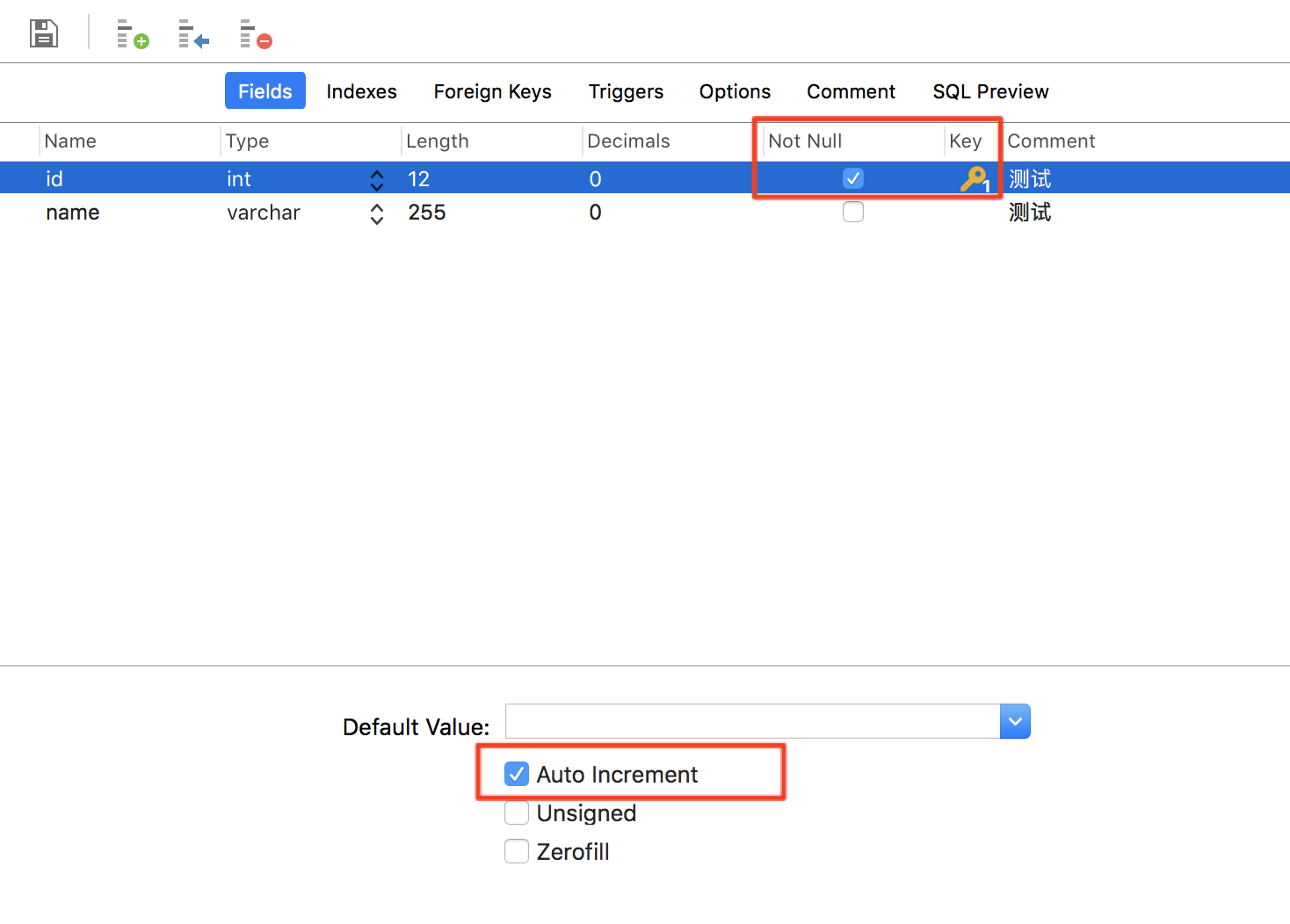
  3. 对于自增的空字段如何insert时赋值
    1. 这个问题来源于我看到*Mapper.xml的insert时,是插入主键id的。
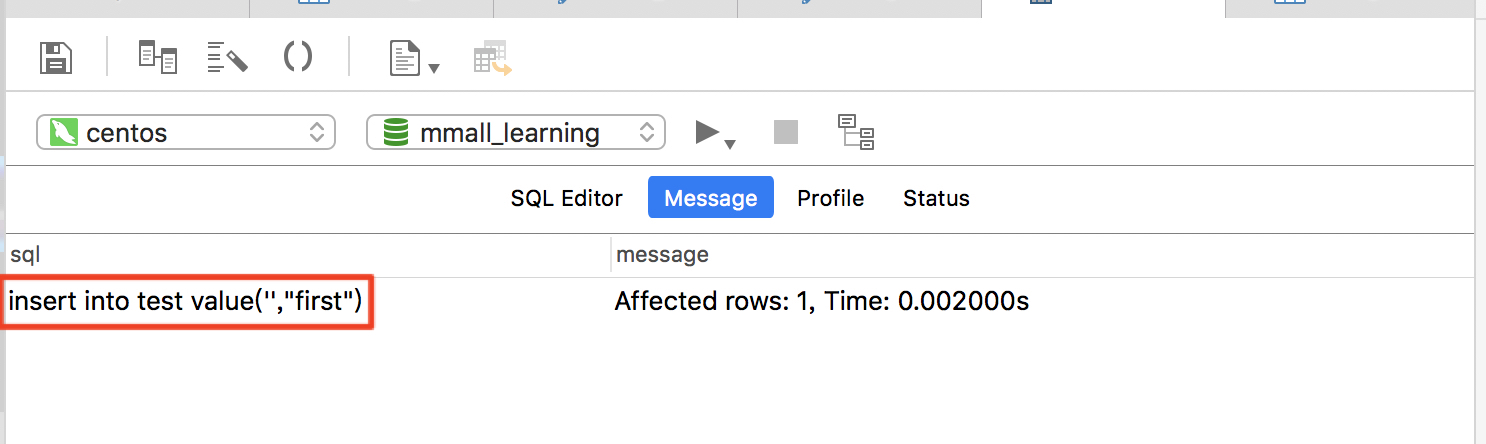
    2. 按我平时来说,我的insert语句中就没有主键id,那么问题来了:insert如何声明主键id的情况下执行
    3. 答案:mysql会自动忽略,其中的‘’insert into test value('',"first")

2018年2月27日 下午7:57

学习目标:

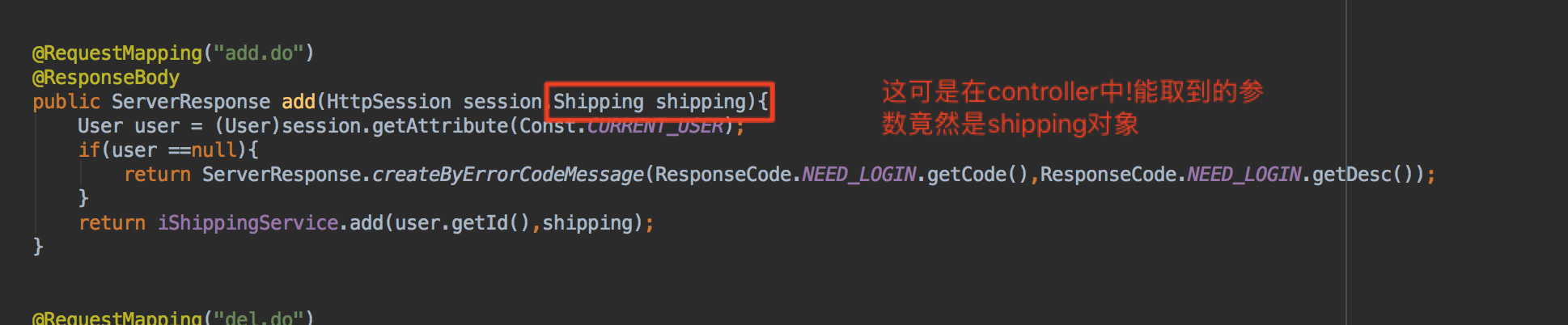
  1. SpringMVC数据绑定中对象的绑定

    1. 解析:我们一般从URL映射到controller之后,controller拿到的参数就是我们URL中的名字,但是我们却又办法能让URL中传来的多个参数,最后然controller通过一个合体的对象来获取
    2. 不用问为啥,这就是框架的作用!
  2. mybatis自动生成主键,配置和使用

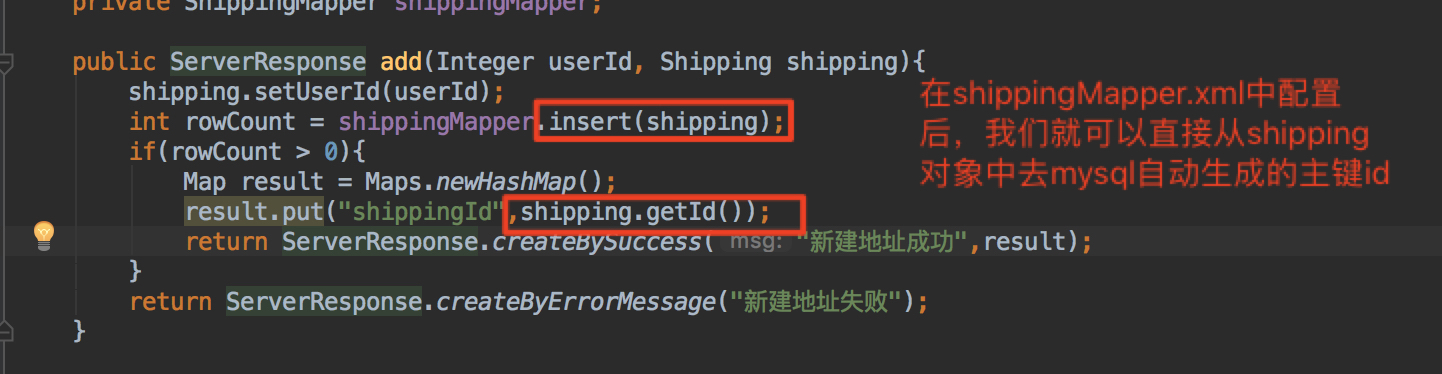
    1. 解析:本身我们在insert动作的时候是不知道id的值得,这个值是mysql自动递增配置的,那么,现在的问题是:我们如何拿到这个mysql自动生成的id?
    2. 方法:在shippingMapper.xml中配置。不要问为啥,就是这么神奇!
    3. 使用:shippingServiceImpl.java
  3. 如何避免横向越权漏洞的巩固

    1. 原则:一定要保证userid是从session中获取及一定没有问题,不要使用URL中传来的userid

2018年2月26日 上午11:25

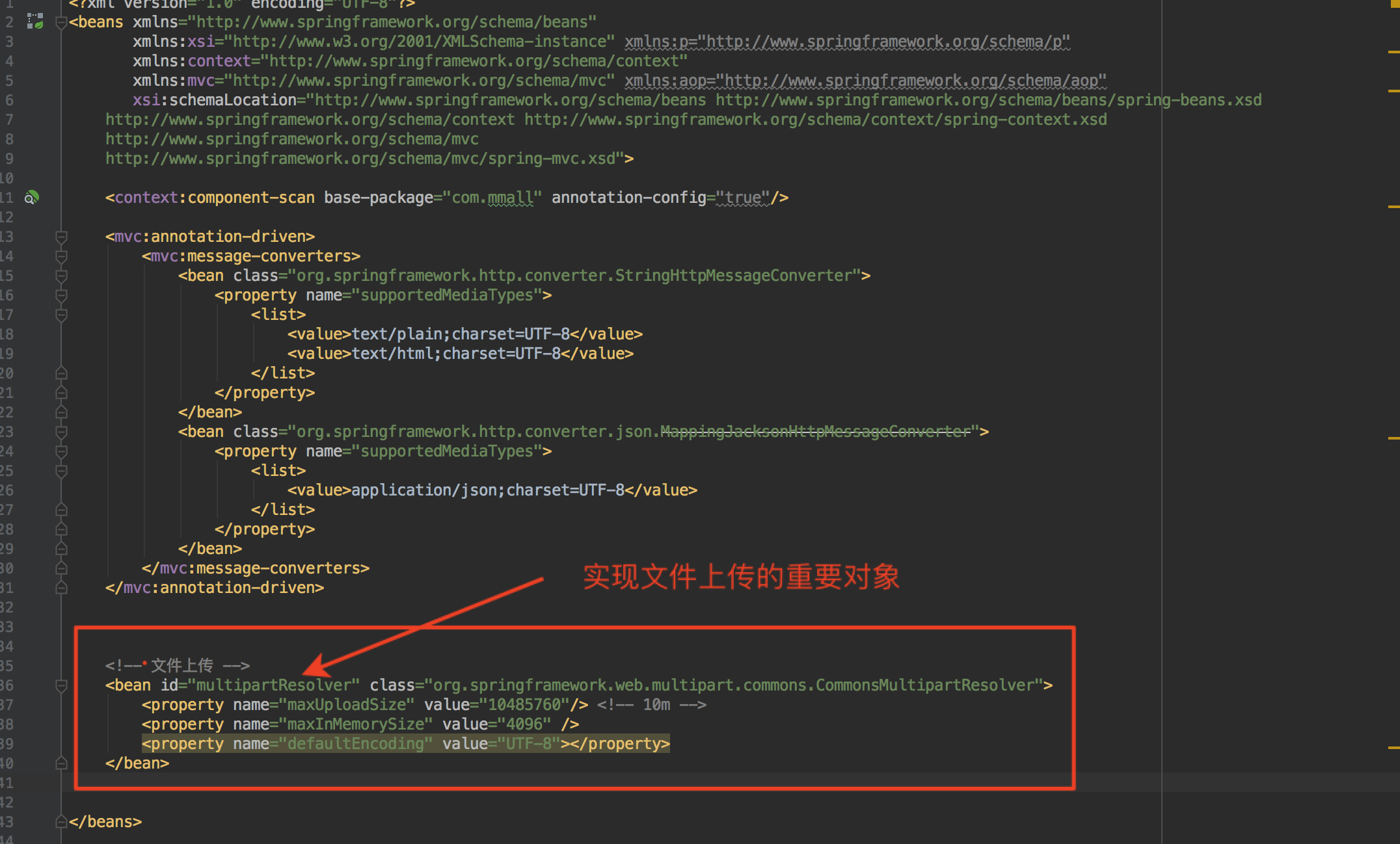
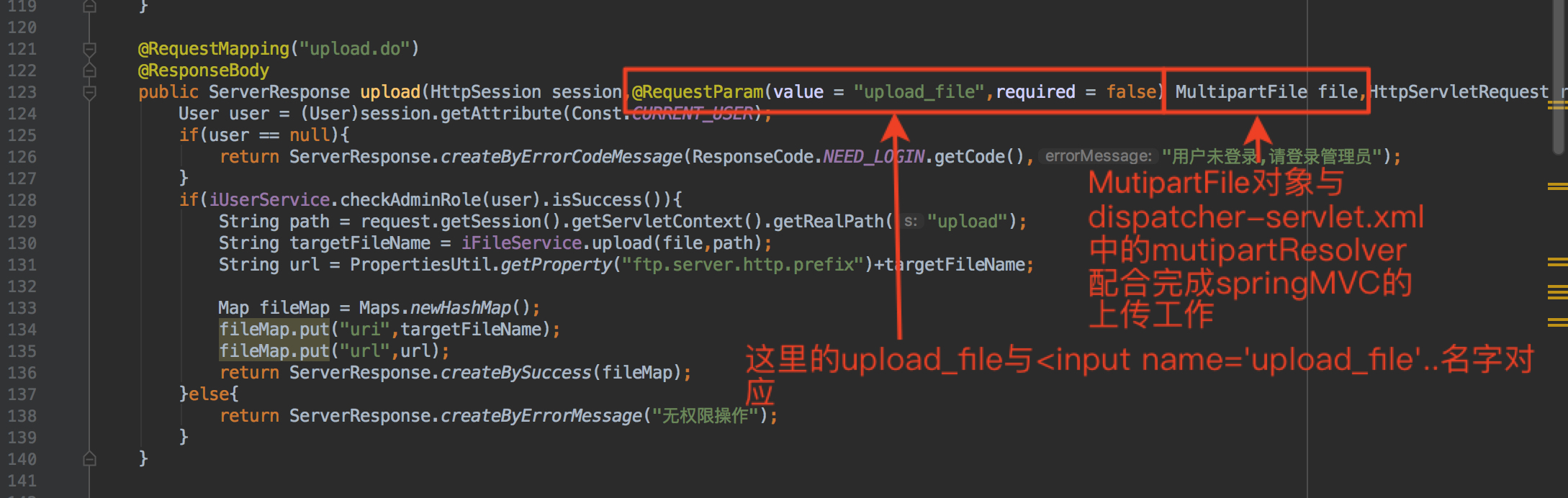
配置:

Dispatcher-servlet.xml

ProductManageController.java

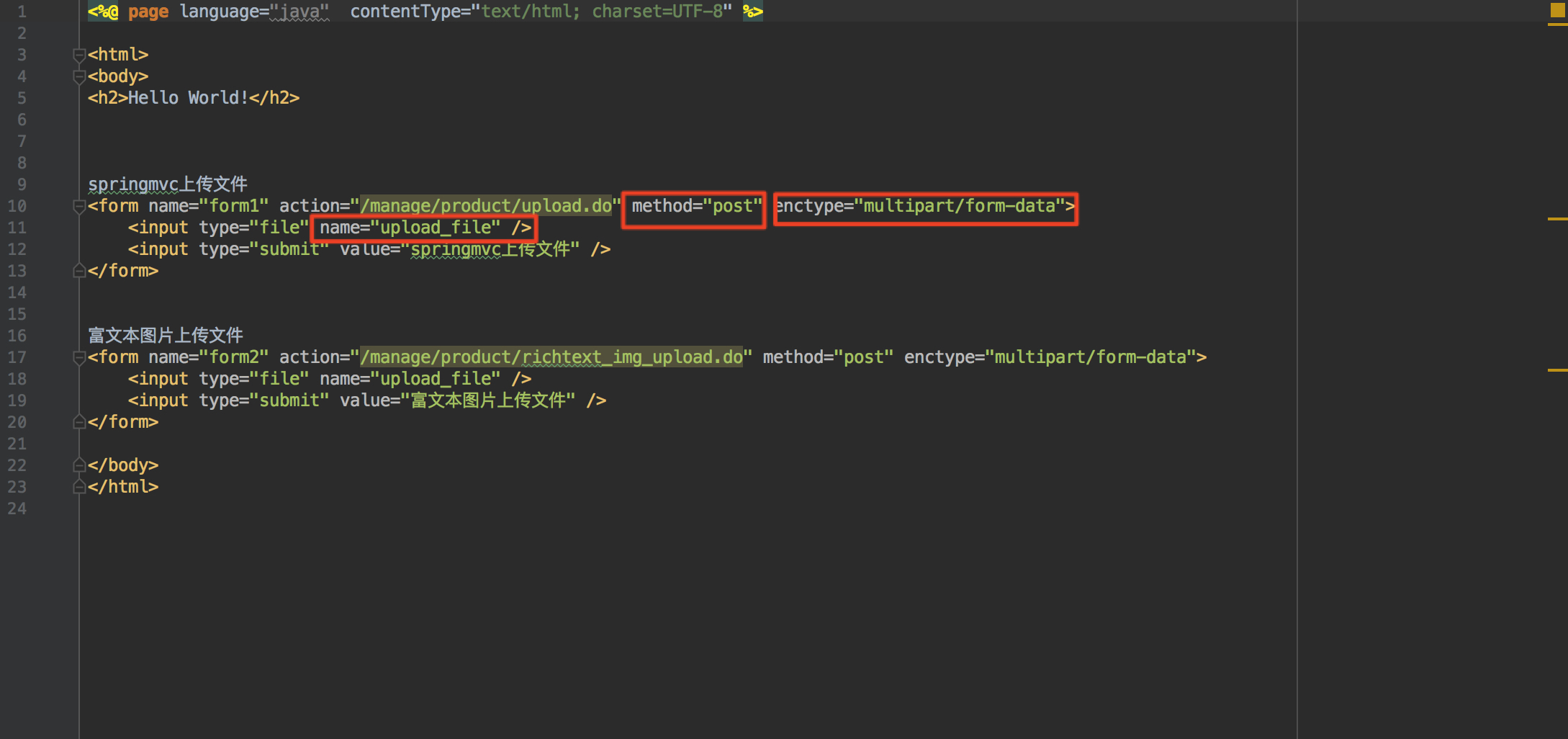
inidex.jsp

具体实现代码:

Service:

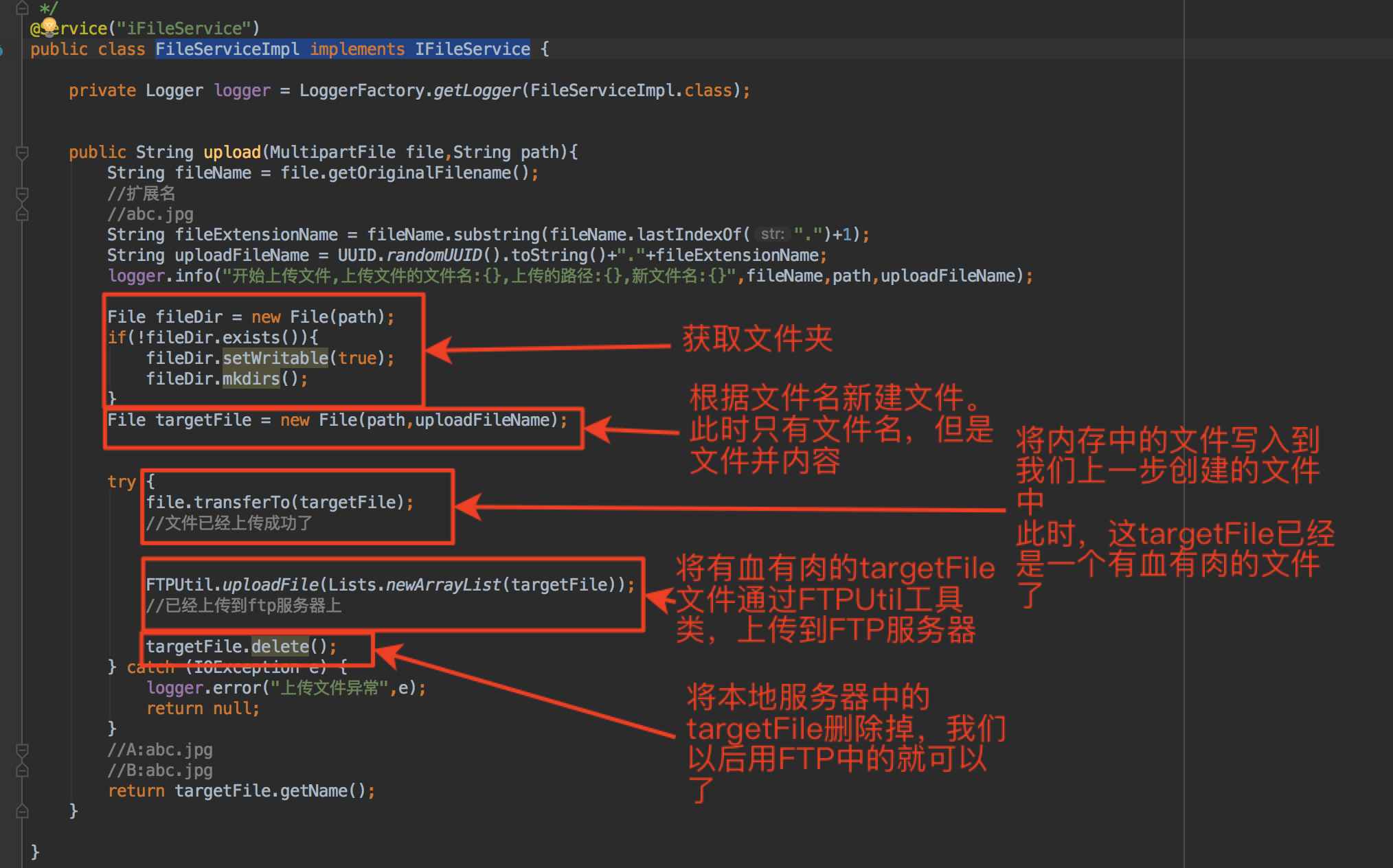
FileServiceImpl.java

具体代码:

1
2
3
4
5
6
7
8
9
10
11
12
13
14
15
16
17
18
19
20
21
22
23
24
25
26
27
28
29
30
31
32
33
34
35
36
37
38
39
40
41
42
43
44
45
46
47
48
49
50
51
52
package com.mmall.service.impl;

import com.google.common.collect.Lists;
import com.mmall.service.IFileService;
import com.mmall.util.FTPUtil;
import org.slf4j.Logger;
import org.slf4j.LoggerFactory;
import org.springframework.stereotype.Service;
import org.springframework.web.multipart.MultipartFile;

import java.io.File;
import java.io.IOException;
import java.util.UUID;

/**
* Created by geely
*/
@Service("iFileService")
public class FileServiceImpl implements IFileService {
private Logger logger = LoggerFactory.getLogger(FileServiceImpl.class);

public String upload(MultipartFile file,String path){
String fileName = file.getOriginalFilename();
//扩展名
//abc.jpg
String fileExtensionName = fileName.substring(fileName.lastIndexOf(".")+1);
String uploadFileName = UUID.randomUUID().toString()+"."+fileExtensionName;
logger.info("开始上传文件,上传文件的文件名:{},上传的路径:{},新文件名:{}",fileName,path,uploadFileName);

File fileDir = new File(path);
if(!fileDir.exists()){
fileDir.setWritable(true);
fileDir.mkdirs();
}
File targetFile = new File(path,uploadFileName);

try {
file.transferTo(targetFile);
//文件已经上传成功了
FTPUtil.uploadFile(Lists.newArrayList(targetFile));
//已经上传到ftp服务器上

targetFile.delete();
} catch (IOException e) {
logger.error("上传文件异常",e);
return null;
}
//A:abc.jpg
//B:abc.jpg
return targetFile.getName();
}
}

注:transferto()方法,是springmvc封装的方法,用于图片上传时,把内存中图片写入磁盘 - CSDN博客

Util:

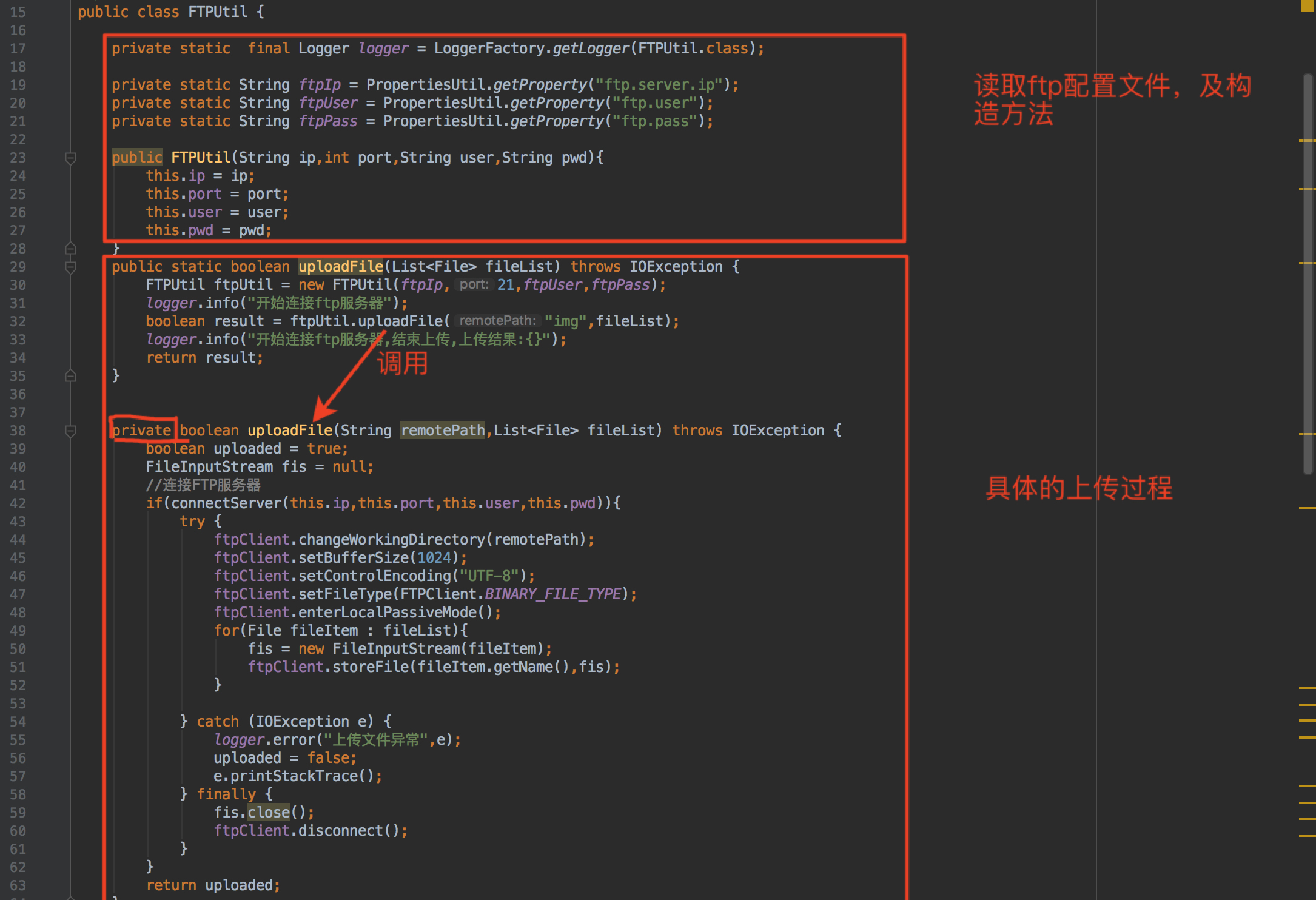
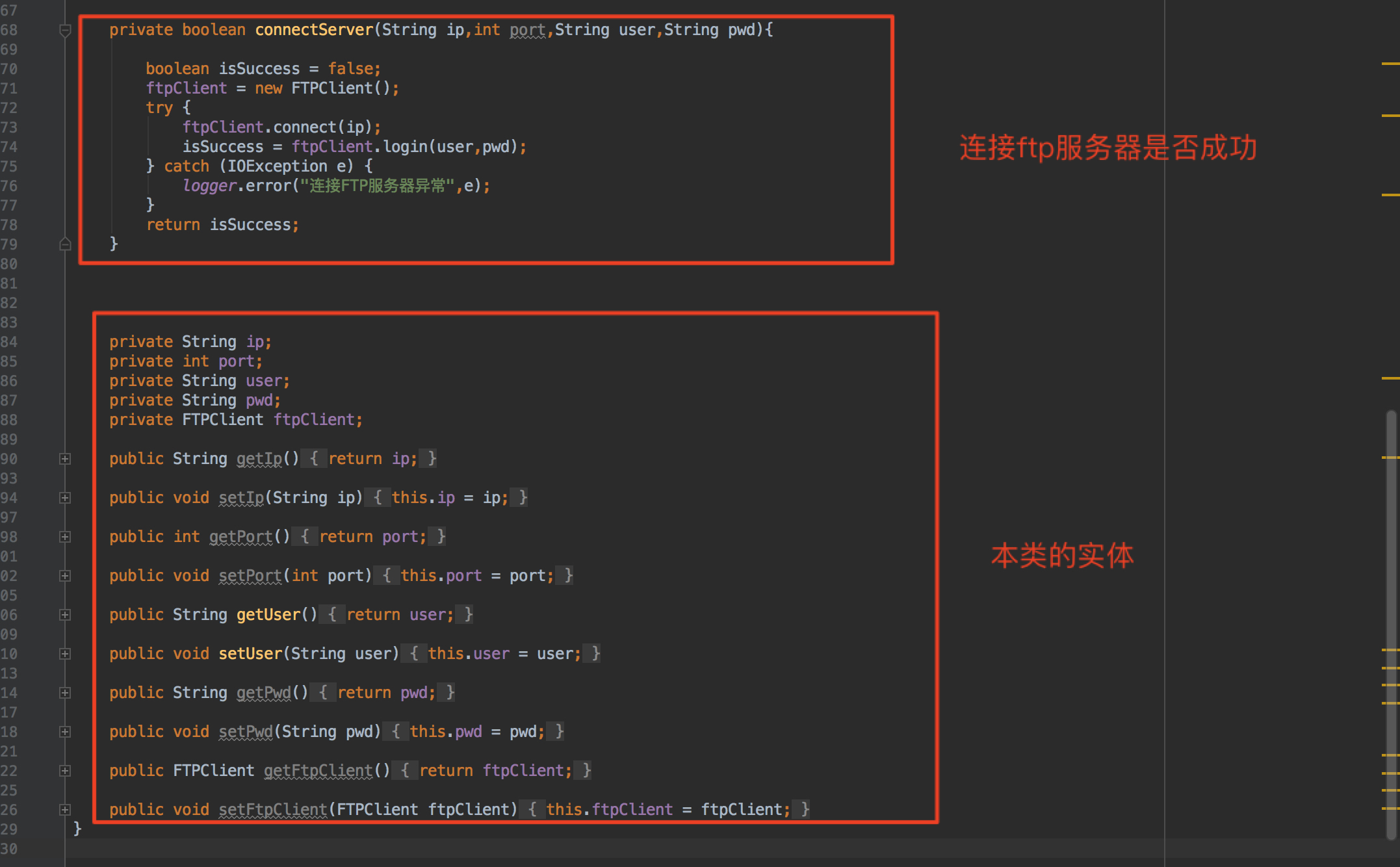
FTPUtil.java
四部分组成:


具体代码:

1
2
3
4
5
6
7
8
9
10
11
12
13
14
15
16
17
18
19
20
21
22
23
24
25
26
27
28
29
30
31
32
33
34
35
36
37
38
39
40
41
42
43
44
45
46
47
48
49
50
51
52
53
54
55
56
57
58
59
60
61
62
63
64
65
66
67
68
69
70
71
72
73
74
75
76
77
78
79
80
81
82
83
84
85
86
87
88
89
90
91
92
93
94
95
96
97
98
99
100
101
102
103
104
105
106
107
108
109
110
111
112
113
114
115
116
117
118
119
120
121
122
123
124
125
126
127
128
129
package com.mmall.util;

import org.apache.commons.net.ftp.FTPClient;
import org.slf4j.Logger;
import org.slf4j.LoggerFactory;

import java.io.File;
import java.io.FileInputStream;
import java.io.IOException;
import java.util.List;

/**
* Created by geely
*/
public class FTPUtil {

private static final Logger logger = LoggerFactory.getLogger(FTPUtil.class);

private static String ftpIp = PropertiesUtil.getProperty("ftp.server.ip");
private static String ftpUser = PropertiesUtil.getProperty("ftp.user");
private static String ftpPass = PropertiesUtil.getProperty("ftp.pass");

public FTPUtil(String ip,int port,String user,String pwd){
this.ip = ip;
this.port = port;
this.user = user;
this.pwd = pwd;
}
public static boolean uploadFile(List<File> fileList) throws IOException {
FTPUtil ftpUtil = new FTPUtil(ftpIp,21,ftpUser,ftpPass);
logger.info("开始连接ftp服务器");
boolean result = ftpUtil.uploadFile("img",fileList);
logger.info("开始连接ftp服务器,结束上传,上传结果:{}");
return result;
}


private boolean uploadFile(String remotePath,List<File> fileList) throws IOException {
boolean uploaded = true;
FileInputStream fis = null;
//连接FTP服务器
if(connectServer(this.ip,this.port,this.user,this.pwd)){
try {
ftpClient.changeWorkingDirectory(remotePath);
ftpClient.setBufferSize(1024);
ftpClient.setControlEncoding("UTF-8");
ftpClient.setFileType(FTPClient.BINARY_FILE_TYPE);
ftpClient.enterLocalPassiveMode();
for(File fileItem : fileList){
fis = new FileInputStream(fileItem);
ftpClient.storeFile(fileItem.getName(),fis);
}

} catch (IOException e) {
logger.error("上传文件异常",e);
uploaded = false;
e.printStackTrace();
} finally {
fis.close();
ftpClient.disconnect();
}
}
return uploaded;
}


private boolean connectServer(String ip,int port,String user,String pwd){

boolean isSuccess = false;
ftpClient = new FTPClient();
try {
ftpClient.connect(ip);
isSuccess = ftpClient.login(user,pwd);
} catch (IOException e) {
logger.error("连接FTP服务器异常",e);
}
return isSuccess;
}


private String ip;
private int port;
private String user;
private String pwd;
private FTPClient ftpClient;

public String getIp() {
return ip;
}

public void setIp(String ip) {
this.ip = ip;
}

public int getPort() {
return port;
}

public void setPort(int port) {
this.port = port;
}

public String getUser() {
return user;
}

public void setUser(String user) {
this.user = user;
}

public String getPwd() {
return pwd;
}

public void setPwd(String pwd) {
this.pwd = pwd;
}

public FTPClient getFtpClient() {
return ftpClient;
}

public void setFtpClient(FTPClient ftpClient) {
this.ftpClient = ftpClient;
}
}

2018年2月26日 下午11:18

  1. 购物车模块的设计思想
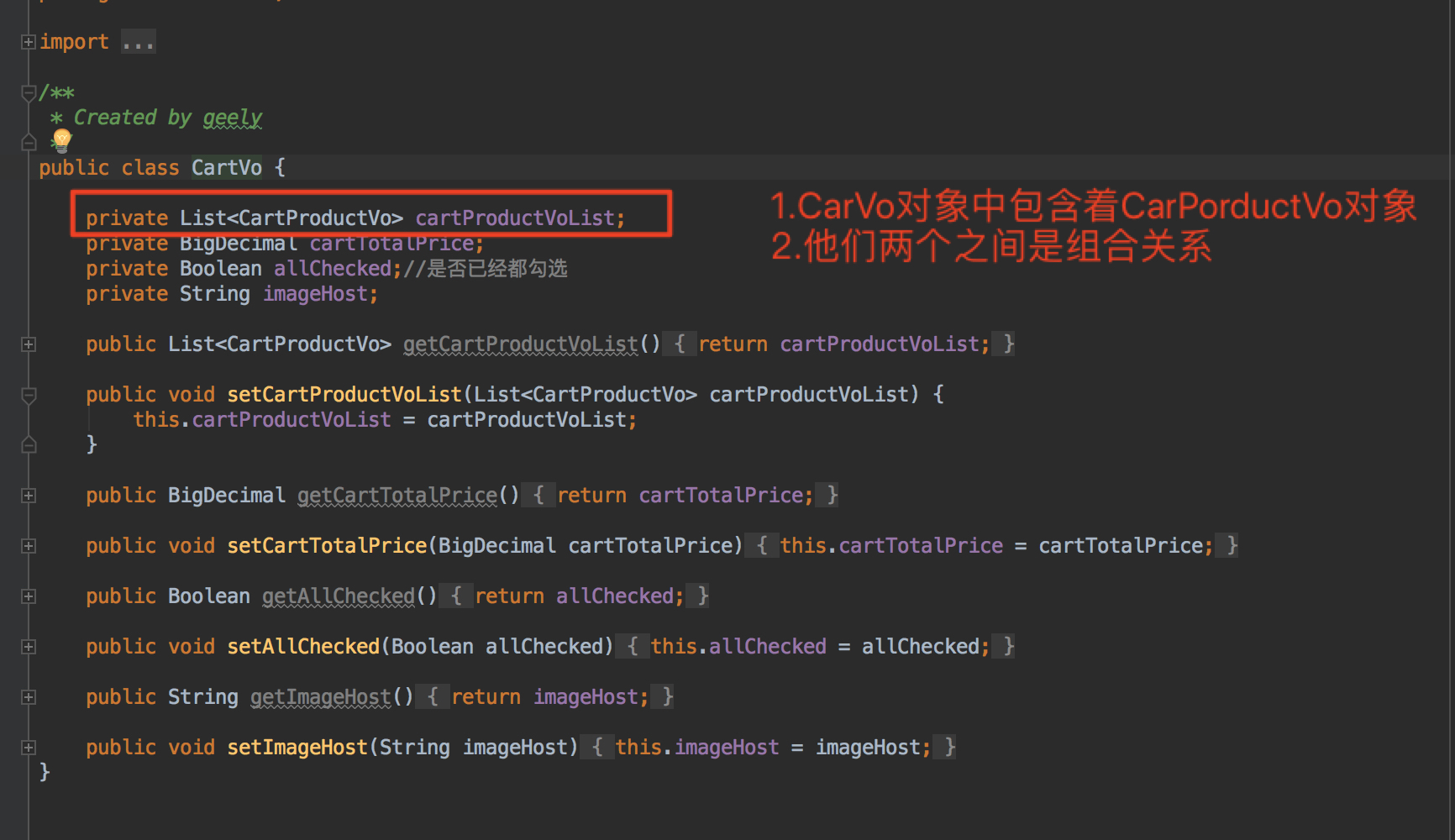
    1. 核心就是利用vo,vo可以理解成是对Pojo的根据实际需要的再次封装,vo可能比pojo变量多,或者少,但是他们俩的本质是一样的,都是实体
    2. 在购物车中vo中使用了组合关系。一个vo(CarVo)包含另一个vo(carProductVo)作为变量
    3. 最后返回的responseService中的data就是CarVo对象
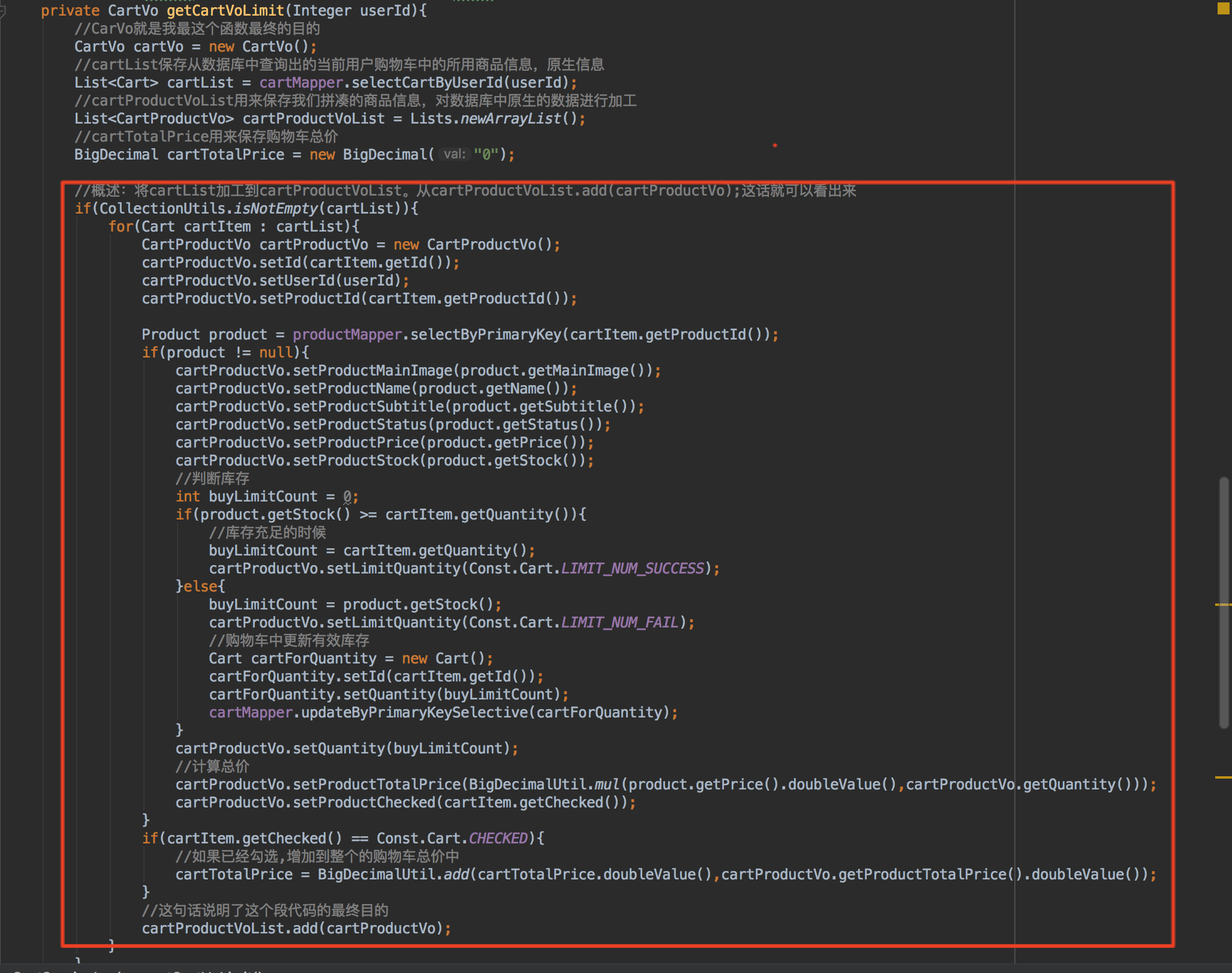
  2. 如何封装一个高复用的购物车核心方法
    1. 重要的原因:
      1. 因为所有的操作都要返回数据库的情况,所以特别重要
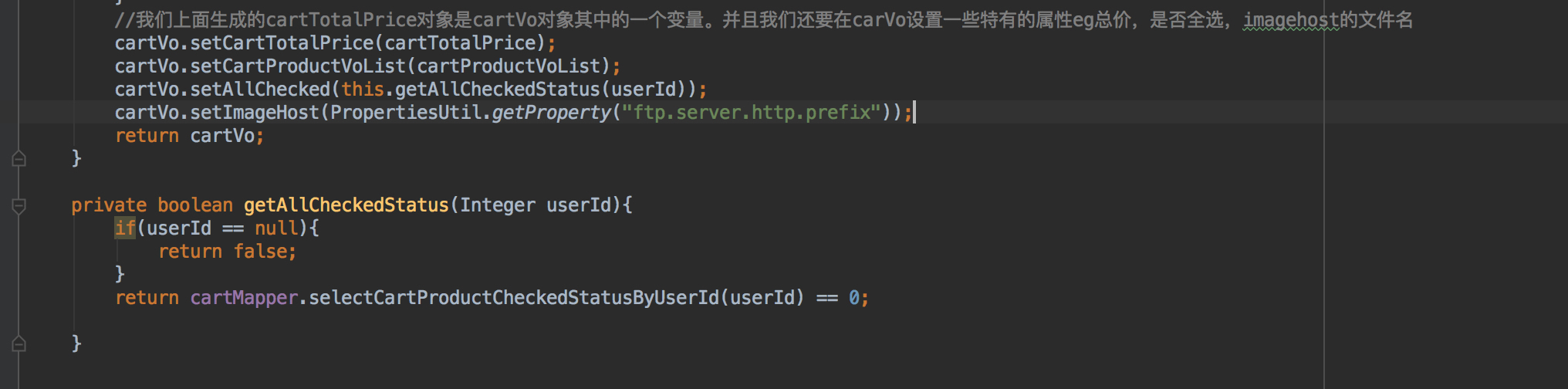
    2. 具体的解释直接看代码中的注释:


      注:代码在附录中1
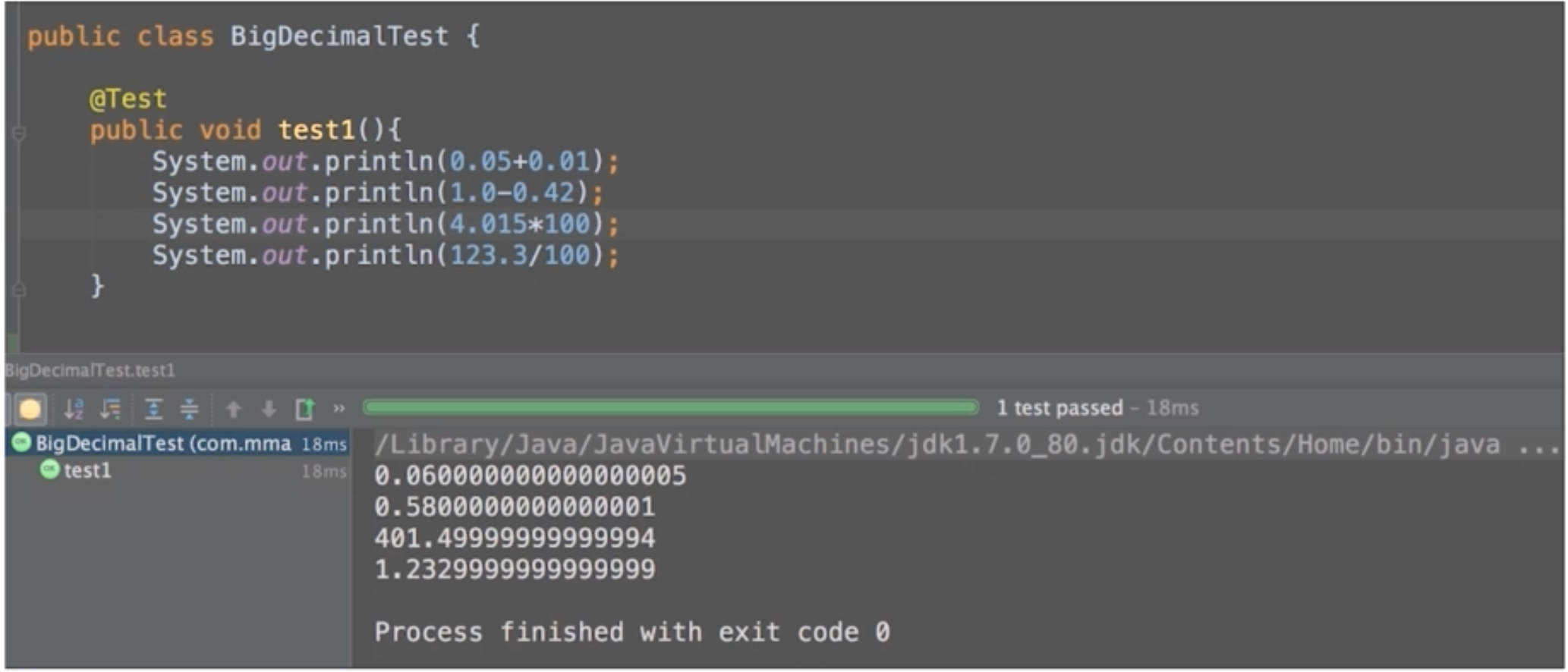
  3. 解决浮点型商业运算中丢失精度的问题
    1. 问题是:
    2. 解决方法:
      1. 使用BigDecimal的String构造器。
      2. 一定是String构造器
      3. 具体看附录中的代码2

附录:

代码1:

1
2
3
4
5
6
7
8
9
10
11
12
13
14
15
16
17
18
19
20
21
22
23
24
25
26
27
28
29
30
31
32
33
34
35
36
37
38
39
40
41
42
43
44
45
46
47
48
49
50
51
52
53
54
55
56
57
58
59
60
//概述:将cartList加工到cartProductVoList。从cartProductVoList.add(cartProductVo);这话就可以看出来
if(CollectionUtils.isNotEmpty(cartList)){
for(Cart cartItem : cartList){
CartProductVo cartProductVo = new CartProductVo();
cartProductVo.setId(cartItem.getId());
cartProductVo.setUserId(userId);
cartProductVo.setProductId(cartItem.getProductId());

Product product = productMapper.selectByPrimaryKey(cartItem.getProductId());
if(product != null){
cartProductVo.setProductMainImage(product.getMainImage());
cartProductVo.setProductName(product.getName());
cartProductVo.setProductSubtitle(product.getSubtitle());
cartProductVo.setProductStatus(product.getStatus());
cartProductVo.setProductPrice(product.getPrice());
cartProductVo.setProductStock(product.getStock());
//判断库存
int buyLimitCount = 0;
if(product.getStock() >= cartItem.getQuantity()){
//库存充足的时候
buyLimitCount = cartItem.getQuantity();
cartProductVo.setLimitQuantity(Const.Cart.LIMIT_NUM_SUCCESS);
}else{
buyLimitCount = product.getStock();
cartProductVo.setLimitQuantity(Const.Cart.LIMIT_NUM_FAIL);
//购物车中更新有效库存
Cart cartForQuantity = new Cart();
cartForQuantity.setId(cartItem.getId());
cartForQuantity.setQuantity(buyLimitCount);
cartMapper.updateByPrimaryKeySelective(cartForQuantity);
}
cartProductVo.setQuantity(buyLimitCount);
//计算总价
cartProductVo.setProductTotalPrice(BigDecimalUtil.mul(product.getPrice().doubleValue(),cartProductVo.getQuantity()));
cartProductVo.setProductChecked(cartItem.getChecked());
}
if(cartItem.getChecked() == Const.Cart.CHECKED){
//如果已经勾选,增加到整个的购物车总价中
cartTotalPrice = BigDecimalUtil.add(cartTotalPrice.doubleValue(),cartProductVo.getProductTotalPrice().doubleValue());
}
//这句话说明了这个段代码的最终目的
cartProductVoList.add(cartProductVo);
}
}
//我们上面生成的cartTotalPrice对象是cartVo对象其中的一个变量。并且我们还要在carVo设置一些特有的属性eg总价,是否全选,imagehost的文件名
cartVo.setCartTotalPrice(cartTotalPrice);
cartVo.setCartProductVoList(cartProductVoList);
cartVo.setAllChecked(this.getAllCheckedStatus(userId));
cartVo.setImageHost(PropertiesUtil.getProperty("ftp.server.http.prefix"));

return cartVo;
}

private boolean getAllCheckedStatus(Integer userId){
if(userId == null){
return false;
}
return cartMapper.selectCartProductCheckedStatusByUserId(userId) == 0;

}

代码二:

1
2
3
4
5
6
7
8
9
10
11
12
13
14
15
16
17
18
19
20
21
22
23
24
25
26
27
28
29
30
31
32
33
34
35
36
37
38
39
40
41
package com.mmall.util;

import java.math.BigDecimal;

/**
* Created by geely
*/
public class BigDecimalUtil {

private BigDecimalUtil(){

}


public static BigDecimal add(double v1,double v2){
BigDecimal b1 = new BigDecimal(Double.toString(v1));
BigDecimal b2 = new BigDecimal(Double.toString(v2));
return b1.add(b2);
}

public static BigDecimal sub(double v1,double v2){
BigDecimal b1 = new BigDecimal(Double.toString(v1));
BigDecimal b2 = new BigDecimal(Double.toString(v2));
return b1.subtract(b2);
}


public static BigDecimal mul(double v1,double v2){
BigDecimal b1 = new BigDecimal(Double.toString(v1));
BigDecimal b2 = new BigDecimal(Double.toString(v2));
return b1.multiply(b2);
}

public static BigDecimal div(double v1,double v2){
BigDecimal b1 = new BigDecimal(Double.toString(v1));
BigDecimal b2 = new BigDecimal(Double.toString(v2));
return b1.divide(b2,2,BigDecimal.ROUND_HALF_UP);//四舍五入,保留2位小数

//除不尽的情况
}
}

2018年2月26日 上午10:02

为什么要上传到ftp服务器_实战问答

jsp中的request.getContextPath() - 原谅时光记住爱 - 博客园

2011-01-16 JavaWeb-WEB应用-虚拟目录三种映射-虚拟主机-web.xml-web应用组成结构_HeDgeHog_新浪博客

nginx+tomcat实现代理访问java web项目 - CSDN博客
自己重写

一次完整的HTTP事务是怎样一个过程?-雷纳科斯的博客-51CTO博客

JavaWeb学习篇之——web应用的虚拟目录映射和主机搭建(Tomcat) - 生死看淡,不服就干! - CSDN博客

2018年2月26日 下午9:00

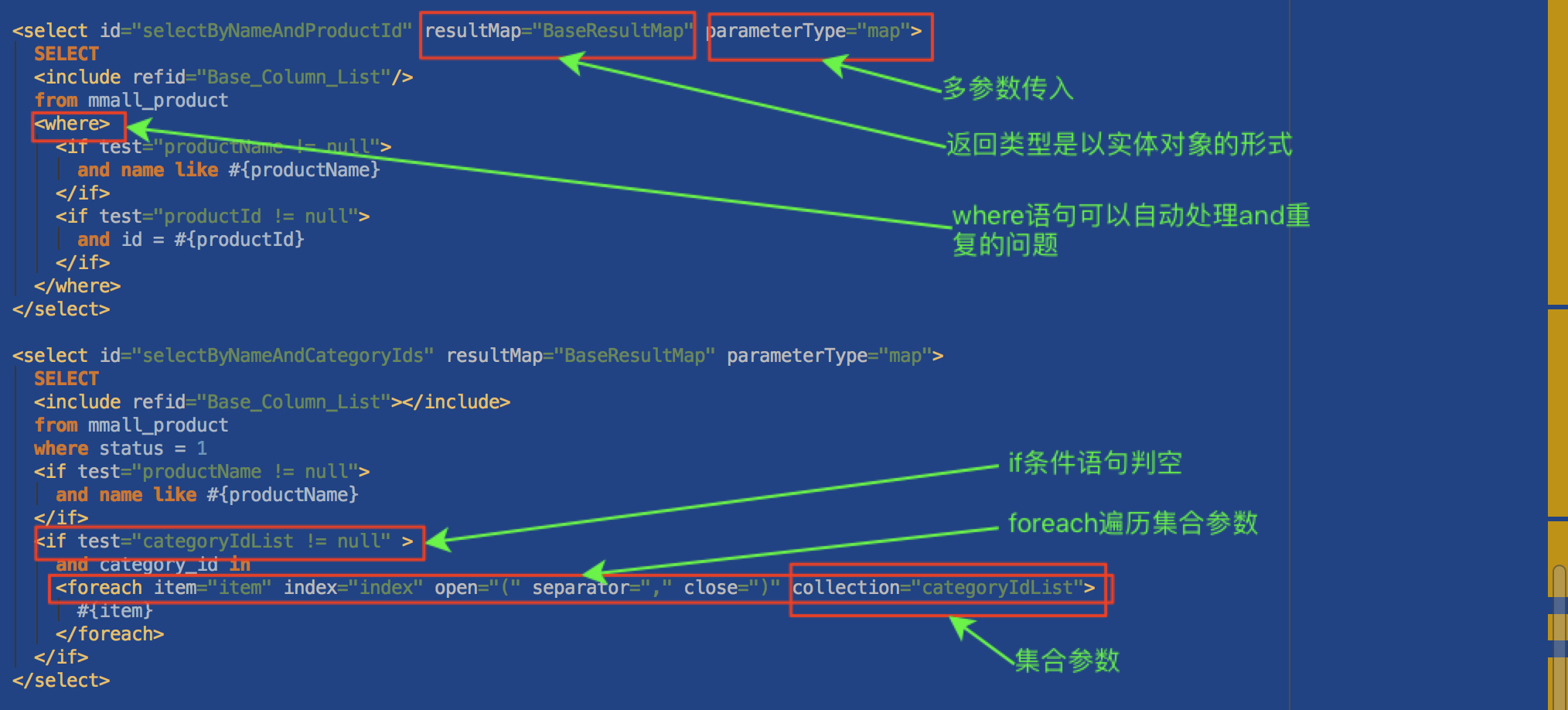
我这里只是简单的举个例子,具体的还是百度吧

2018/4/2文章更新:

  1. mybatis 表名做为参数 - 简书

第一部分:

1
2
3
4
5
6
7
8
9
10
11
12
13
14
15
16
17
18
19
20
21
22
23
24
25
26
27
28
29
30
31
  <select id="selectByNameAndProductId" resultMap="BaseResultMap" parameterType="map">
SELECT
<include refid="Base_Column_List"/>
from mmall_product
<where>
<if test="productName != null">
and name like #{productName}
</if>
<if test="productId != null">
and id = #{productId}
</if>
</where>
</select>

<select id="selectByNameAndCategoryIds" resultMap="BaseResultMap" parameterType="map">
SELECT
<include refid="Base_Column_List"></include>
from mmall_product
where status = 1
<if test="productName != null">
and name like #{productName}
</if>
<if test="categoryIdList != null" >
and category_id in
<foreach item="item" index="index" open="(" separator="," close=")" collection="categoryIdList">
#{item}
</foreach>
</if>
</select>

</mapper>

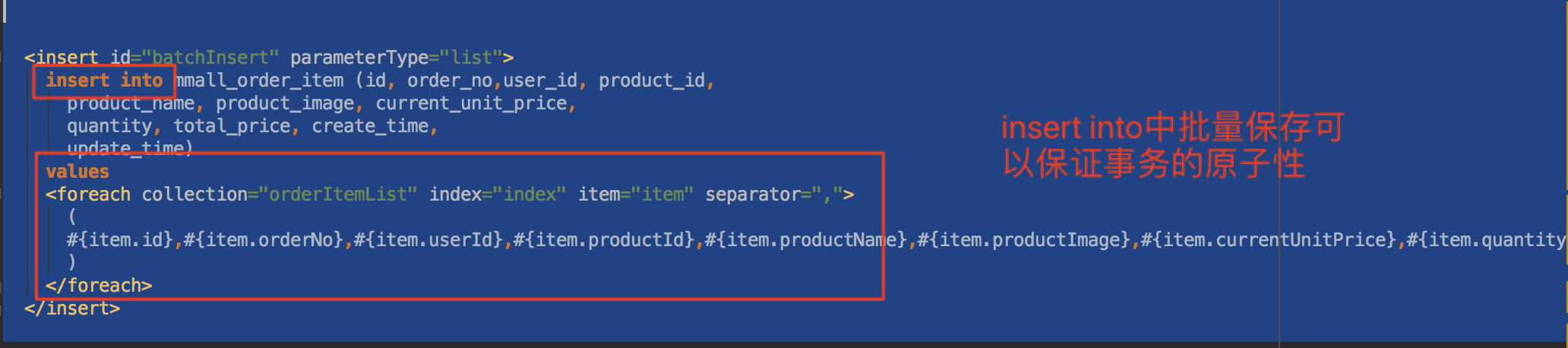
第二部分:批量插入


orderItemMapper.xml

1
2
3
4
5
6
7
8
9
10
11
12
13

<insert id="batchInsert" parameterType="list">
insert into mmall_order_item (id, order_no,user_id, product_id,
product_name, product_image, current_unit_price,
quantity, total_price, create_time,
update_time)
values
<foreach collection="orderItemList" index="index" item="item" separator=",">
(
#{item.id},#{item.orderNo},#{item.userId},#{item.productId},#{item.productName},#{item.productImage},#{item.currentUnitPrice},#{item.quantity},#{item.totalPrice},now(),now()
)
</foreach>
</insert>

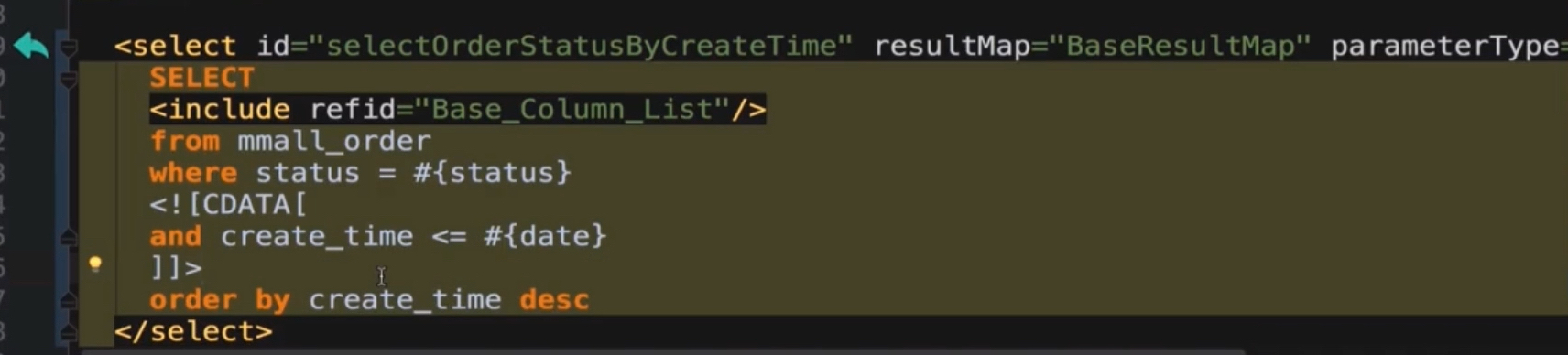
表示xml解析器忽略解析